58
Description / Location of Menu
Configs > Control > Save Config
Configs > Control > Power-Up Config
Description / Location of Menu
Only available in Quick Setup when not in Safe Mode.
Only available in Quick Setup when not in Safe Mode.
Only available in Quick Setup when in Safe Mode.
Entering Safe Mode
Safe Mode is an optional feature that administrators can use to restrict access to the printer menus and
settings. The additional benefit of this mode is that once the complete setup has taken place,
administrators can enable this feature to make it easier for daily users to find and change the most typical
menus.
By default, the printer is not in Safe Mode. The administrator enables Safe Mode by going into Quick Setup
> Admin Users section and doing the following:
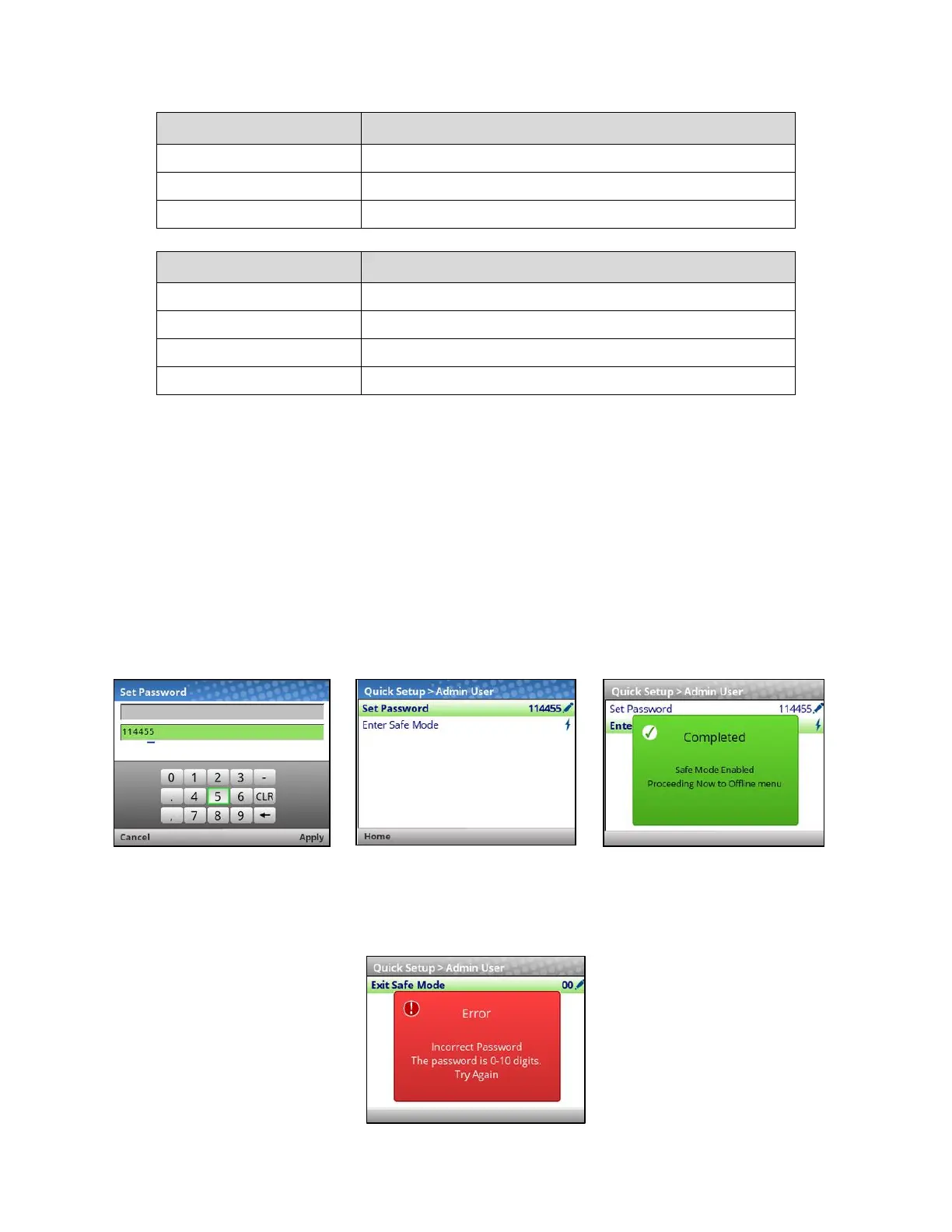
• Setting up a Password via Quick Setup > Admin Users > Set Password.
• Entering Safe Mode via Quick Setup > Admin Users > Enter Safe Mode.
The password can be any string of 1-10 digits. See the screenshots below on how this is done and what to
expect. Note that once the password is set, it will display when not in Safe Mode.
Exiting Safe Mode
When the administrator wants to exit safe mode, they will also need to return to Quick Setup > Admin
Users section and enter the Password via Quick Setup > Admin Users > Exit Safe Mode. If the wrong
password is entered, the following screen be shown.



 To Next Page