284
Appendix D Prepare The Printer
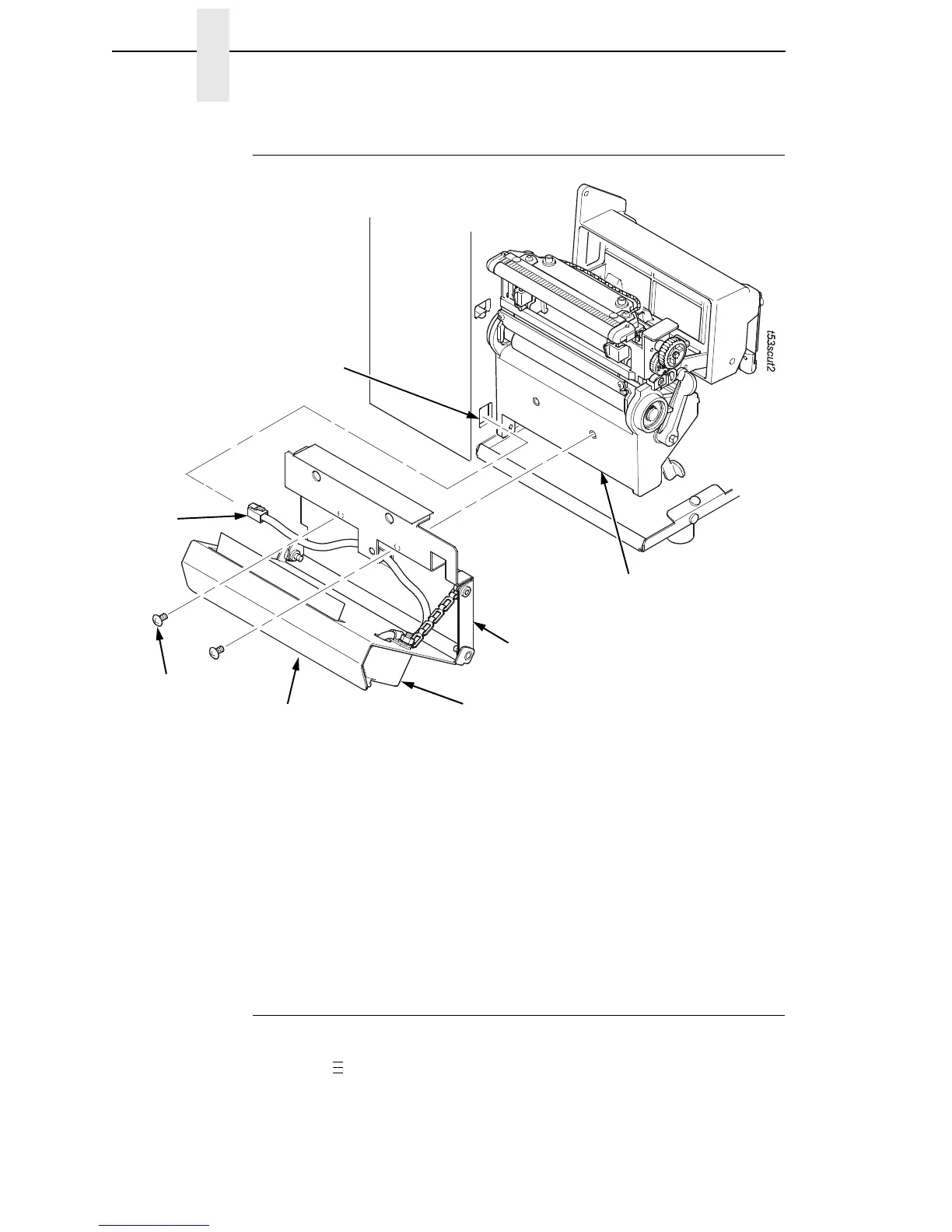
Installing The Standard Cutter
Figure 2. Standard Cutter Assembly
1. Loosen the knurled thumbscrew on the front of the cutter and swing open
the cutter assembly from the cutter assembly mounting bracket.
2. Place the cutter assembly in position.
3. Install the two screws using the appropriate metric hex key.
4. Plug the RJ-11 connector into the RJ-11 receptacle.
5. Place the cutter assembly into the up (closed) position and secure it by
tightening the knurled thumbscrew.
Restore The Printer To Operation
1. Set the printer power switch to | (ON).
2. Press to place the printer in Menu Mode.
3. Press the ↓ and ↵ keys at the same time until “ENTER SWITCH
UNLOCKED” appears on the printer display.
Cutter Assembly
RJ-11 Receptacle
Mounting Bracket
Lower Support Assembly
RJ-11
Connector
Screw (2)
Thumbscrew
(Not visible in this
view.)
.
.
.














 To Next Page