34 PRODIGIT
b. 3311F at r2.05 version above is enabled.
c. 3312F at r2.05 version above is enabled.
d. 3314F at r2.05 version above is enabled.
e. 3315F at r2.05 version above is enabled.
3.2.17. key
The SHORT key allows the parameters of a SHORT circuit test to be entered.
The SHORT test will attempt to sink high current up to the 3310F load
module’s maximum current in order to check the power source’s protection
and behavior. The test time can be adjusted and threshold values for the
High and low voltage limits set.
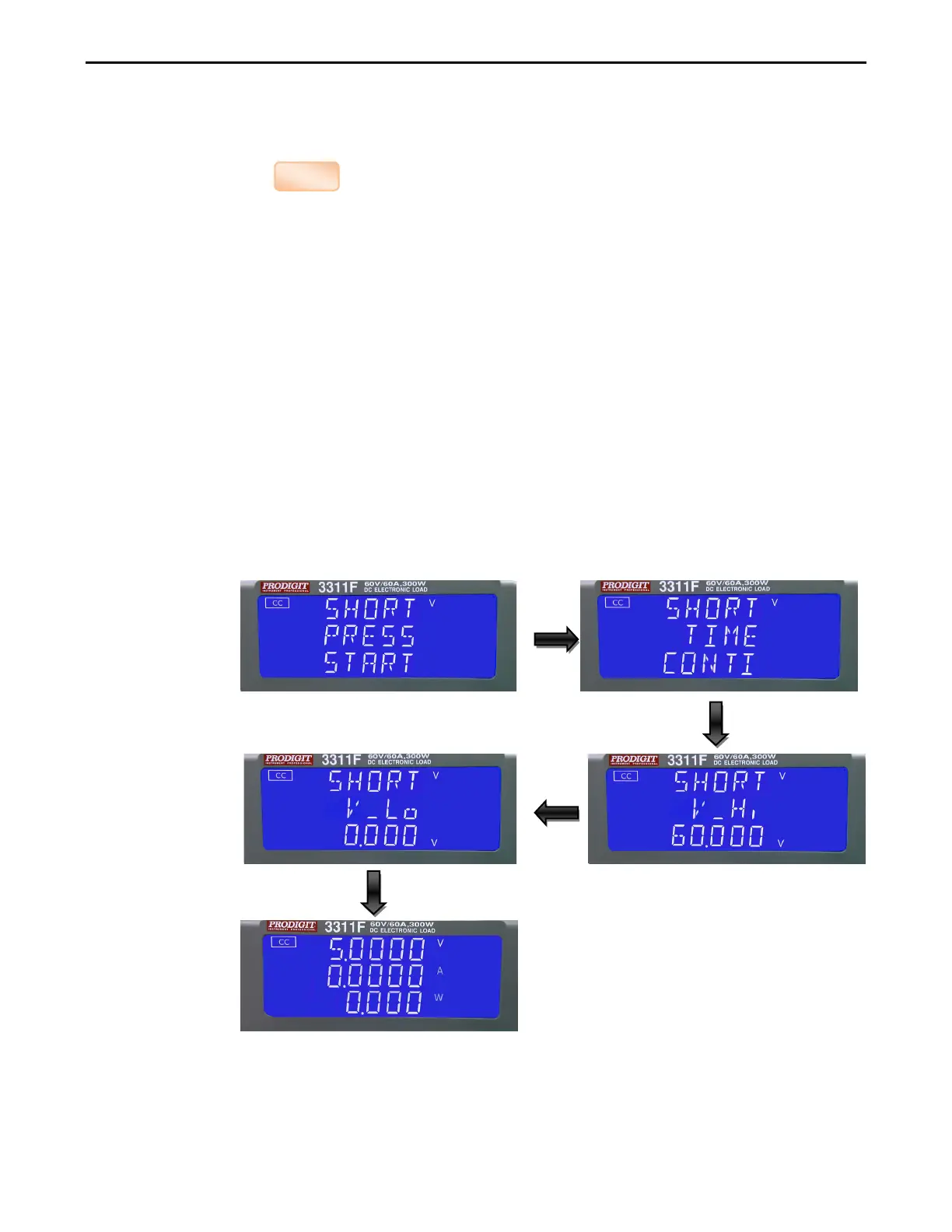
Pressing the SHORT key once will cause the button to illuminate. The
Message “SHORT PRESS START” will be shown across the 3 displays.
Each press of the SHORT key moves the menu on one step. The upper and
Middle LCDs show the currently selected test parameter as text. The value is
adjusted by the rotary knob and can be read from the lower display during
Setting.
The setting sequence is shown below:
SHORT PRESS START (pressing the red start/stop key starts test)
SHORT TIME (CONTI = Continuous or 100ms to 10,000ms possible)
SHORT V_Hi (High voltage threshold setting)
SHORT V_Lo (Low voltage threshold setting
Exit SHORT test set-up
setting the short test time,The LCD display show 「SHORT」 on upper 5
digits LCD display,shows 「TIME」on middle 5 digits LCD display,



 To Next Page