36 PRODIGIT
falls outside the V_Hi and V_Lo threshold levels during the test. The NG
flag will also illuminate.
Note 3: If continuous short time is selected the test is ended by pressing the red
START/STOP button.
3.2.18. key
The OCP key allows the parameters of an Over Current Protection test to be
entered. The OCP test will ramp up the load current in steps to validate the
Device Under test’s (DUT) protection and behavior. A voltage threshold level
can be set. If the voltage measured during the test is lower than the set
Threshold voltage then the test will fail and the display will signal OCP
ERROR. Similarly a current Threshold (I STOP) can be set. If the measured
Current reaches the I STOP Threshold the test will be discontinued and the
OCP ERROR message will be displayed.
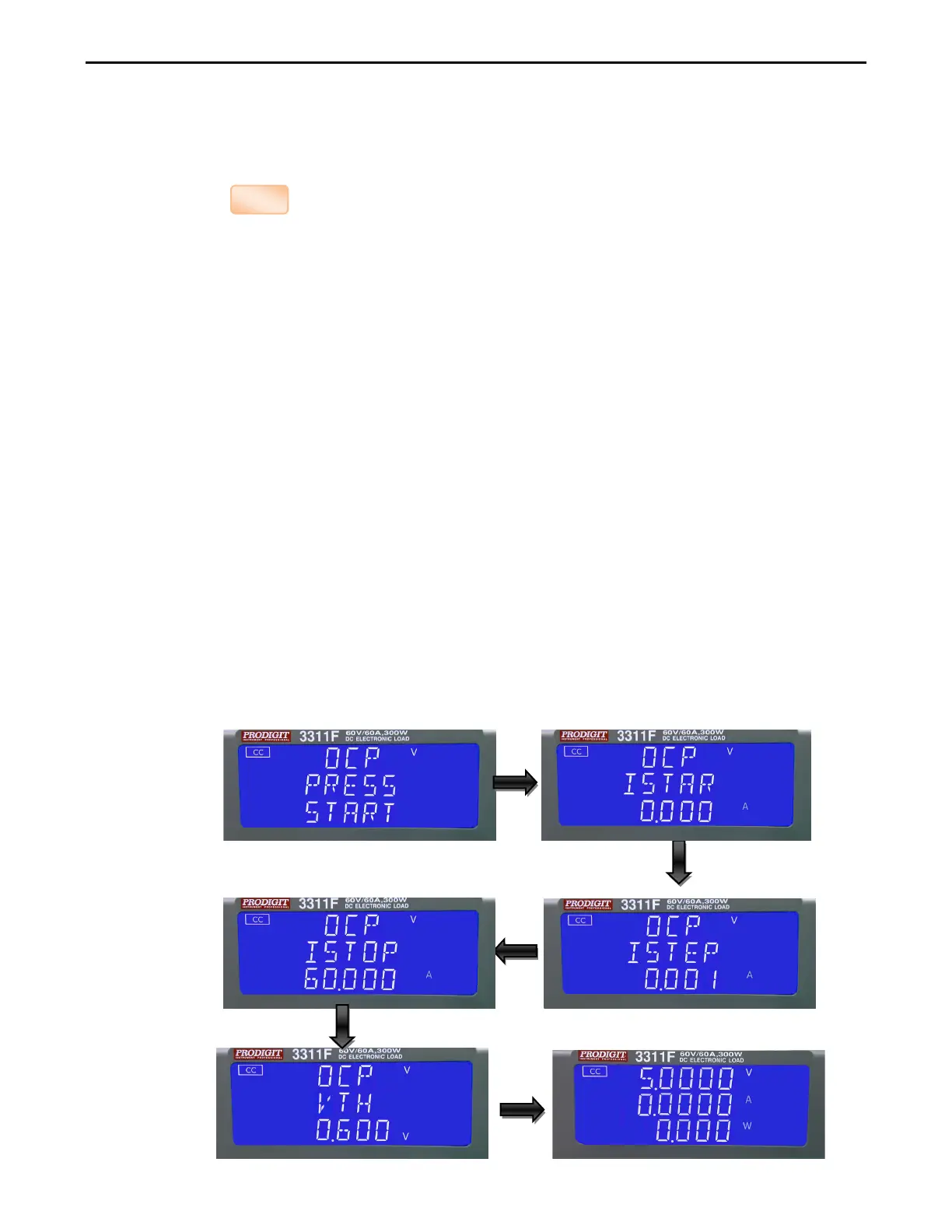
Pressing the OCP key once will cause the button to illuminate. The message
“OCP PRESS START” will be shown across the 3 displays.
Each press of the OCP button moves the menu on one step. The upper and
Middle LCDs show the currently selected test parameter as text. The value is
adjusted by the rotary knob and can be read from the lower display during
Setting.
The setting sequence is shown below:
OCP PRESS START (pressing the red start/stop key starts test)
OCP I STAR (current starting point of the OCP test)
OCP I STEP (value of incremental current steps from I START)
OCP I STOP (the OCP test’s upper current threshold
OCP Vth (the voltage threshold setting)
Exit OCP test set-up



 To Next Page