5958
4. While Waiting: If the system is in a waiting state, the status
contact will remain closed.
5. While Restarting: If the flame blows out and the system is
in the process of relighting the pilot, the status contact will
remain closed. If the pilot fails to relight within the specified
number of relight attempts, then the contact will open.
START INPUT
The Start Input Contact is used to remotely stop and start the PF2100. This can be done by connecting
it to an output relay on a PLC or to a switch located elsewhere on the site. Generally speaking, the
system will begin running when the contact is closed and will stop running when the contact is open.
The exception to this is when the system shuts down as a result of an alarm condition. In this case,
the contact must be closed to acknowledge the shutdown condition and must then be opened and
closed again to restart the system. The status contact can give some idea as to whether the system is
shutdown. However, it is not always possible to do so, so it is recommended to always start the system
using the close-open-close sequence described above. This will always work even if the system is not
waiting for a shutdown message to be acknowledged. Once the start sequence has been entered, the
system will start after the purge time has elapsed. When the start contact is opened, the system will
always stop immediately.
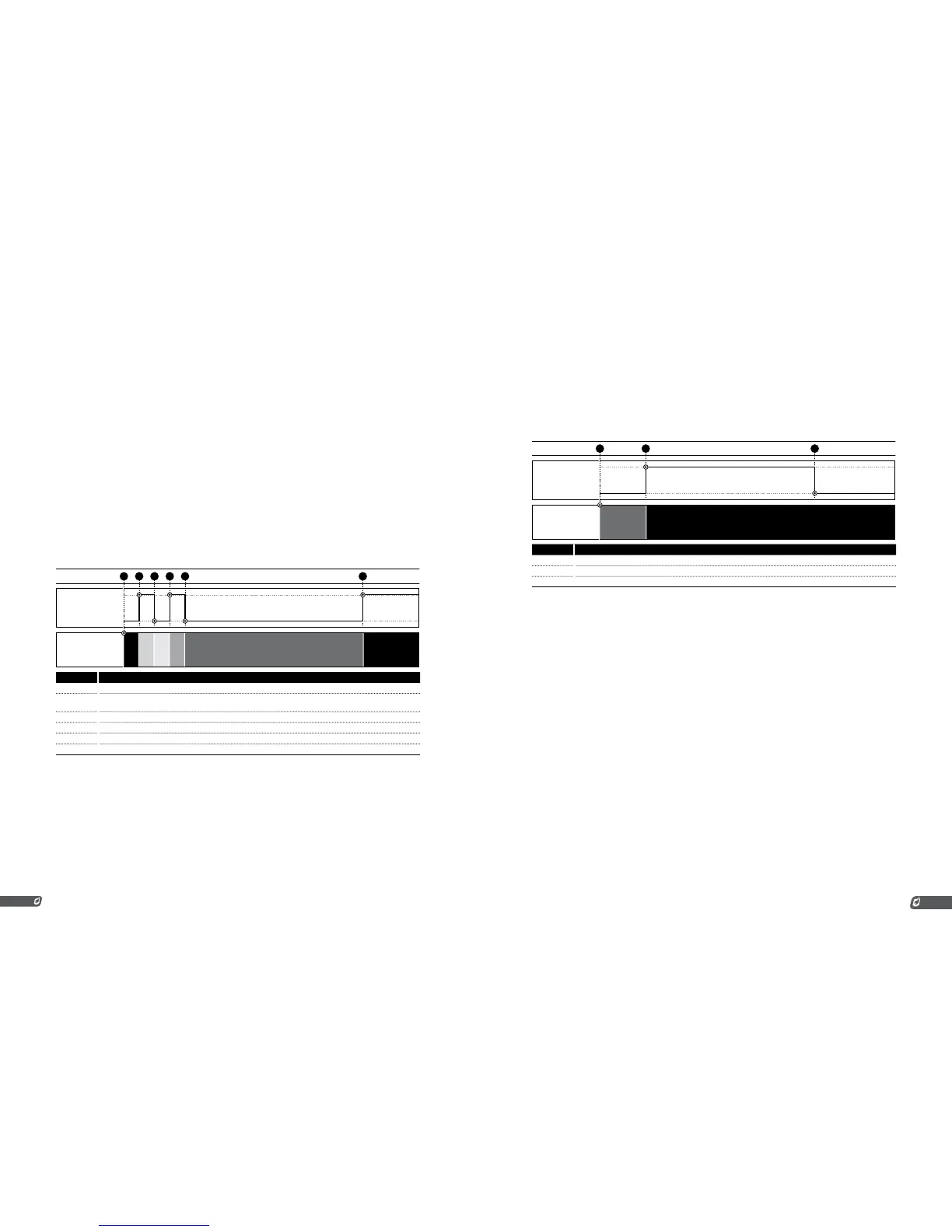
START
CONTACT
OPEN
CLOSED
SYSTEM
STATE
SHUTDOWN
SHUTDOWN
WAITING
READY
WAITING
RUNNING
EVENT
2 4 5 631
# CHART EVENTS
1 System already in a shutdown state due to some previous alarm.
2 User opens Start Contact. Shutdown message on display is acknowledged and cleared. System is now waiting for
Start Contact to close.
3 User closes Start Contact. System is now ready to be started.
4 User opens Start Contact (again). System is now waiting for Start Contact to close again.
5 User closes Start Contact (again). System begins running.
6 User opens Start Contact. System shuts down immediately.
If this contact is not needed, it must be shorted out with the provided jumper or a wire.
ESD INPUT
The ESD Input Contact is used to stop the PF2100 in the event of an emergency. This is normally done by
connecting the contact to the site’s ESD Loop. The PF2100 will shutdown immediately when the contact
is opened and cannot be restarted until the contact is closed. The PF2100 will not restart automatically if
the ESD contact is subsequently reclosed but must instead be restarted via the start contact, the keypad,
or the Modbus card (if installed).
ESD
CONTACT
OPEN
CLOSED
SYSTEM
STATE
SHUTDOWNRUNNING
EVENT
321
# CHART EVENTS
1 System already running.
2 ESD Contact opens,system shuts down.
3 ESD Contact closes, system does not restart automatically and remains shut down.
If this contact is not needed, it must be shorted out with the provided jumper or a wire.
PROOF OF CLOSURE INPUT
When the PF2100 is started, it drives the Main Valves to the closed position. If, for some reason, the
valves do not close, a dangerous situation can result. This condition might arise if a valve is mechanically
damaged, frozen open, or has been wired incorrectly. If undetected, the PF2100 may attempt to light the
burner while a dangerous amount of gas is present resulting in an explosion. To prevent this, the Proof
of Closure Input Contact can be used to monitor the mechanical position of the Main Valves. This feature
requires the use of valves that have a built-in Proof of Closure output. If more than one Main Valve is
used, the Proof of Closure outputs from each valve are wired together in series before being connected
to the PF2100’s Proof of Closure input.
The Proof of Closure contact must be closed in order for the Purge Timer to count down. If it is ever
opened while the system is not running, the Purge Timer is reset and must count down again before the
system can be started. In short, the Proof of Closure contact must be closed for the entire duration of the
Purge Time or the system will not start. While running, if the Proof of Closure contact ever opens when it
is not expected to be open, the system will shut down after 7 seconds.



 To Next Page