52
PURGE
TIME
MAX
0s
31 4
# CHART EVENTS
1 The system begins in the Alarm State because the Proof of Closure (PoC) Contact is open while it is not running.
2 Proof of Closure closes, purge time begins counting down, system does not start running automatically.
3 User starts system in Auto Mode. System counts down the remaining purge time on the display.
4 Purge Time Elapses, system ignites pilot, detects flame and begins counting down the Pilot-to-Main delay.
5 Proof of Closure opens and remains open for 7 seconds before Main Valves turn on, the system shuts down due
to the incorrect valve state.
If this contact is not needed, it must be shorted out with the provided jumper or a wire.
LEVEL INPUT
The Level Input is generally used in tank heater applications. A level switch is installed in the tank
to determine when the tank fluid level drops below to position of the fire tube. This switch is then
connected to the Level Input Contact on the PF2100. If the fluid level drops below the switch position,
the switch opens and the PF2100 will stop heating the tank. This is to prevent damage to the tank and
fire tube which may result from applying heat to the empty tank. Generally, this situation arises when a
tanker truck arrives on site and empties the tank into the truck. The system can be setup to begin heating
the tank again automatically after the level of fluid rises back above the switch position. This is done by
enabling the “Level Event Restart” setting in menu 4.
The response to the contact opening is delayed by 2s to reject electrical noise that is common on some
sites. If long periods of severe noise are common on a particular site, the delay can be increased to 20s
by enabling the “Pressure/Level Delay” feature in menu 4.
If this contact is not needed, it must be shorted out with the provided jumper or a wire.
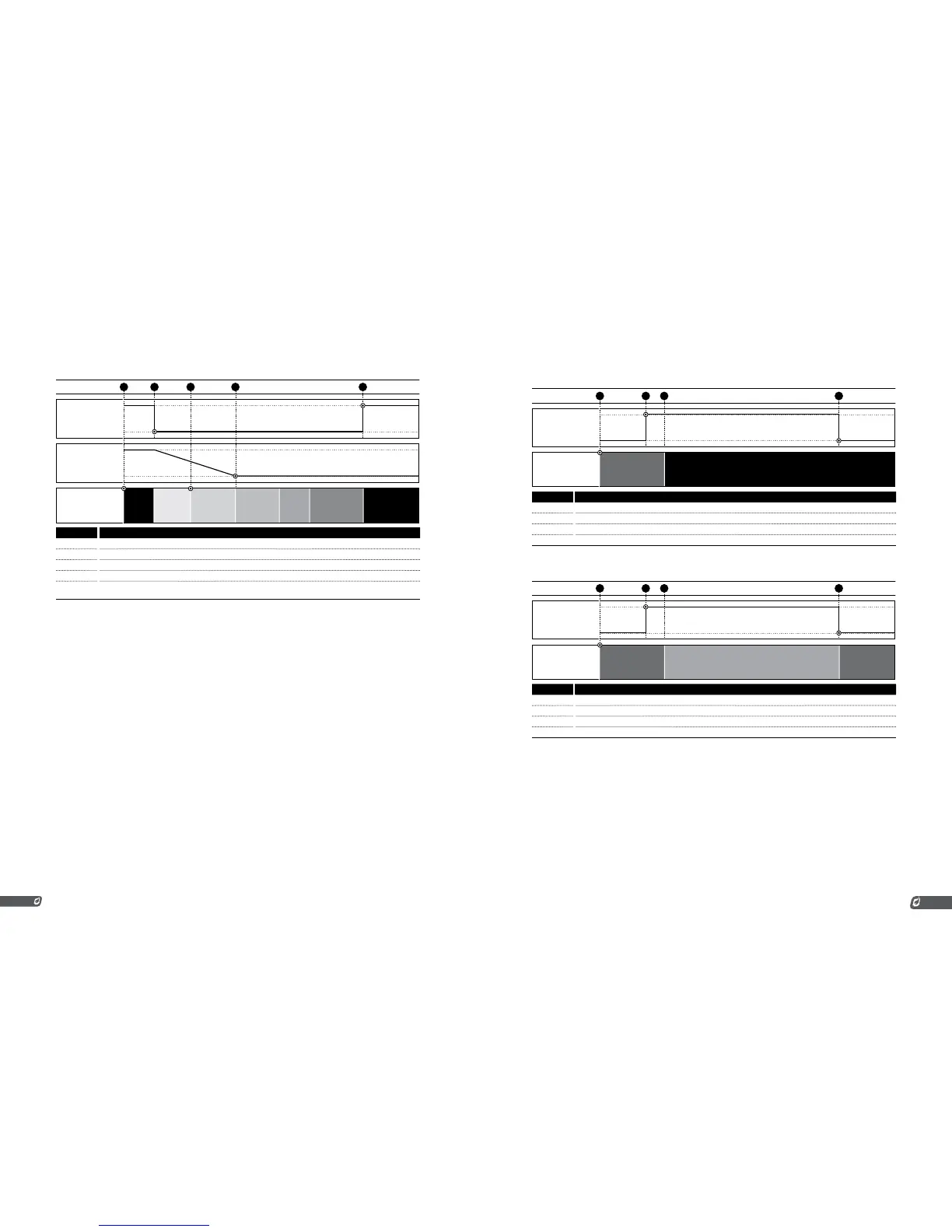
Chart 1: Level Event Restart = Disabled
LEVEL
CONTACT
OPEN
CLOSED
SYSTEM
STATE
SHUTDOWNRUNNING
EVENT
42 31
# CHART 1 EVENTS
1 System already running with Level Contact closed.
2 Level Contact opens, timer begins counting down.
3 Timer expires, System shuts down.
4 Level Contact closes, system does not restart automatically.
Chart 2: Level Event Restart = Enabled
SYSTEM
STATE
RUNNINGRUNNING WAITING ON LEVEL
EVENT
LEVEL
CONTACT
OPEN
CLOSED
42 31
# CHART 2 EVENTS
1 System already running with Level Contact closed.
2 Level Contact opens, timer begins counting down.
3 Timer expires. System waits for Level to close.
4 Level Contact closes, system starts running again.
LOW PRESSURE INPUT
The Low Pressure Input is used to monitor fuel train pressure. Insufficient fuel pressure may result in
the flame burning back into the fuel train causing damage or improper operation. A low pressure switch
can be installed on the fuel train and then connected to the Low Pressure Input Contact on the PF2100.
If the fuel pressure drops below the switch’s mechanically set pressure setting, the switch opens
and the PF2100 will close all valves and stop running. The system can be setup to begin running again
automatically after the pressure returns above the switch’s pressure setting. This is done by enabling the
Auto Restart feature in menu 4.
The response to the contact opening is delayed by 2s to reject electrical noise that is common on some
sites. If long periods of severe noise are common on a particular site, the delay can be increased to 6s by
enabling the “Pressure/Level Delay” feature in menu 4.
If this contact is not needed, it must be shorted out with the provided jumper or a wire.



 To Next Page