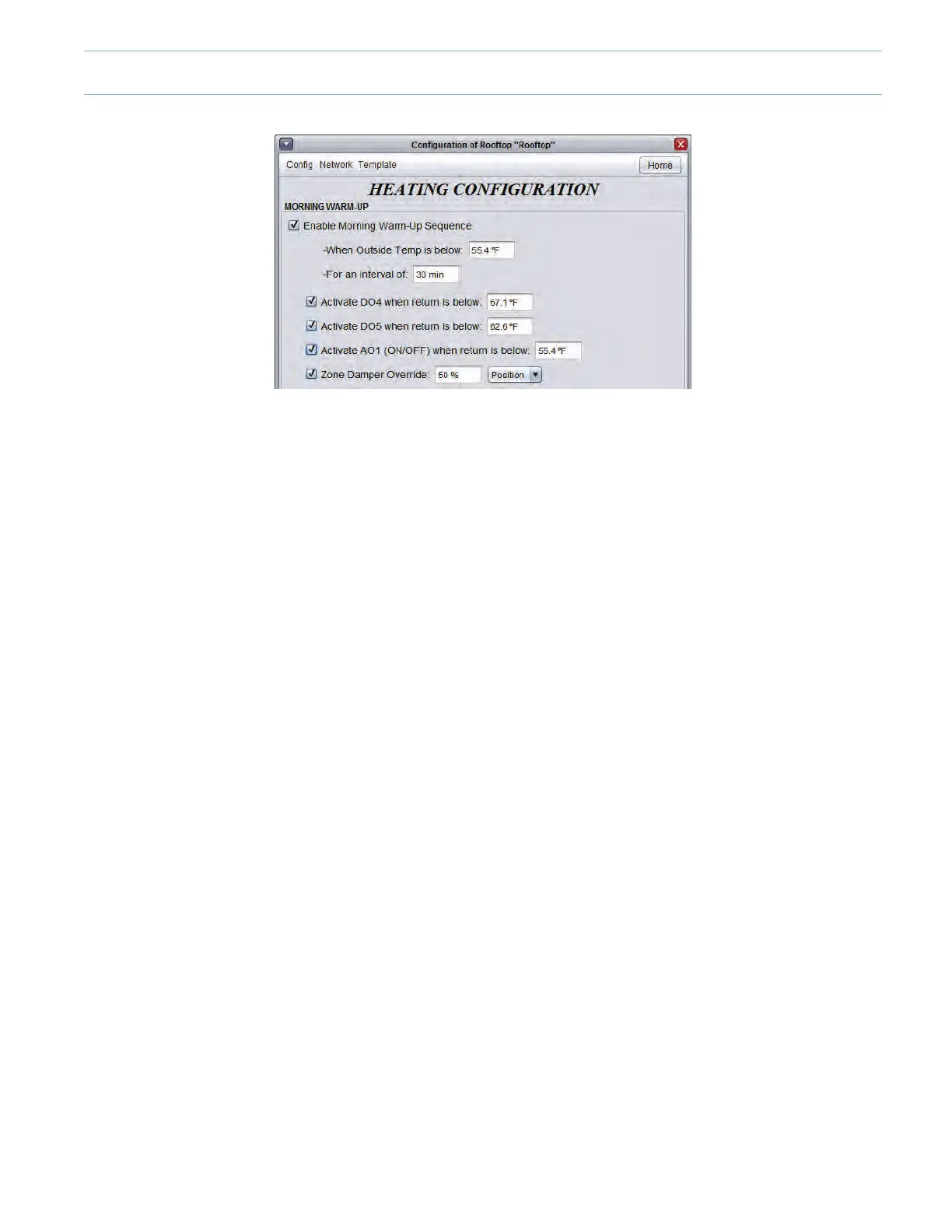
• EntertheOutsideTemperaturebelowwhichthe“MorningWarm-UpSequence”isenabled(Default55.4ºF).
• Entertheintervaloftimeforwhichthe“MorningWarm-UpSequence”isenabled(Default30min).
• Click the appropriate checkbox to activate Digital Output 4, Digital Output 5 and Analog Output 1 based on the mechanical
equipment’ssetup.Theoutputswill activatetheir respectiveheatingstagesif thereturn airtemperature is belowtheir
indicated value.
• In this example:
> DigitalOutput4willactivateitsheatingstageifthereturntemperatureisbelow67.1ºF
> DigitalOutput5willactivateitsheatingstageifthereturntemperatureisbelow62.6ºF
> AnalogOutput1*willactivateitsheatingstageifthereturntemperatureisbelow55.4
> Thesevaluescanbechangedtosuitthespecicrequirementsoftheproject.
*Analog Output 1 will have to be ON-OFF , i.e. 0VDC (OFF) or 10VDC (ON). If a digital contact is required, use a 10VDC
relay.
• Clickthe“ZoneDamperOverride”checkboxtoforceallzonedamperstoaspecicpositionwhentheMorningWarm-Up
Sequenceisactive.
9-13



 To Next Page