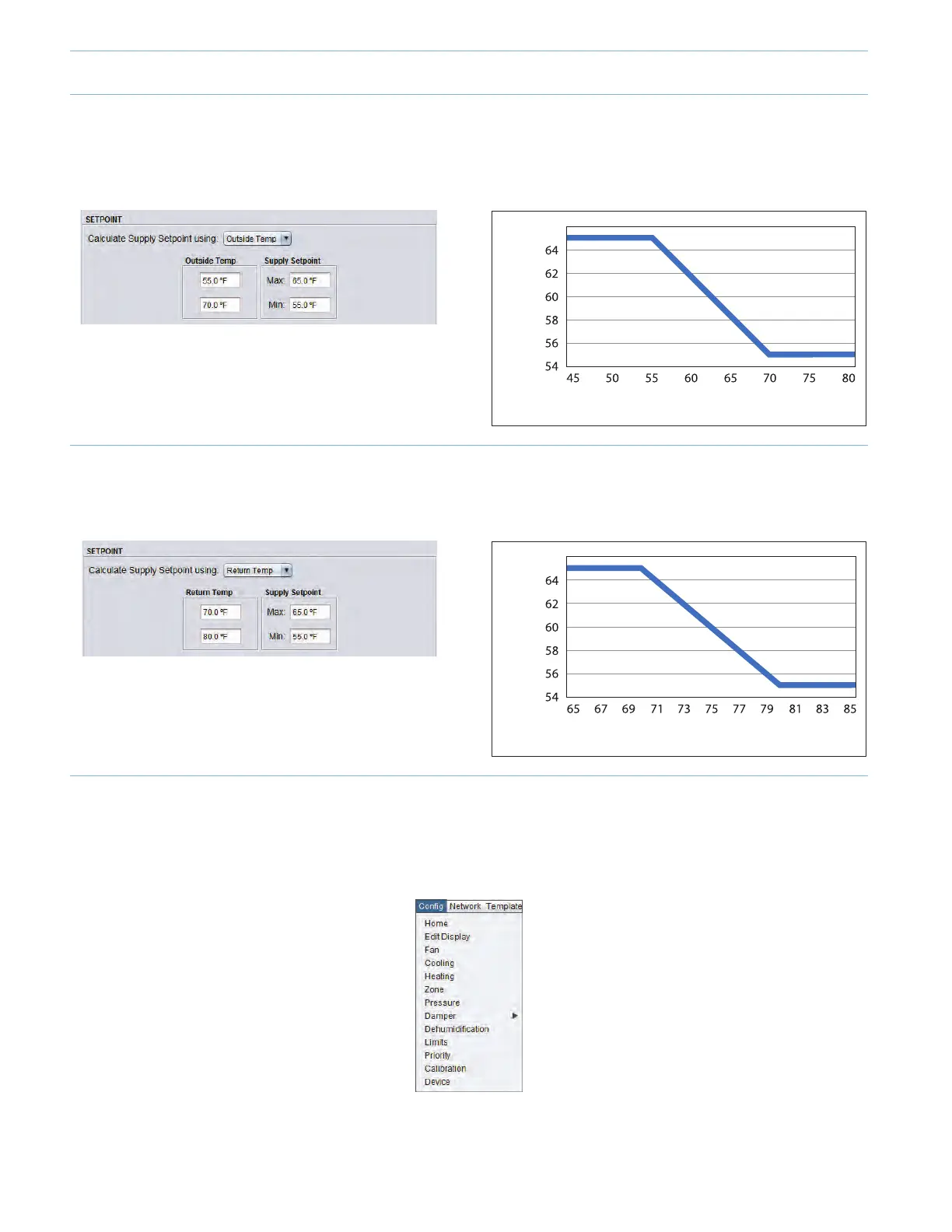
2.2.3 - Calculate Supply Setpoint Using “Outside Temperature”
By setting “Calculate Supply Setpoint using Outside Temp”, the target discharge temperature in the supply will be reset based
on the outside temperature.
Supply Setpoint
Outside Temperature
66
2.2.4 - Calculate Supply Setpoint Using “Return Temperature”
By setting “Calculate Supply Setpoint using Return Temp”, the target discharge temperature in the supply will be reset based
on the return temperature.
Supply Setpoint
Return Temperature
66
2.3 - Conguring the Morning Warm-Up
When the cooling mode is set to “Supply Temp”, the heating conguration menu will automatically update to display the
morning warmup setup.
• Onthetopleftofthescreen,select“Cong”andthen“Heating”.
• Click the “Enable Morning Warm-Up Sequence” checkbox. This sequence will be enabled upon a transition from
“Unoccupied” to “Occupied”.
9-12



 To Next Page