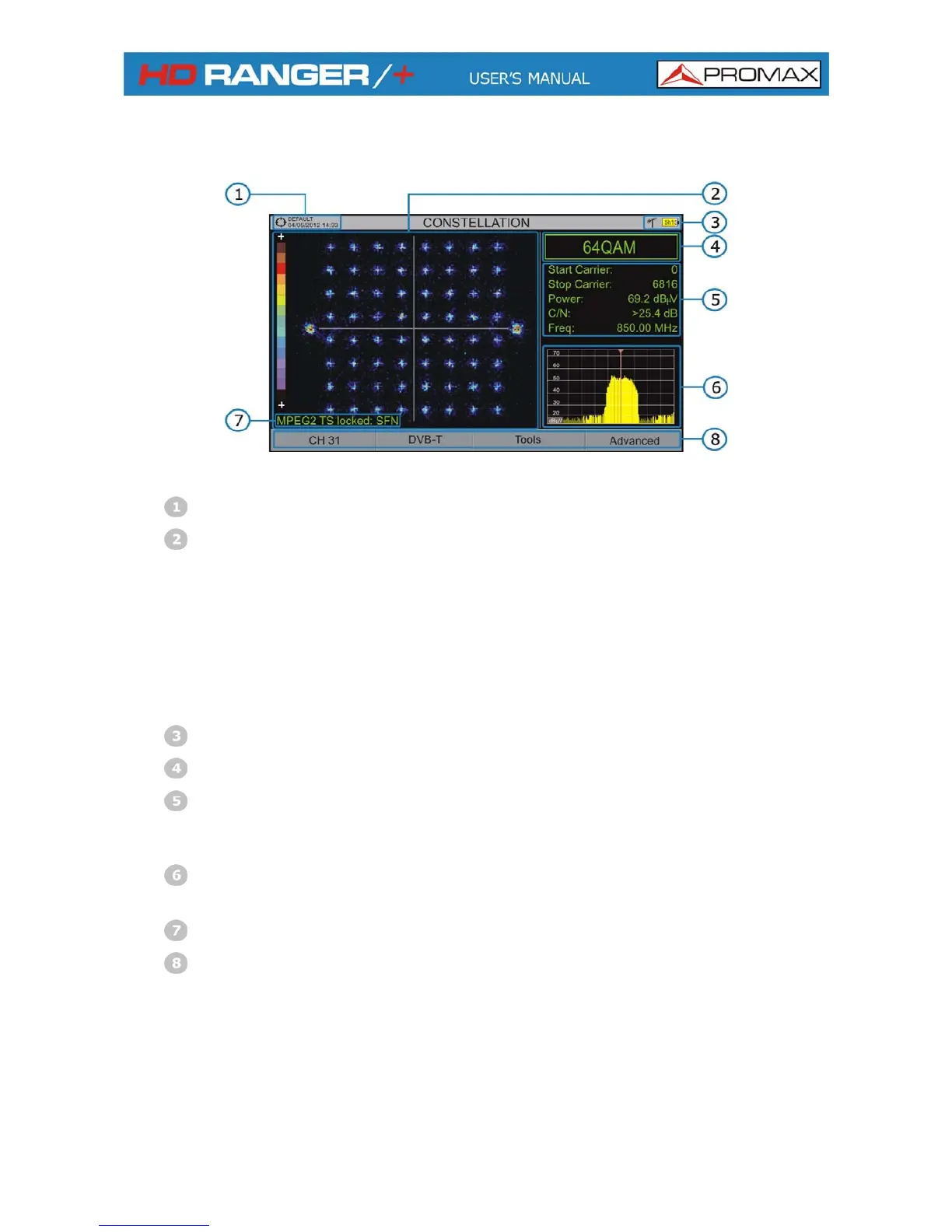
Constellation screen description:
Figure 40.
Selected installation; date and time.
Constellation window.
c
a r p density
nsity).
rse
ation with respect to the
this is indicative of good
bsence of problems.
The olour scale placed at the left side indicates the signal quality in a
qualitative way by a gr dation of colou s pro ortional to the of
symbols concentrated in a given area. The colour scale ranges from black
(no symbols) to red (highest de
Greater dispersion of the symbols indicates higher noise level or wo
signal quality signal. If there is symbols concentr
full grid (see advanced menu for types of grid)
ratio signal/noise or a
Selected band, battery level.
Constellation modulation.
Data Window.
The data shown are: Start Carrier, Stop Carrier, Power, C/N and
frequency/channel.
Spectrum of the tuned signal.
Spectrum is displayed with the span selected at the SPECTRUM mode.
Signal status (searching/locked/multiplex name).
Softkeys menus.
► Joystick Left/Right: Frequency/Channel change (depending on the joystick
active mode).
April 2013
6-57



 To Next Page