26
PROMISE Technology
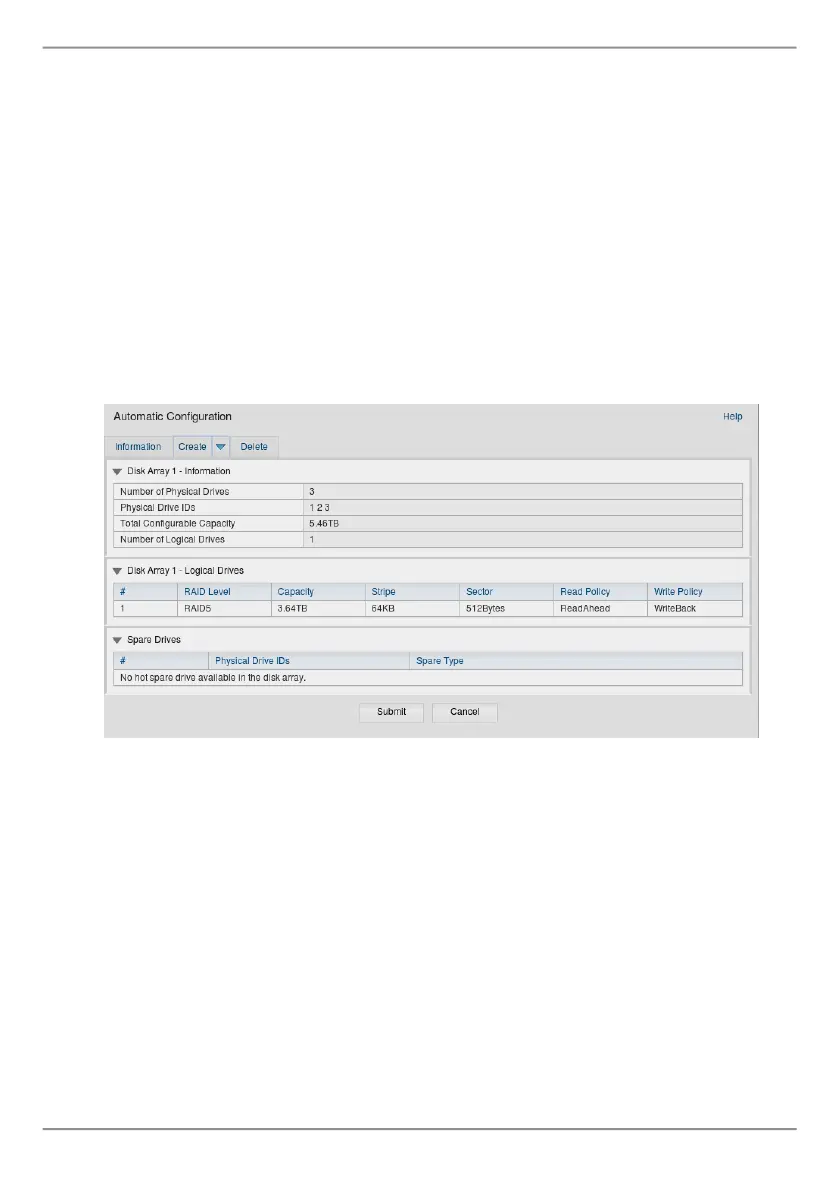
Automatic Conguration
WhenyouchoosetheAutomaticoption,thefollowingparametersappearon
thescreen:
• Disk Arrays–Thenumberofphysicaldrivesinthediskarray,theirID
numbers,congurablecapacity,andthenumberoflogicaldrivestobe
created
• Logical Drives–TheIDnumberofthelogicaldrive(s),theirRAIDlevel,
capacity,andstripesize
• Spare Drives–Thephysicaldriveslotnumberofthededicatedhotspare
assignedtothisdiskarray.AhotsparedriveiscreatedforallRAIDlevels
exceptRAID0,whenveormoreunconguredphysicaldrivesareavailable
Figure 27: Automatic Disk Array Conguration menu
Ifyouaccepttheseparameters,clicktheSubmitbutton.
ThenewdiskarrayappearsintheDiskArrayListontheInformationtab.
IfyoudoNOTaccepttheseparameters,usetheExpressorAdvancedoptiontocreate
yourlogicaldrive.



 To Next Page
 Loading...