44
MARK76V3002 Rev 3
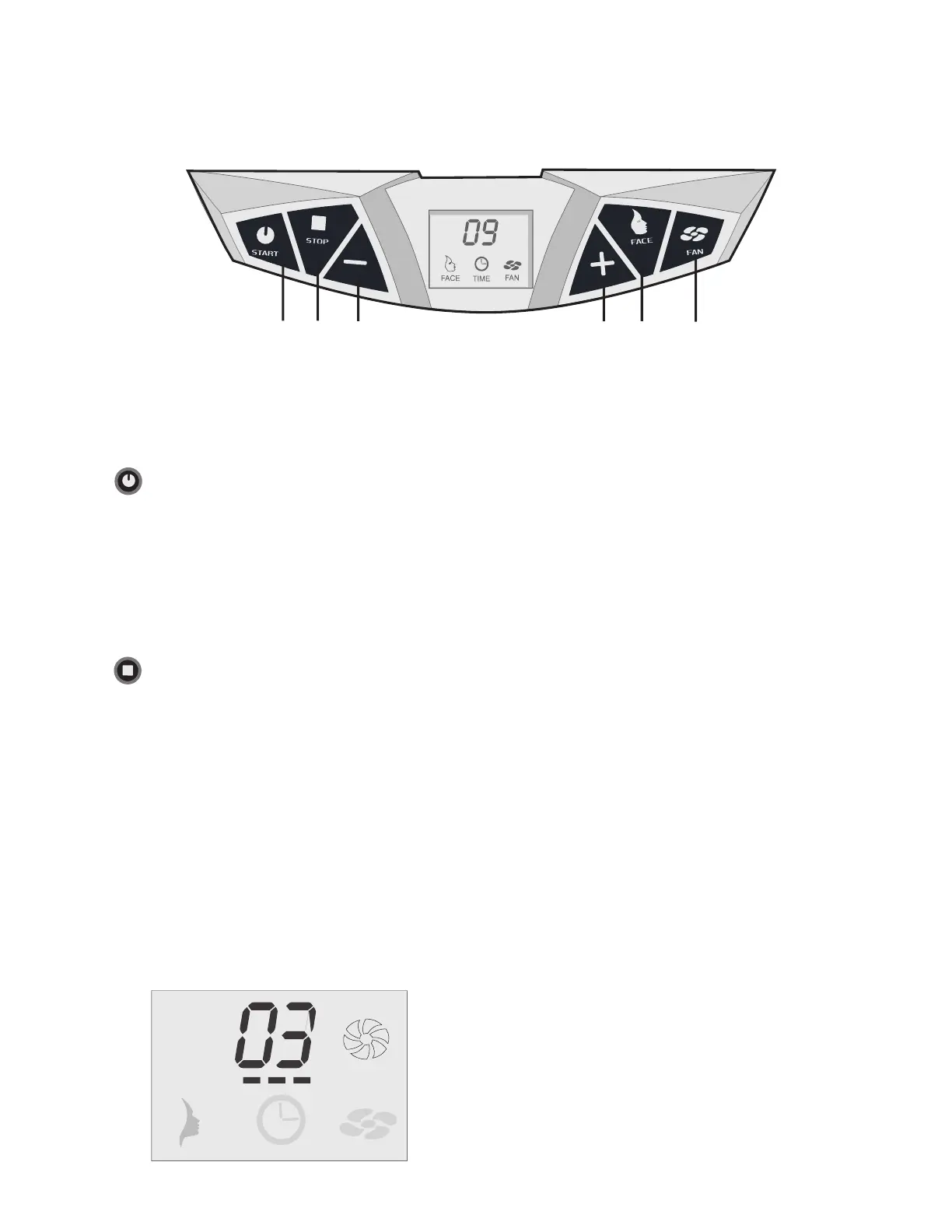
A B C D E F
Start
Stand-alone mode:
By depressing start once the “+ and –“ buttons can be used to set the tanning time.
Pressing for a second time will start the unit.
Remote mode: (only for commercial units)
The unit can be started automatically by the external timer. The start button can be
used only when the unit has to be restarted from “pause”.
Stop
Stand-alone mode: (for residential units)
Pressing stop once will cause the unit to “pause”. The lights will go out but the
ventilation will continue
to run.
Pressing stop twice will initiate a mandatory after-cooling phase of 3 minutes. The unit
cannot be started during these 3 minutes.
Remote mode: (only for commercial units)
Pressing stop once will cause the unit to “pause”. The lights will go out but the
ventilation will continue
to run.
The unit will not respond to pressing stop several times. The external timer
automaticallywillswitchtheunito.Switchingowillinitiateamandatorycooldownof
3 minutes. The unit cannot be started during these 3 minutes.
Operation
Illustration after-cooling
Note: Typically Stand-alone mode is for residential use and Remote mode is for commercial use
All units come standard in remote-mode





 To Next Page