45
MARK76V3002 Rev 3
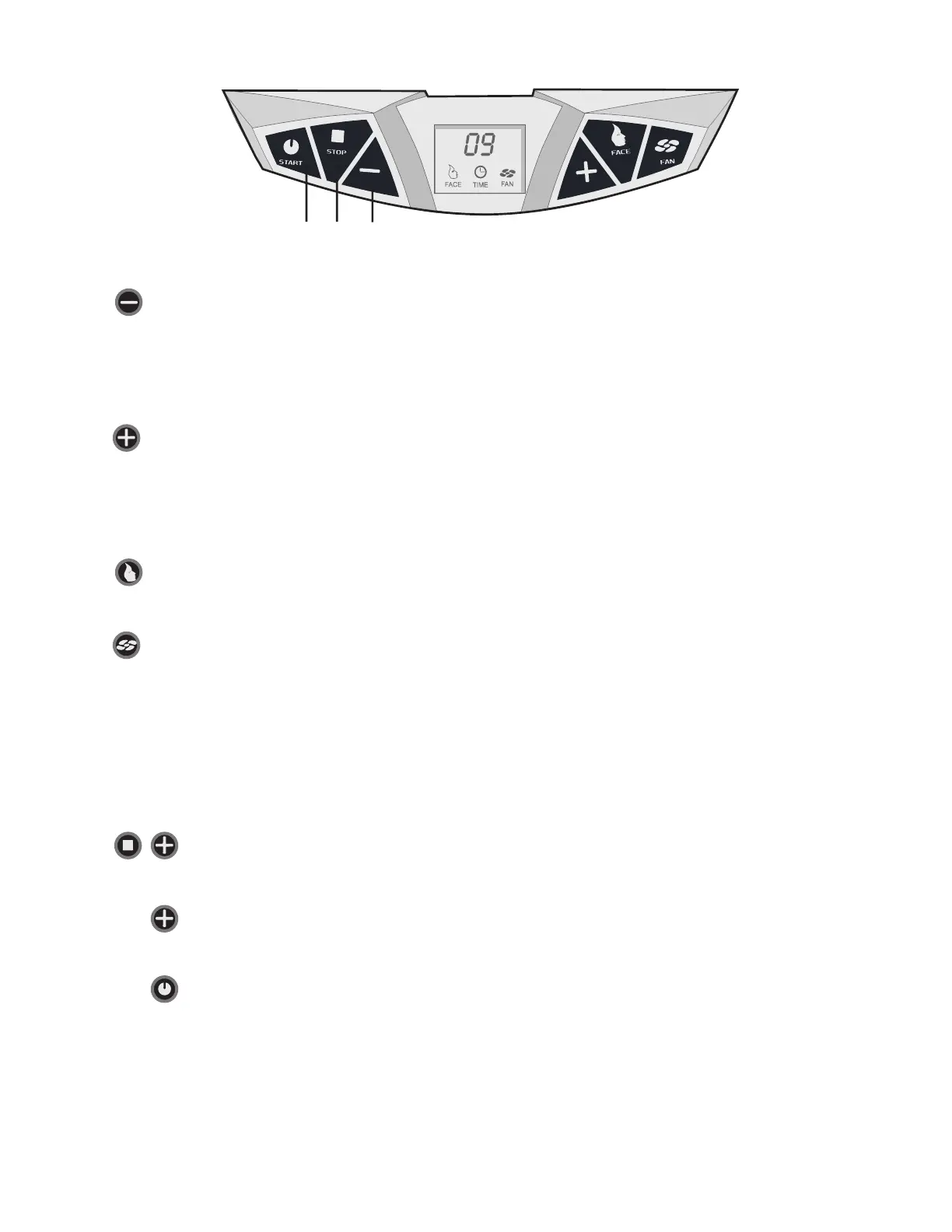
A B C D E F
Stand-alone mode:
a. Reduce tanning time
b. Reduce body cooler speed
Coin mode:
a. Reduce body cooler speed
Stand-alone mode:
a. Increase tanning time
b. Increase body cooler speed
Coin mode:
a. Increase body cooler speed
Face
Switchthefacetanneronando
Fan
Switchthebodycooleronando
General:
The unit is generally set for use with external timer. When the unit has to operate in
combination with an remote timer (remote mode), the internal time should be set to 0
minutes. If you want to use the unit in stand-alone mode follow the steps below:
Press both "stop" and "+" and hold for 10 seconds until "01" is shown.
Press the "+" button and continue to press until the display indicates “15”
Press start once and the unit will beep in response.
Note: The maximum tanning session is restricted to 15 minutes.
Press start again and unit will show "15" min.
Press start for a third time and unit will turn on.





 To Next Page