AGENT-2 S41D Line - User Manual AG2-S41D/MU-EE
Ed. Jun-2012 Proprietary information 46 of 89
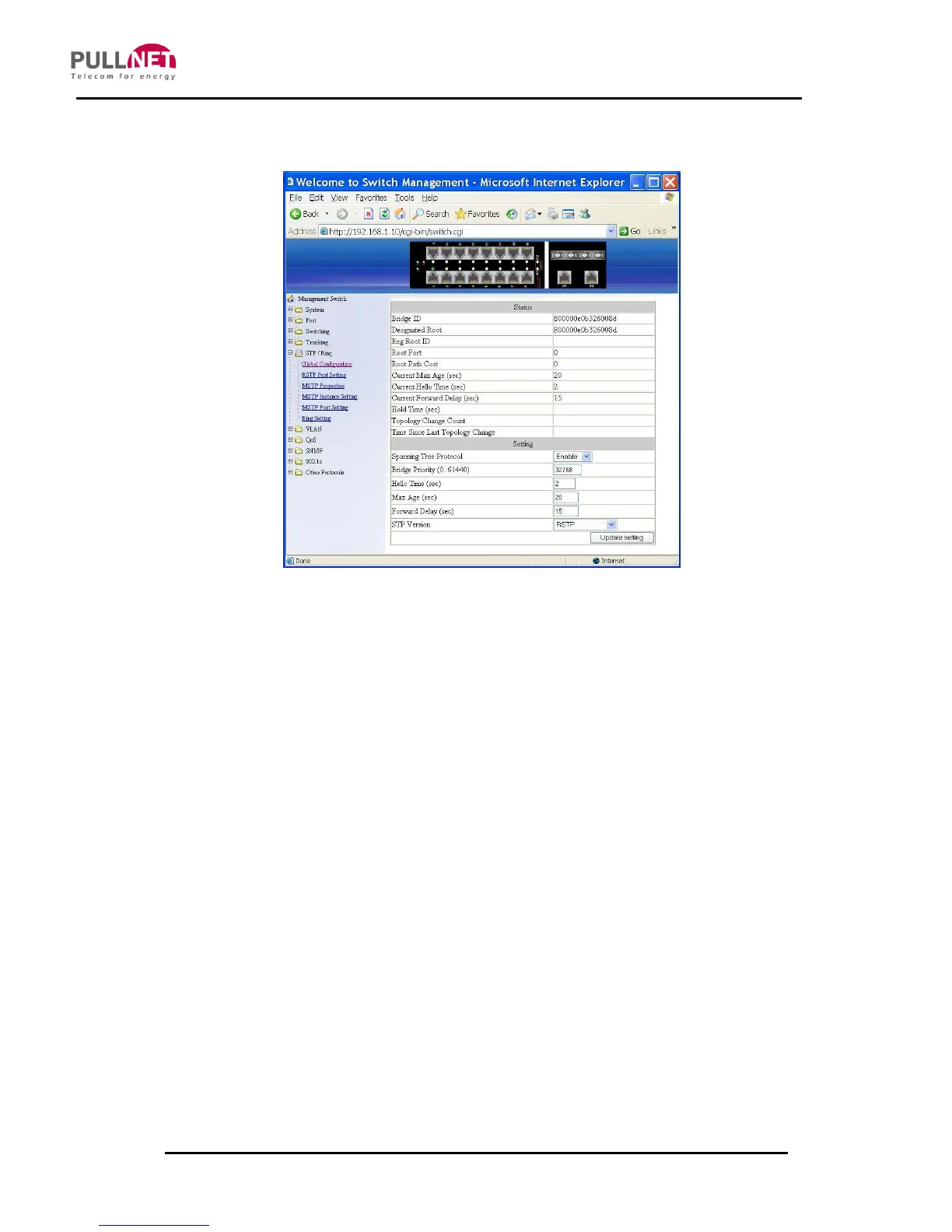
8.7 STP / RING
Global Configuration
1. Spanning Tree Protocol: Click on the “Spanning Tree Protocol” drop-down
menu to Choose “Enable” or “Disable” from the “Spanning Tree Protocol” drop-
down list to enabling or disabling the Spanning Tree Protocol on the Switch.
2. Bridge Priority (0..61440): Click on the “Bridge Priority” text box and type a
decimal number between 0 and 61440.
3. Hello Time (sec) (1..9): Click on the “Hello Time” text box and type a decimal
number between 1 and 9.
4. Max Age (sec) (6..28): Click on the “Max Age” text box and type a decimal
number between 6 and 28.
5. Forward Delay (sec) (4..30): Click on the “Forward Delay” text box and type a
decimal number between 4 and 30.
6. STP Version: Click on the “STP Version” drop-down menu to choose “MSTP”,
“RSTP” or “STP compatible” from the “STP Version” drop-down list.
7. Update setting: Click on the “Update setting” button after finishing the Global



 To Next Page