AGENT-2 S41D Line - User Manual AG2-S41D/MU-EE
Ed. Jun-2012 Proprietary information 72 of 89
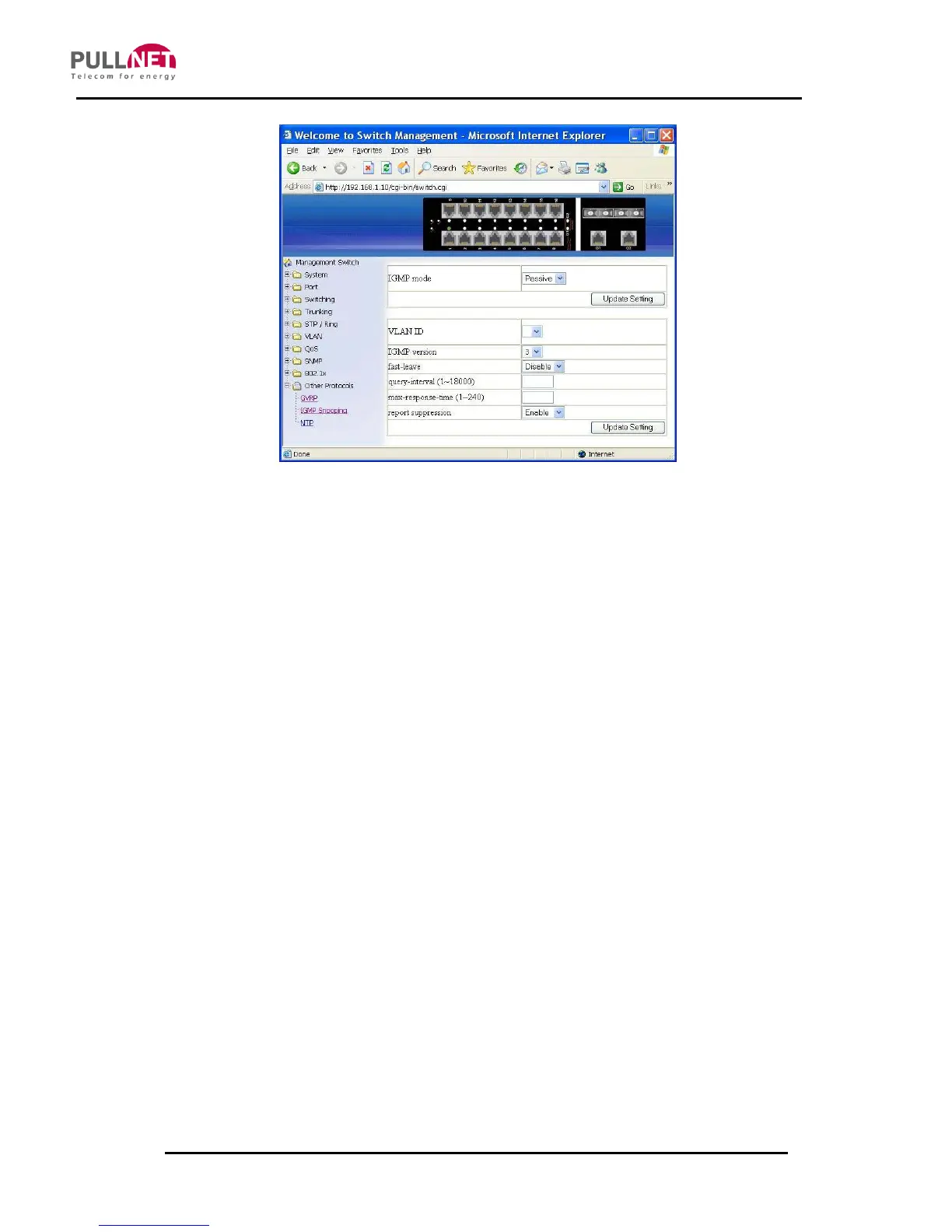
IGMP Snooping
1. IGMP mode: Click on the “IGMP mode” drop-down menu from the “IGMP
mode” drop-down list in order to choose “Disable”, “Passive”, or “querier” for
the switch. Disable: Disable IGMP on the switch. Passive: The switch is set
with only multicast-data-forwarding capability. Querier: The switch acts as the
querier for the network. There is only one querier on a network at any time.
2. Update Setting: Click on the “Update Setting” button after finishing the IGMP
mode settings procedure.
3. VLAN ID: Click on the “VLAN ID” drop-down menu from the “VLAN ID” drop-
down list to choose the VLAN under IGMP Snooping configuration for the
switch.
4. IGMP version: Click on the “IGMP version” drop-down menu from the “IGMP
version” drop-down list to choose “1”, “2”, or “3” for the switch.
5. Fast-leave: Click on the “fast-leave” drop-down menu from the “fast-leave”
drop-down list in order to choose “Enable” or “Disable” for the switch. By
enabling this function will allow members of a multicast group to leave the
group immediately when an IGMP Leave Report Packet is received by the
Switch.
IGMP querier:



 To Next Page