USR-W630s User Manual
Table 4. Detail parameters of STA settings
Users can click the “Scan” button to search for current
2.4/5.8G WIFI hotspots.
Select the AP name to connect to.
This parameter is selected based on whether the AP is
encrypted.
No Encryption/mixed-psk.
lan: bridge mode
wwan1: Repeater mode
Once selected, check the wireless connect with ping.
Illustrate:
If you need to set the static IP of STA after turning on STA, please go to Network-WAN to set it;
If you set up a bridge to the LAN port, you need to turn off DHCP on the br-lan interface, and set the LAN
port address to the same network segment as the AP to be connected;
Only one of 2.4G and 5.8G STA can be enabled.
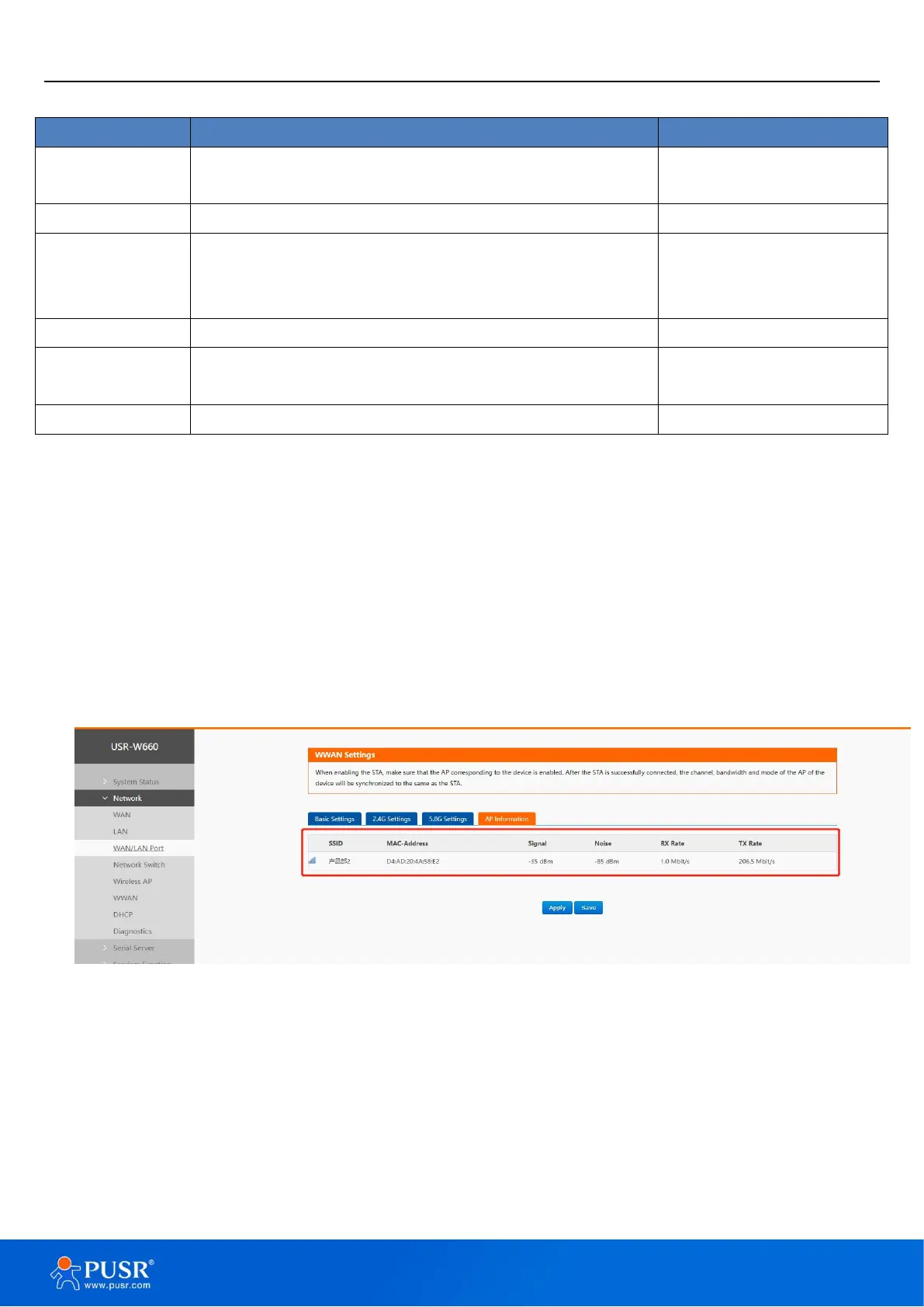
4.5.2. AP information
If the USR-W630s connect to upper-level Wi-Fi successfully, the information will be displayed in this page.
Figure 22. AP Information
4.6. DHCP function
Static address assignment: Set at Network-DHCP. This feature is an extension of the LAN interface DHCP
settings and is used to assign fixed IP addresses and host identities to DHCP clients.
Use “Add” to add new lease entries. MAC-address can be used to identify a host, IPv4-address can be used
to assign an address, and hostname can be used to assign an identity.


 To Next Page