USR-W630s User Manual
5.2.6. HTTPD Mode(HTTP client)
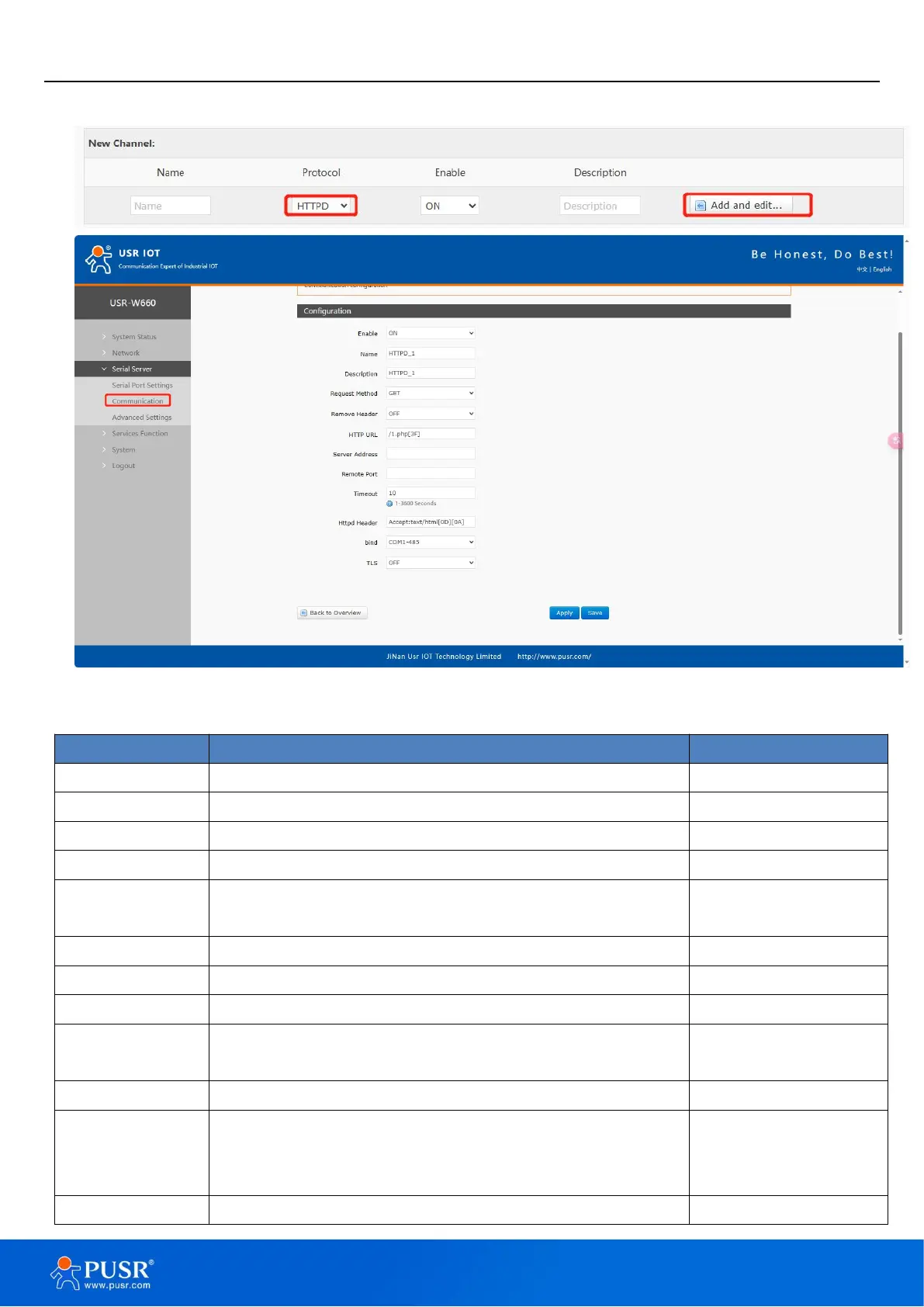
Figure 38. HTTP client settings
Whether this link is enabled, ON (enabled)/OFF (disabled ).
Set the name of this link.
Set the remark information of this link.
ON: Set to filter HTTP headers of data packet
OFF: Set not to filter HTTP headers of data packet
Add the URLs that need to be accessed
IP or domain name of server.
Listening port of server.
If the server does not actively disconnect within the timeout
period, this end needs to wait for the disconnection time
Set HTTP headers of data packet
COM1-485: Data is transmitted by RS485 only.
COM2-232: Data is transmitted by RS485 only.
COM1+COM2:Data is transmitted by RS485 and RS232 both.
The version can be TLS1.0 or TLS1.2.


 To Next Page