USR-W630s User Manual
2.2. Brief introduction of the web page
On the left side of the web page is a tab page where you can specifically set some parameters of the module.
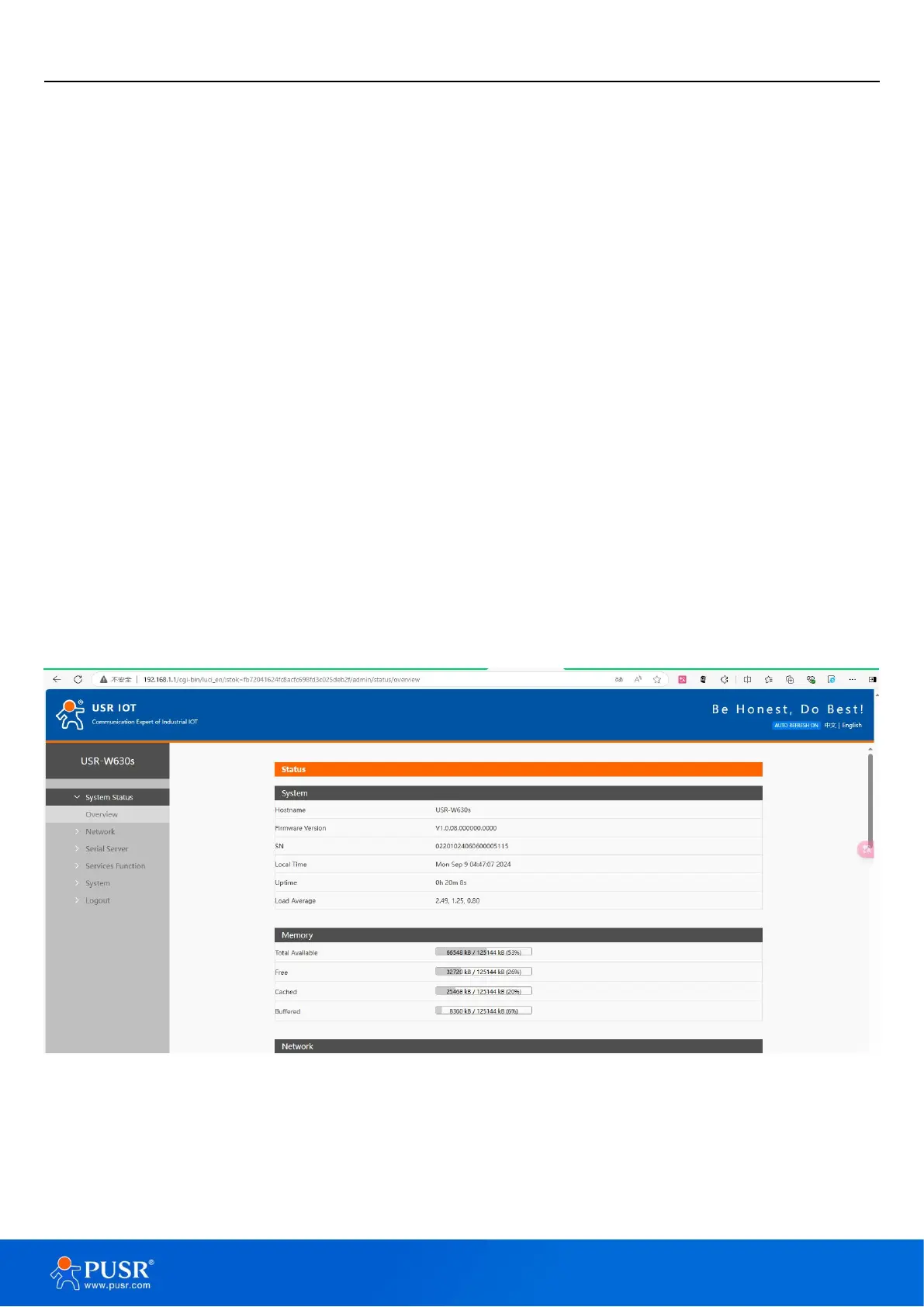
Status: Mainly displays the device’s name information, firmware version, routing table, running status,
serial port communication status, etc.;
Network: WAN, LAN, network switching, wireless WiFi hots-pot, wireless client, DHCP, network port
mode, network diagnosis;
Serial port server function: serial port parameter setting, communication protocol setting, network AT
configuration, serial port heartbeat configuration, no data re-connection and restart settings;
Service functions: manned cloud service, DDNS, SNMP service;
System: host name/password settings, scheduled restart, HTTP port settings, NTP time synchronization,
access restrictions, logs, backup/upgrade, factory reset, restart, etc.
3. Status & System
3.1. System Status
Overview of product information, memory usage, network connection status, connected sites, serial port
server communication, routing table, DHCP allocation.
Figure 2. System Status
3.2. Name and password
The default password can be changed, and the default password is root, and the username cannot be set.
This password is the management password (webpage login password). The default host name of the wireless


 To Next Page