USR-W630s User Manual
6.2. DDNS
DDNS (Dynamic Domain Name Server) is a service that maps a user's dynamic IP address to a fixed domain
name resolution service. Each time a user connects to the network, the client program sends the dynamic IP
address of the host to the server program located on the service provider's host through information
transmission. The server program is responsible for providing DNS services and implementing dynamic domain
name resolution.
6.2.1. Supported Services
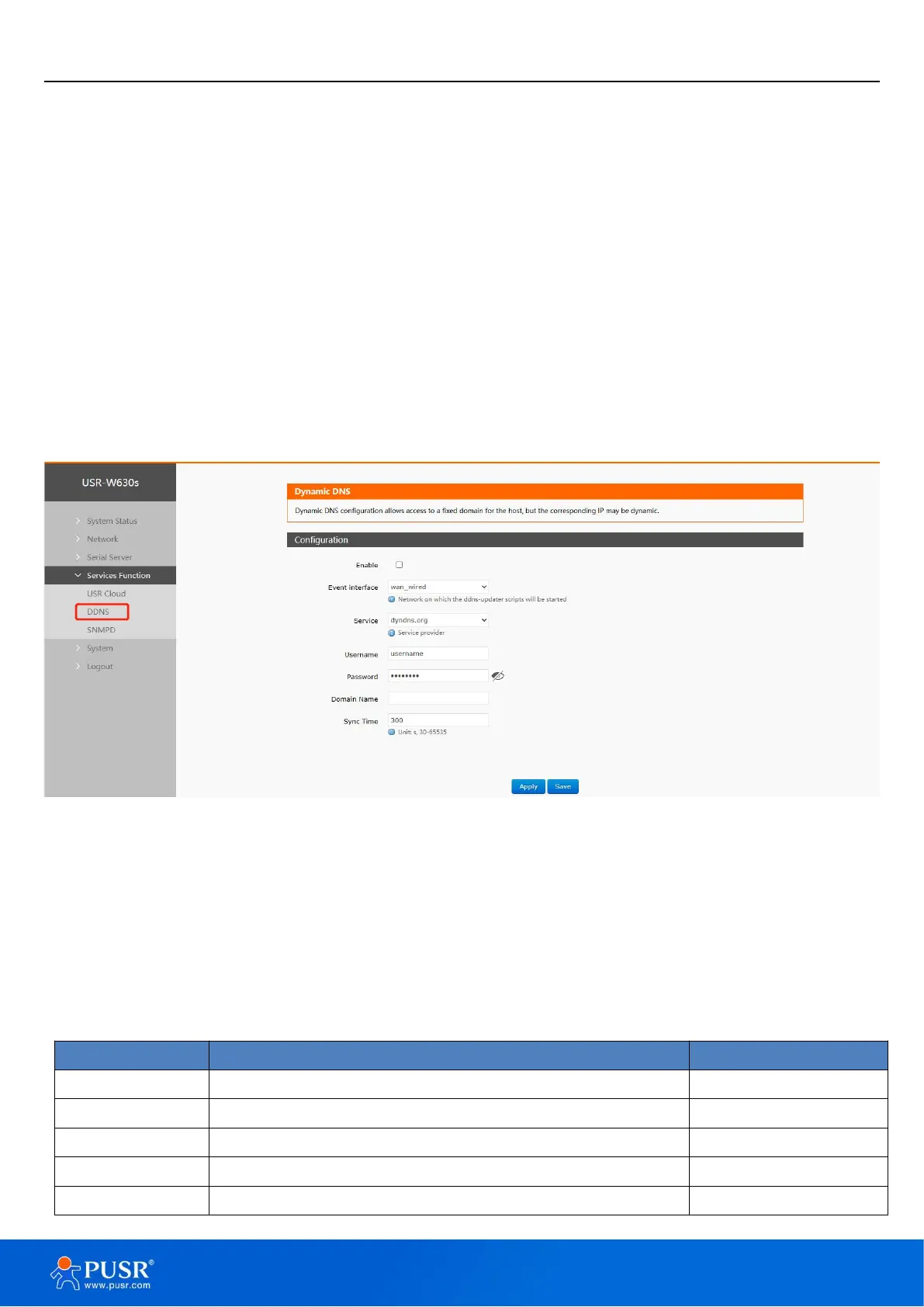
The use of dynamic domain names falls into two scenarios. The first scenario is when the wireless client itself
supports this service (check under the "Service" dropdown menu and select the corresponding DDNS service
provider, here using Peanut Shell). The setup method is as follows:
Figure 41. Dyndns Service
DDNS function provides dynamic domain name resolution capability for wireless clients in the external
network, allowing them to apply for a domain name that points to their WAN IP address.
This feature allows remote access to wireless clients directly through domain names.
Parameters need to be filled in as follows (using Peanut Shell as an example).
Check to enable DDNS functionality
Choose which WAN port as needed
Please fill in the DDNS service address
Peanut Shell account name


 To Next Page