15
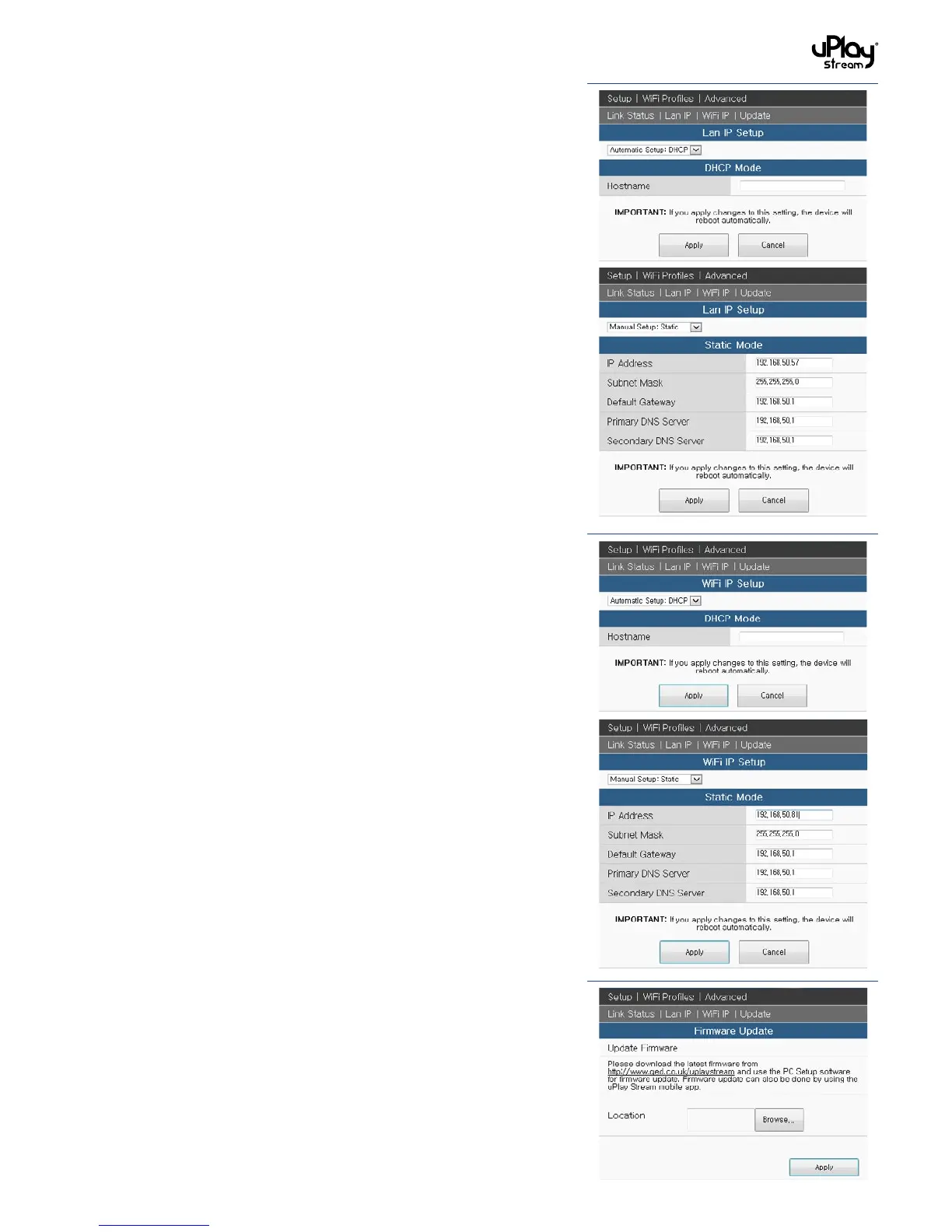
In the LAN Status section, connection information including IP
Address, Subnet Mask, Default Gateway, Primary DNS Server
and Secondary DNS Server can be found.
5.3.2 LAN IP
In the LAN IP Setup section, you can select between Automatic
Setup: DHCP and Manual Setup: Static settings. When applying
changes to this setting, the device will reboot automatically.
Please wait patiently for the changes to be applied.
Automatic Setup: DHCP: Most of the settings are done
automatically. Enter the Hostname if applicable.
Manual Setup: Static: Enter the IP Address (Static IP), Subnet
Mask, Default Gateway, Primary DNS Server and Secondary DNS
Server respectively.
5.3.3 WiFi IP
In the WiFi IP Setup section, you can select between Automatic
Setup: DHCP and Manual Setup: Static settings. When applying
changes to this setting, the device will reboot automatically.
Please wait patiently for the changes to be applied.
Automatic Setup: DHCP: Most of the settings are done
automatically. Enter the Hostname if applicable.
Manual Setup: Static: Enter the IP Address (Static IP), Subnet
Mask, Default Gateway, Primary DNS Server and Secondary DNS
Server respectively.
5.3.4 Firmware updates
The firmware of the uPlay Stream can be updated to introduce
new features or fix bugs. Please follow the steps below for
firmware updates using the PC / MAC Setup software:
1. Visit http://www.qed.co.uk/qeduplaystreamsupport to
download the latest firmware.
2. Press Browse… to locate the new firmware file.
3. Press Apply to start the update.
Note:
• Firmware update is an advanced operation. Improper
firmware update operations may cause failure or damage
to the uPlay Stream receiver.
• PleaseDONOTdisconnectthepowerornetworkconnection
during the update.
• Firmwareupdateinthissetuppageisonlyavailablewhen
using PC or MAC setup software. For iOS or Android, please
use the in-app firmware update function as detailed in
section 6.8.


 To Next Page