EasyManua.ls Logo

quadient DS-85i - Troubleshooting Table

quadient DS-85i
157 pages
Print Icon
To Next Page IconTo Next Page
To Previous Page IconTo Previous Page
Loading...
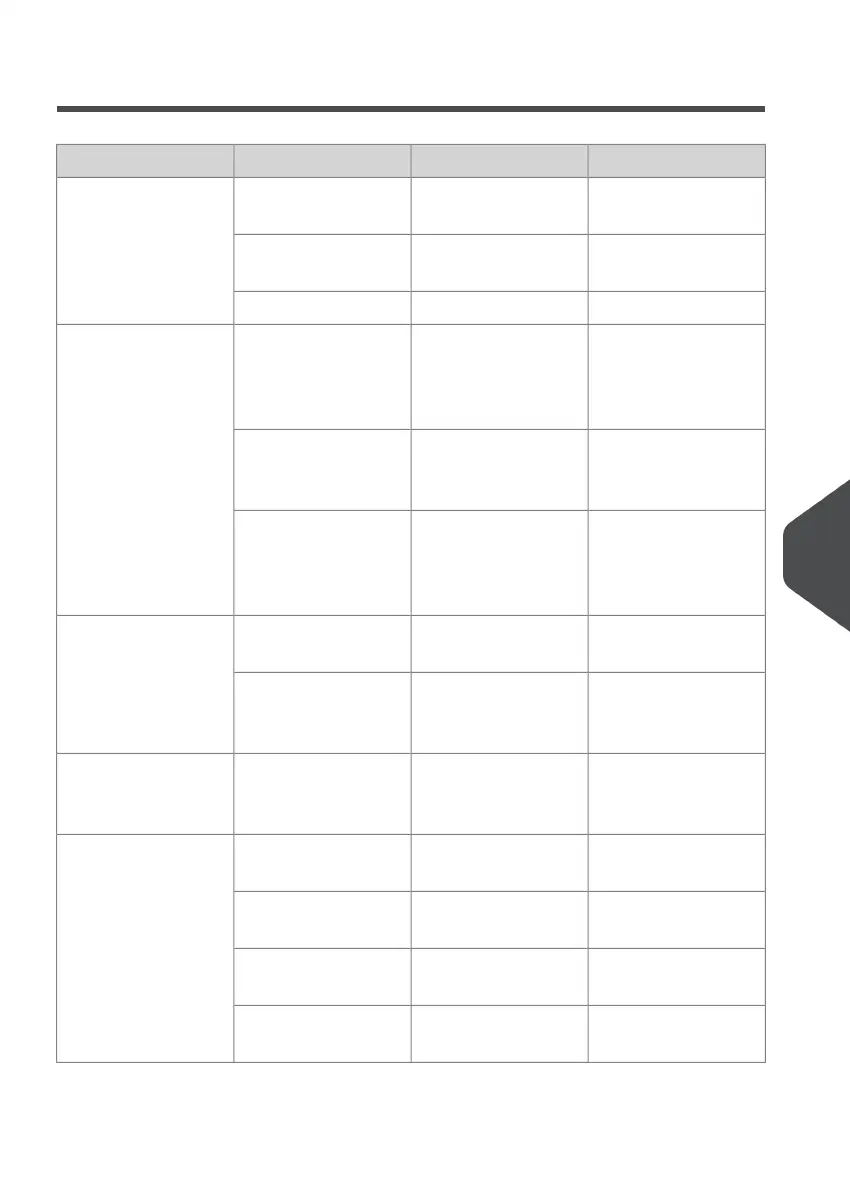
Troubleshooting Table
ReferenceRemedyPossible causeSymptom
-Connect the system
to the mains.
System not connec-
ted to mains.
The system cannot
be started after
switching on.
-Replace fuse below
power switch.
Fuse is blown.
-Close the covers.A cover is opened.
Loading Envelopes
on page 69
Check envelope feed
adjustments. Place
envelopes correctly in
hopper.
Envelopes stacked
reversed in the hop-
per.
System stops with
envelope at insert po-
sition (flap not open).
Envelope Specifica-
tions on page 142
Store envelopes ac-
cording to specifica-
tions.
Envelope flap sticks.
Envelope Specifica-
tions on page 142
Change envelopes
according to specific-
ations.
Wrong envelope type
used (not according
to specifications or
job settings).
Loading Envelopes
on page 69
Adjust envelope sep-
aration.
Envelope separation
not correctly set.
Envelopes are double
fed.
Loading Envelopes
on page 69
Check and replace if
needed.
Envelopes not placed
properly in the hop-
per.
Loading Envelopes
on page 69
Check side guides
and adjust if needed.
Side guides of the
envelope hopper are
set too wide.
Envelope stops
skewed.
Loading Envelopes
on page 69
Refill hopper.Hopper almost empty.Envelopes are fed ir-
regularly.
Loading Envelopes
on page 69
Adjust envelope sep-
aration.
Separation set too
narrow.
Loading Envelopes
on page 69
Check side guides
and adjust if needed.
Side guides set too
narrow.
Loading Envelopes
on page 69
Reposition the envel-
ope support.
Envelope support not
positioned correctly.
10
English
135
| Page 135 | Nov-25-2020 04:16 | Fault Finding

Table of Contents