980 User Guide Rev. B29
Page 106 August 5, 2011
5.3.14 ACA Data Panel
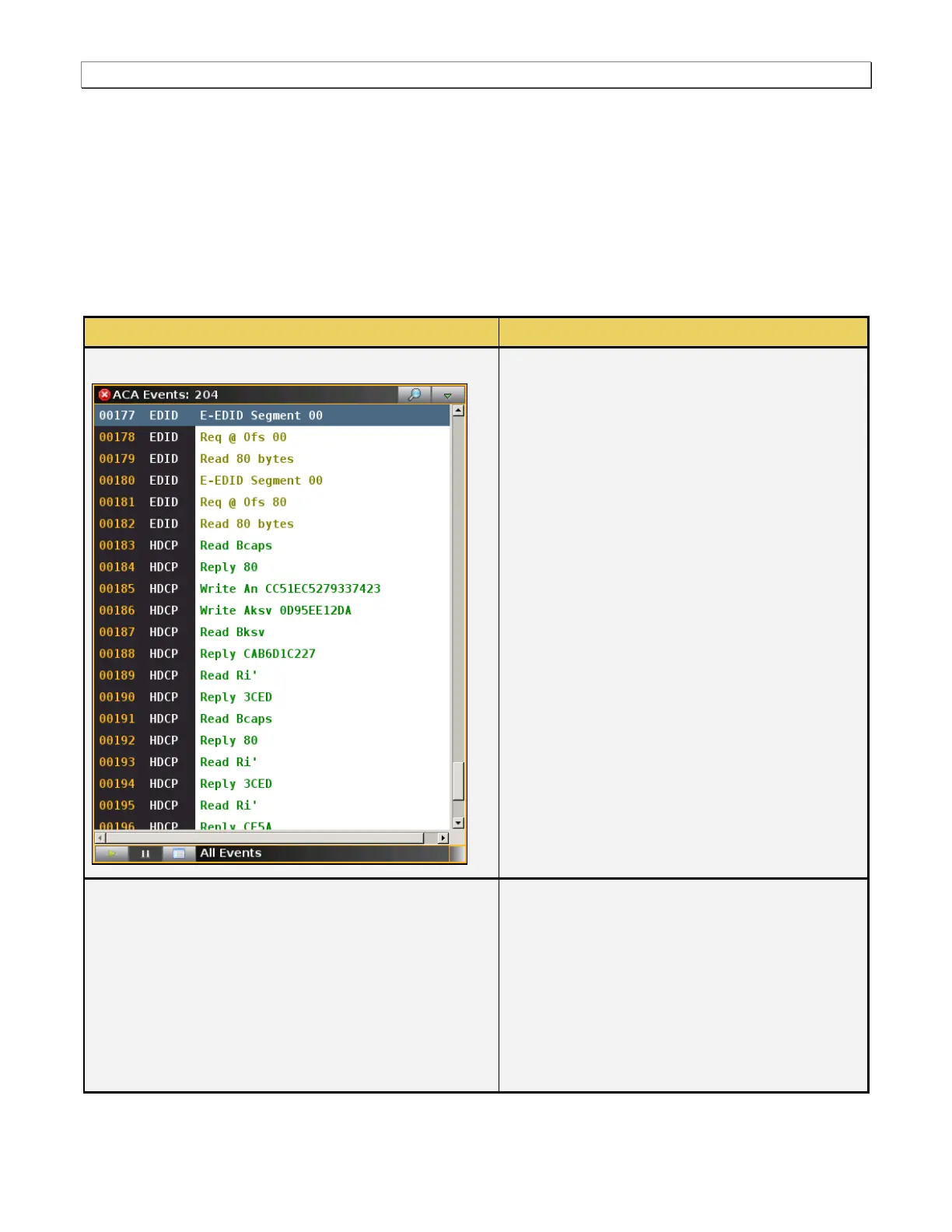
The ACA (Auxiliary Channel Analyzer) enables you to view the DDC traffic for HDMI streams and the C-Bus traffic
for MHL streams. The ACA button opens up the ACA Events panel (shown below). The ACA Events panel
enables you to view the transaction data in real time. There is a details panel associated with the ACA panel that
provides additional information about a selected transaction in the ACA Events panel. There is a control pull down
menu associated with the ACA Events panel. The control menu can be accessed either from the panel itself (the
pull down tab on the upper right corner) or from the ACA button on the main control panel on the right side of the
Real Time window. The table below describes the information in the AUD Info panel and the associated control
menu.
Auxiliary Channel Analyzer
The following information is provided in the ACA
data dialog box:
Item number – This is a unique sequence
number of the transaction.
Type – The type of DDC transaction; either
EDID or HDCP.
Transaction Description – A description of the
transaction.
ACA Control Pulldown Menu
There is a pulldown menu associated with the ACA
Info panel. You can access either from the main
control panel or from the ACA panel via the icon on
the upper right of the panel. The ACA pulldown
menu provides the following functions:
Show/Hide – Enable or disable the appearance
of the ACA panel in the Real Time window.
Start – Starts and Stops the collection of DDC
data.



 To Next Page