User’s Manual 75
B.2.1 Replacing the Backup Battery
The battery is user-replaceable, and is fitted in a battery holder. To replace the battery, lift
up on the spring clip and slide out the old battery. Use only a Panasonic CR2330 or equiv-
alent replacement battery, and insert it into the battery holder with the + side facing up.
NOTE: The SRAM contents and the real-time clock settings will be lost if the battery is
replaced with no power applied to the BL2100. Exercise care if you replace the battery
while external power is applied to the BL2100.
CAUTION: There is an explosion danger if the battery is short-circuited, recharged,
or replaced incorrectly. Replace the battery only with the same type or an equivalent
type recommended by the battery manufacturer. Dispose of used batteries according
to the battery manufacturer’s instructions.
B.2.2 Battery-Backup Circuit
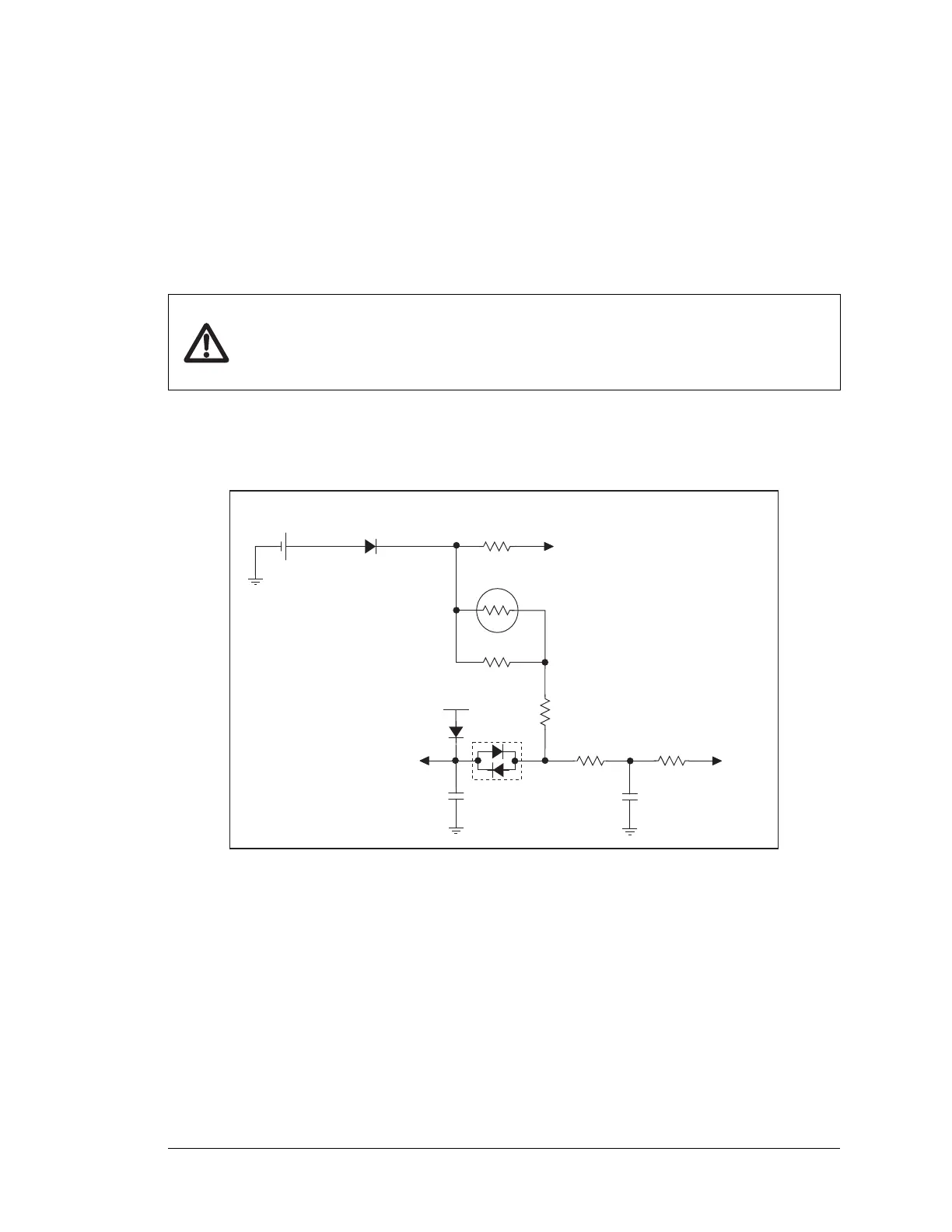
Figure B-2 shows the battery-backup circuit located on the BL2100 module.
Figure B-2. BL2100 Backup Battery Circuit
The battery-backup circuit serves three purposes:
• It reduces the battery voltage to the SRAM and to the real-time clock, thereby limiting
the current consumed by the real-time clock and lengthening the battery life.
• It ensures that current can flow only out of the battery to prevent charging the battery.
• A voltage, VOSC, is supplied to U6, which keeps the 32.768 kHz oscillator working
when the voltage begins to drop.
VRAM and Vcc are nearly equal (<100 mV, typically 10 mV) when power is supplied to
the BL2100.
R38
10 kW
VRAM
BT1
Internal Battery
VBAT
R41
47 kW
2 kW
R39
RT1
22 kW
VBAT
Vcc
22 kW
R37
47 kW
VOSC
R36
D1
D3
D2
T
thermistor
C17
10 nF
C27
10 nF



 To Next Page