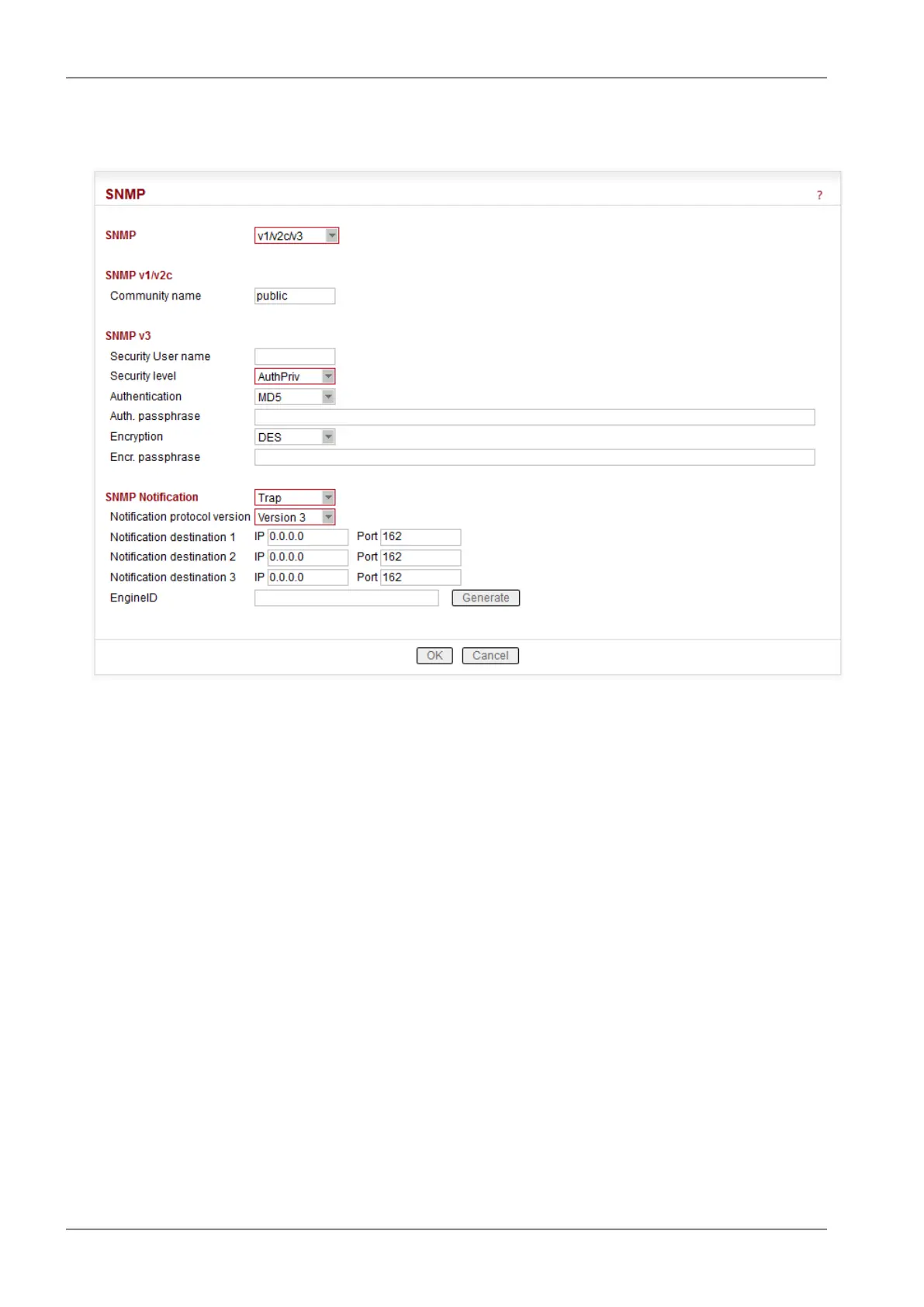
■ SNMP
You can read more about SNMP in RipEX (MIB table description incl.) in Application note "RipEX
SNMP Configuration Guide" here: http://www.racom.eu/eng/products/m/ripex/app/snmp.html
List box: Off, v1/v2c/v3, v3 only
Default = Off
When enabled, RipEX works as a standard SNMP agent, i.e. it responds to "SNMP GET Request"
packets received from even several SNMP managers on any of its IP addresses. It transmits SNMP
Traps or SNMP Informs as per its configuration (Settings/Device/Alarm management or Rout-
ing/Backup).
The "v3 only" option can be enabled if the higher security is required.
SNMP v1/v2c
Community name
Default = public
This string is used for authentication with SNMP manager. Max. length is 32 chars. Following
characters are not allowed:
" (Double quote)
` (Grave accent)
\ (Backslash)
$ (Dollar symbol)
; (Semicolon)
RipEX Radio modem & Router – © RACOM s.r.o.100
Advanced Configuration


 To Next Page