EasyManua.ls Logo

Radio Shack 43-143 - User Manual

Radio Shack 43-143
96 pages
Print Icon
To Next Page IconTo Next Page
Loading...
Please read this Owner’s Manual before installing,
setting up, and using your new phone.
www.radioshack.com
43-143
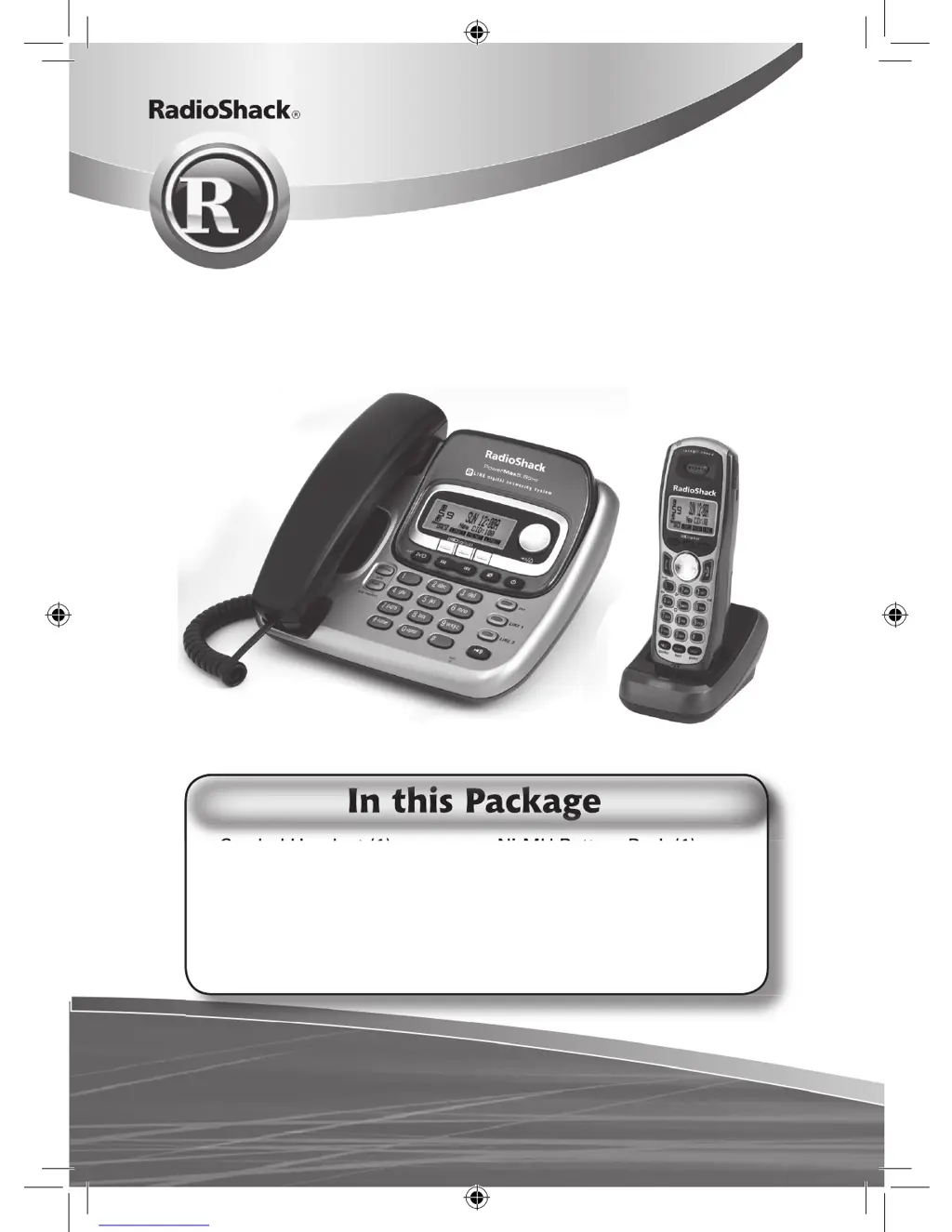
5.8 GHz Expandable
2-Line Corded/Cordless Telephone
with Answering System & Caller ID
Corded Handset (1)
Cordless Handset (1)
Base (1)
Charger (1)
Quick Start Guide (1)
Owner’s Manual (1)
Ni-MH Battery Pack (1)
(inside handset)
Handset Cord (1)
Modular Cord (1)
AC Adapters (2)
Belt Clip (1)
Corded Handset (1)
Ni-MH Battery Pack (1)
In this Package
UP841BH_43-143_OM3.indd 1 12/19/2006 6:55:02 PM

Table of Contents

Questions and Answers

  • M
    morganlindsayAug 19, 2025
    Why can't I make or receive calls on my Radio Shack Cordless Telephone?
    • S
      Scott EvansAug 19, 2025
      If you cannot make or receive calls on your Radio Shack Cordless Telephone, verify the following: * Ensure you're not too far from the base. * Check that the line isn't already in use for an outside call. * Inspect both ends of the base telephone line cord. * Confirm the AC adapter is plugged into both the base and the wall outlet. * Try disconnecting and reconnecting the AC adapter. * Consider de-registering and then re-registering the handset.
  • T
    Tammy NelsonAug 21, 2025
    What to do if my Radio Shack 43-143 Cordless Telephone handset doesn’t ring or receive a page?
    • M
      Michael MooreAug 21, 2025
      If your Radio Shack Cordless Telephone handset isn't ringing or receiving pages: * Ensure you are not too far from the base. * Charge the handset battery for at least 15-20 hours by placing it on the charger. * De-register the handset and then register it again.
  • A
    April ClarkeAug 23, 2025
    How to fix the CHARGE indicator on my Radio Shack Cordless Telephone when it won’t illuminate?
    • L
      leekimberlyAug 23, 2025
      If the CHARGE indicator on your Radio Shack Cordless Telephone doesn't light up when the handset is in the cradle, check these items: * Be sure the AC adapter is properly connected to both the charger and the wall outlet. * Ensure the handset is correctly placed in the charger. * Verify the charging contacts on the handset are clean.
  • N
    Natasha McdonaldAug 26, 2025
    How to reduce noise interference on my Radio Shack Cordless Telephone?
    • K
      Katherine ParsonsAug 26, 2025
      If you are experiencing severe noise interference with your Radio Shack Cordless Telephone: * Keep the handset away from devices like microwave ovens, computers, remote control toys, wireless microphones, alarm systems, intercoms, room monitors, fluorescent lights, and other electrical appliances. * Try moving to a different location or turning off potential sources of interference.
  • J
    James SloanAug 28, 2025
    Why does the audio sound weak on my Radio Shack 43-143 Cordless Telephone?
    • K
      kelly60Aug 28, 2025
      If the audio sounds weak on your Radio Shack Cordless Telephone: * Move the handset and/or base away from metal objects or appliances. * Ensure that you are not too far from the base.
  • S
    Sandy WadeAug 29, 2025
    What to do if the answering machine does not work on my Radio Shack Cordless Telephone?
    • C
      Crystal RollinsAug 30, 2025
      If the answering machine on your Radio Shack Cordless Telephone isn't working: * Ensure the base is plugged in. * Verify that the answering machine is turned on. * Check that the message record time is not set to announce only.
  • E
    Emily Clark PhDSep 1, 2025
    What to do if I can’t make or receive a call during power failure on my Radio Shack 43-143?
    • S
      Steven MullinsSep 1, 2025
      During a power failure, to make or receive a call on your Radio Shack Cordless Telephone: * Use the base corded handset. * Make sure the TEL line cord is firmly connected.
  • Y
    Yolanda LeeSep 3, 2025
    How to fix the issue when I cannot register the handset at the base of my Radio Shack 43-143 Cordless Telephone?
    • J
      jilleatonSep 3, 2025
      If you cannot register the handset at the base of your Radio Shack Cordless Telephone: * Charge the battery pack in the handset for 15-20 hours. * Ensure you have not already stored ten handsets. * De-register the handset and then register it again.
  • M
    Manuel MartinezSep 5, 2025
    Why are messages incomplete on my Radio Shack 43-143 Cordless Telephone?
    • A
      ashleykerrSep 5, 2025
      If messages are incomplete on your Radio Shack Cordless Telephone: * The incoming messages may be too long; remind callers to leave brief messages. * The memory may be full; delete some or all of the saved messages.
  • J
    Jasmine HerringSep 7, 2025
    Why does the Caller ID not display on my Radio Shack 43-143?
    • P
      Patricia PowellSep 8, 2025
      If the Caller ID does not display on your Radio Shack Cordless Telephone, it might be because the call was placed through a switchboard. Contact your telephone provider to check that your Caller ID service is active and that there are no issues with the service.

Radio Shack 43-143 Specifications

General IconGeneral
BrandRadio Shack
Model43-143
CategoryCordless Telephone
LanguageEnglish

Related product manuals