MULTIMEDIA 267
Remote Commands
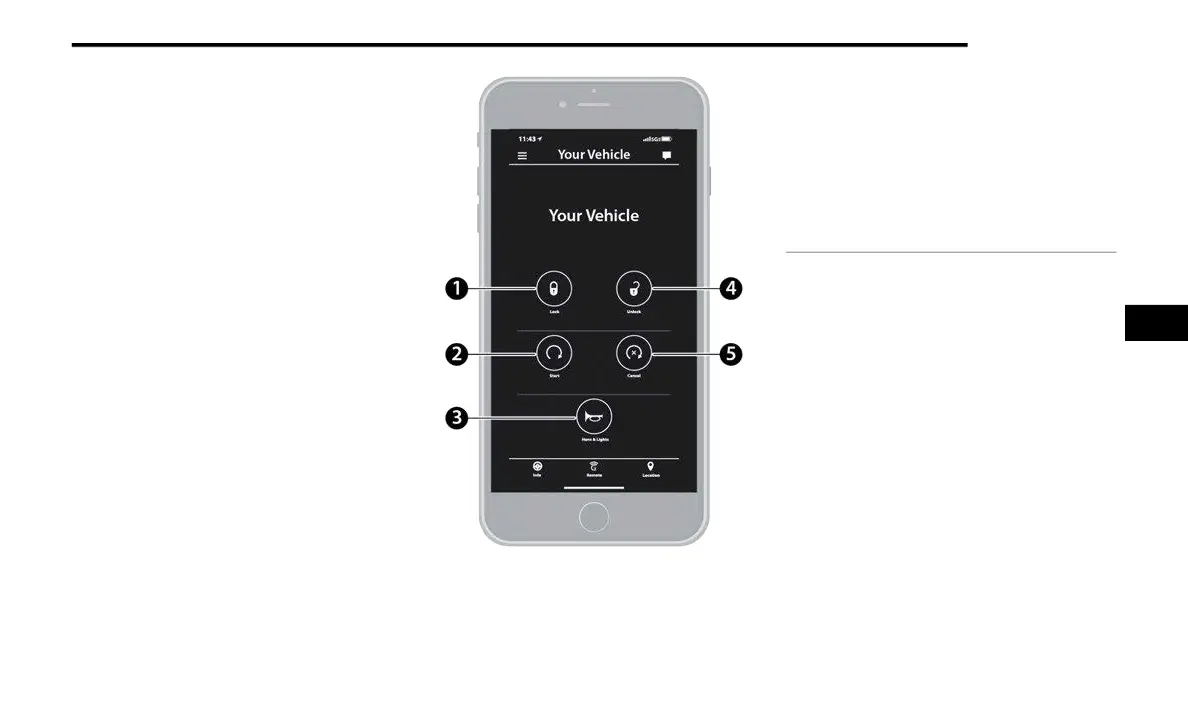
On the Remote Commands screen, you have
access to several vehicle features that can be
controlled remotely from your mobile device. These
features include locking/unlocking, remote
starting, and activating the horn and lights of the
vehicle.
Remote Commands
Remote Commands lets you send a request to your
vehi
cle in one of three ways:
Anywhere using your mobile device and
Uconnect App
From your computer on the Owner’s Site (not
available on all functions)
Contacting SiriusXM Guardian™ Customer Care
(not available on all functions)
Using A Remote Command Through Your Mobile
Devi
ce And The Uconnect App
1. Press the desired Remote Command icon on
you
r mobile device.
2. A pop-up screen will appear asking for your
Sir
iusXM Guardian™ Security PIN (this is the
same four-digit code established when you
activated your SiriusXM Guardian™ system).
Enter the SiriusXM Guardian™ Security PIN on
the keypad.
1 — Lock
Press this button to lock your
v
ehi
cle.
2 — Vehicle
Start
Press this button to start your
vehicle.
3 — Horn &
Light
s
Press this button to sound the
horn and activate your lights.
4 — Unlock
Press this button to unlock your
vehi
cle.
5 — Cancel
Vehi
cle Start
Press this button to cancel
remot e start.
5



 To Next Page