2168233 46-R3
ERVICE
S
3.1-2 Changing A Parameter's
Setting (continued)
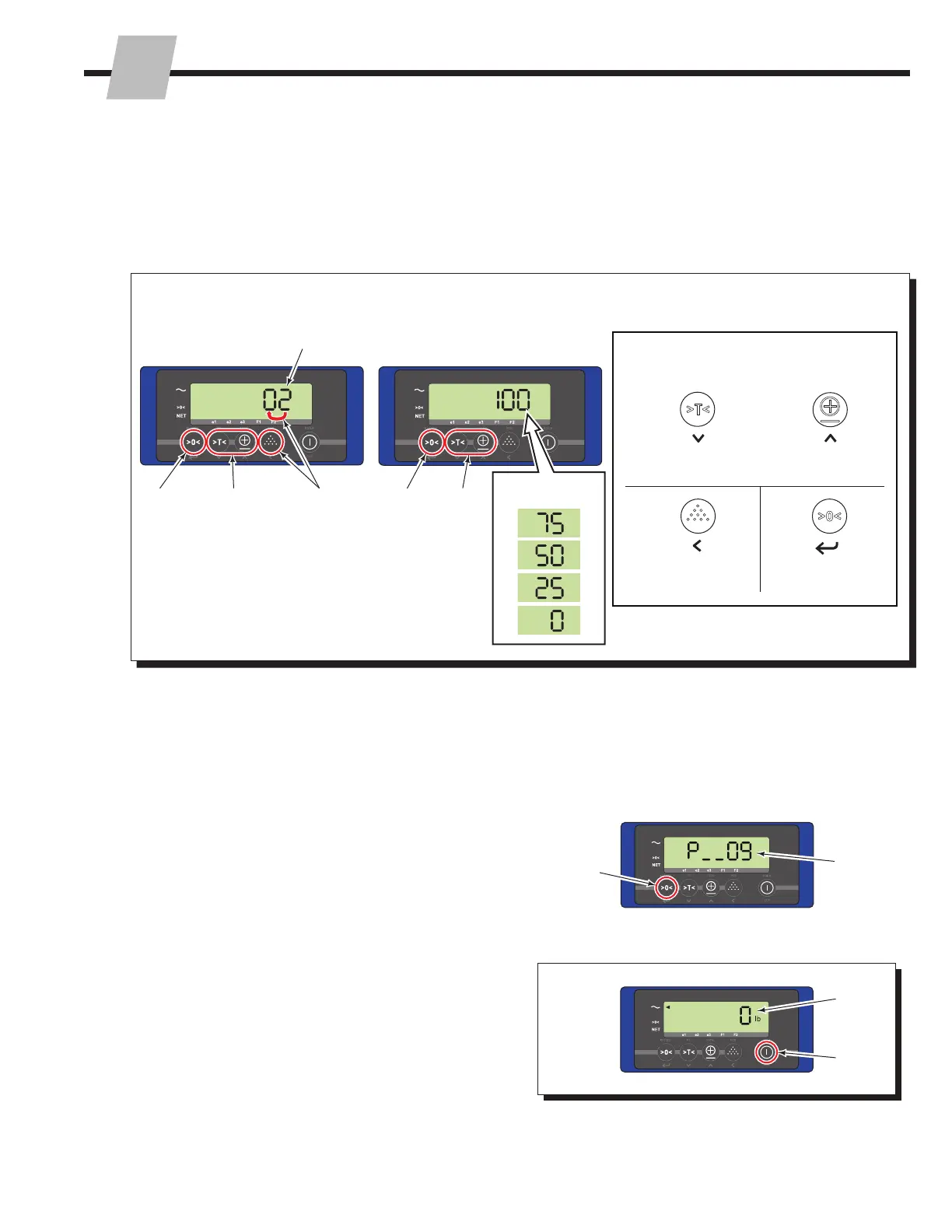
5 If required, change the parameters value. Refer to the
Entry Mode Guide (below) to scroll or change the values
(A and B). Always accept the value by pressing the
"Zero" button, C.
FK0250.eps
Entry Mode Guide
Selected value will flash
A
A
B
C C
The following buttons are available,
while in entry mode:
Decrease the Value
or Scroll Down
Increase the Value
or Scroll Up
Shift to the next
digit on the left
Accept the value
(press last)
C
A
B
OR
Example: Parameter 61 Example: Parameter 66
Example Available
Setting Options:
6 After pressing the "Zero" button to accept the value
(Step 5), the value is accepted in the previous step, the
display screen will go to the main parameter screen,
showing the next parameter number. Repeat Steps 2-5
for each parameter to verify or change.
7 To exit and save settings, press the "On/Off" button two
times.
8 The display will return to normal weighing mode.
9 Restart the display to enable the recent changes:
• Press and hold the "On/Off" button for three seconds
to turn off the display.
• Then, press the "On/Off" button to turn on the display.
7
8
9
Next
Parameter
(example
shown)



 To Next Page