ERVICE
S
20 68233 46-R3
2
3.1-2 Changing A Parameter's Setting
NOTE: Refer to the Parameter Table (Section 3.1-3) on the
following pages to determine the parameter number.
1 Access the Parameters Menu as described in Section
3.1-1.
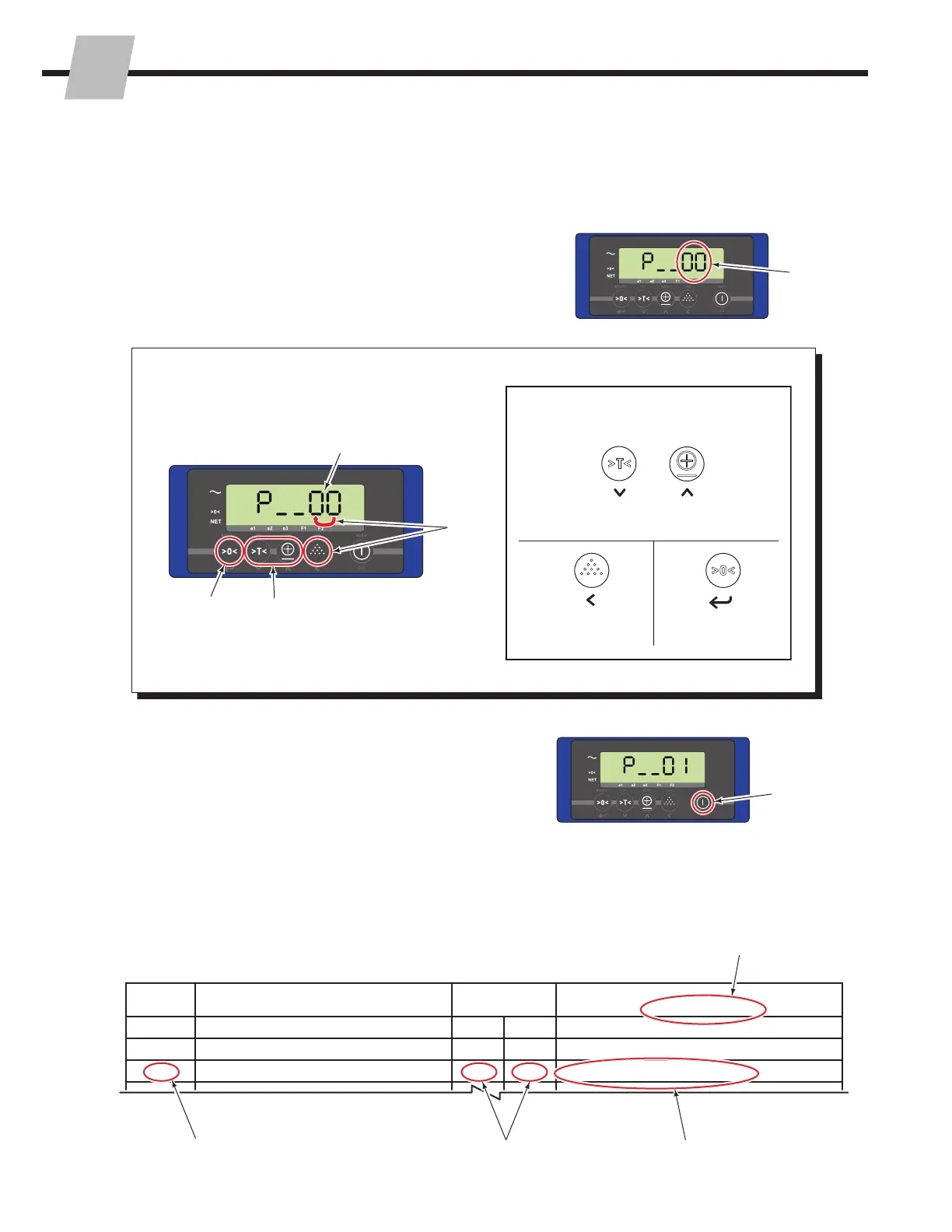
2 Enter the parameter number of the parameter setting to
change. Use the Entry Mode Guide (below) as an aid
to change the parameter number (A and B). Always
accept the value by pressing the "Zero" button, C.
Entry Mode Guide
Selected value will flash
A
B
C
The following buttons are available
while in Entry Mode:
Decrease
the Value
Increase the
Value
Shift to the next
digit on the left
Accept the value
(press last)
C
A
B
OR
3 Press the "Zero" button to enter the selected parameter.
3
4 Refer to the "Available Setting Options" column, found
on the Parameter table (Section 3.1-3) on the following
pages, to determine if the current setting should be
changed and setting the options available.
Parameter Function
Default Settings
Setting OptionsEU US
01 Weight units kg lb kg, lb
02 Smallest graduation step for multirange 120.1, 0.2, 0.5, 1, 2, 5, 10, 20, 50
03 Biggest graduation step for multirange 250.1, 0.2, 0.5, 1, 2, 5, 10, 20, 50
FK0249.eps
Setting Options Column
Example:
Selected Parameter Row Setting Options Available
Current Settings



 To Next Page