356823346-R3
ERVICE
S
3.2-4 Corner Calibration
Corner Calibration is the second procedure of the Three
Part Calibration. This calibration procedure takes a
reading of a weight's electrical output signal at each load
cell (corner) location. The four readings are then adjusted
to be equalized for accuracy of weight.
IMPORTANT: This procedure is set up where Fork 1 is the
left fork and corner positions are as shown on page 32.
Verify fork layout prior to performing this procedure.
IMPORTANT: Use a minimum 100 lbs. (45 kg). For optimal
corner calibration, use 1000 lbs. (454 kg).
IMPORTANT: Use the same weight for each corner.
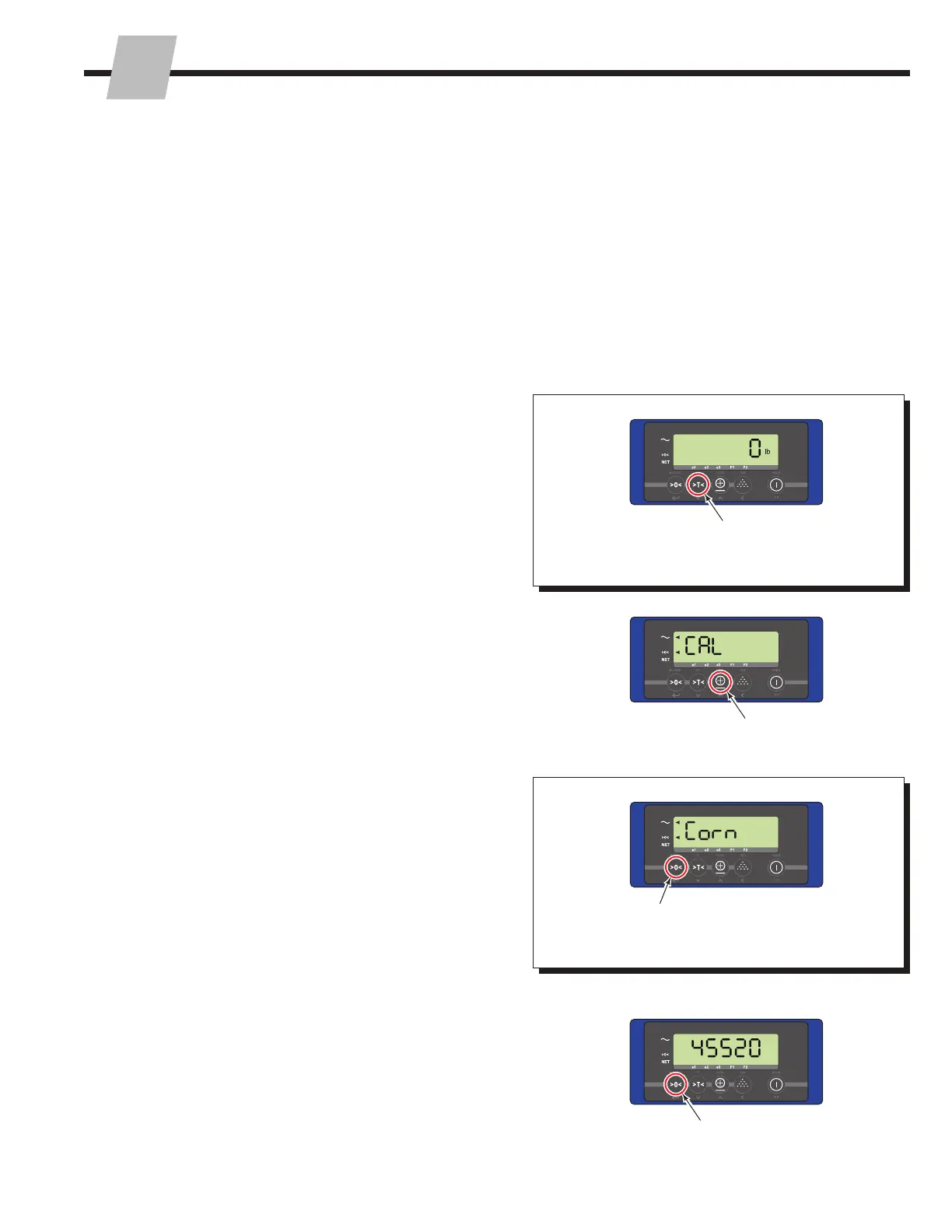
1
1 From normal weighing mode, press and hold the "Tare"
button until "CAL" appears on the display.
NOTE: Various screens may show on the display.
Depending on the display's software version, the amount
of time for "CAL" to appear, will vary from 20 to 30
seconds.
3 Press the "Zero" button. The display will show an
average output value of all the load cells (example
45520),
2 Press the "Total" button. "Corn" will appear.
4
3
2
4 Software versions earlier than 2.13 – Press and hold
the "Zero" button for two seconds.
Software versions 2.13 and newer – Press the "Zero"
button.



 To Next Page