ERVICE
S
26 6823346- R3
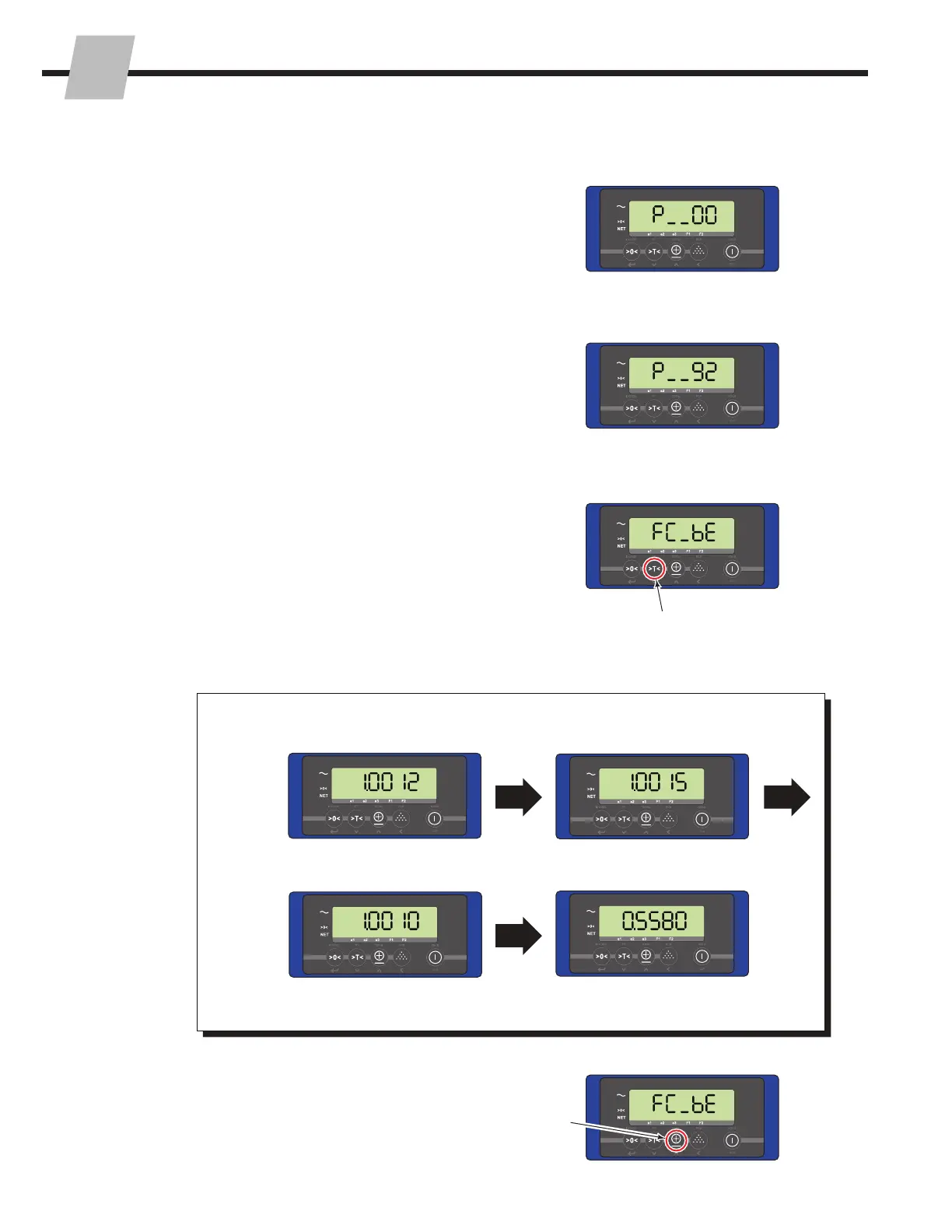
3.1-4 View Current Calibration
Settings
NOTE: Some software versions may not offer this
parameter.
1 Access the Parameters Menu as described in Section
3.1-1.
6 Each corner calibration value will show for two seconds.
3 Change the current parameter menu number to "92".
Refer to "Changing A Parameter's Settomg", Section
3.1-2, Steps 2 and 3.
2 Verify that Parameters 1 through 5 are correct according
to US (EU) values found on the sticker on the display.
Refer to "Changing A Parameter's Setting", Section
3.1-2, Steps 2, 3 and 4. Press the "Zero" button after
viewing each value.
4 The display will show "FC_bE".
5 Press the "Tare" button (down) to view the four corner
calibration values.
Corner A value: Corner B value:
Corner C value:
Corner D value:
Procedure continued on next page
7 Press the "Total" button (up) to view the zero calibration
and weight calibration values.
1
3
4
5
7
6



 To Next Page