296823346-R3
ERVICE
S
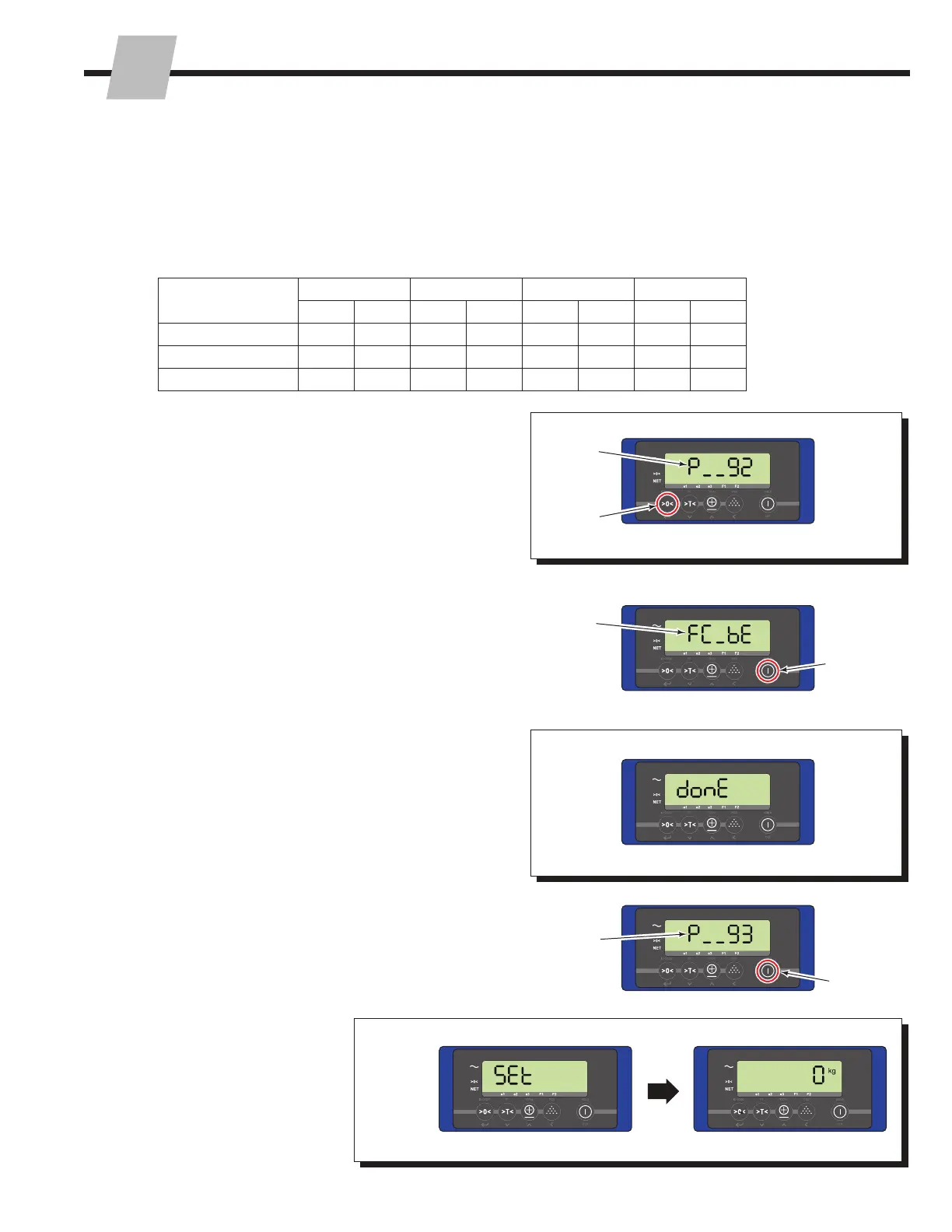
7 Change the current parameter menu number to "92".
Refer to "Changing A Parameter's Settings", Section
3.1-2, Steps 2 and 3.
8 Press the "Zero" button to enter Parameter 92.
9 The display will show "FC_bE".
10 Press and hold the "On/Off" button for three seconds.
11 The display will show "Done" for two seconds.
13 Press the "On/Off" button two times.
14 The display will show "SET"
and then return to normal
weighing mode.
12 The display will revert to the parameter menu, showing
parameter 93.
3.1-5 Change Units (continued)
6 Update Parameters 2 through 5 referencing the chart
below. Refer to "Changing A Parameter's Settings",
Section 3.1-2 to update the parameters.
NOTE: The following changes are for standard iForks.
If the iForks system is customized, contact Cascade on
updating Parameters 2 through 5.
iForks Capacity
(Non-NTEP only)
Parameter 2 Parameter 3 Parameter 4 Parameter 5
US EU US EU US EU US EU
5000 lb. (2268 kg) 2 1 2 1 1000 550 5000 2275
6000 lb. (2722 kg) 2 1 2 1 1000 550 6000 2725
10,000 lb. (4536 kg) 2 1 5 2 1000 550 10000 4550
7
8
9
10
11
12
13
14


 To Next Page
 Loading...
