ERVICE
S
42 6823346-R3
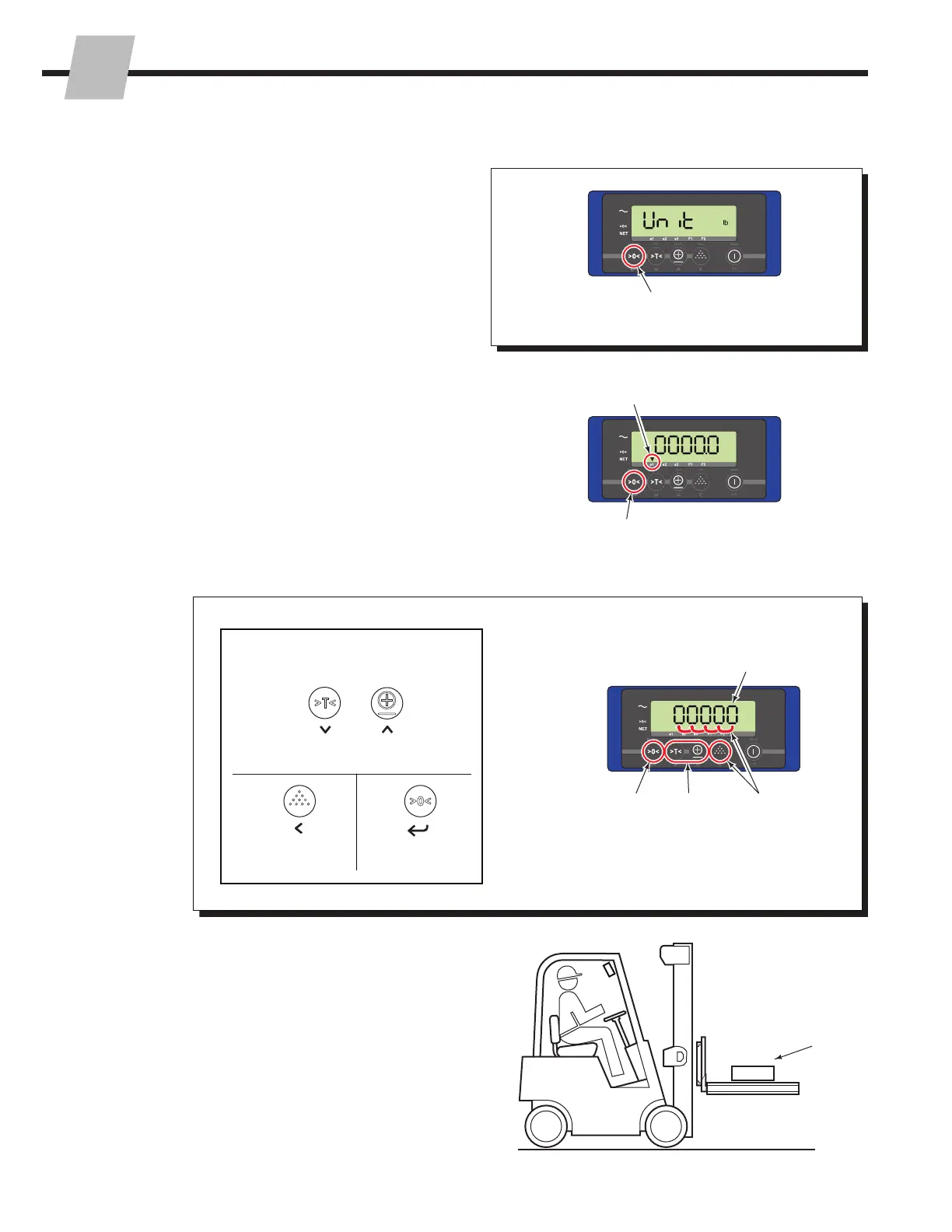
6 An arrow above "e1" will show on the screen. Press the
"Zero" button to begin calibration for the first (known)
weight, Weight 1.
NOTE: If a pallet/cover was not a part of the Zero
Calibration (Section 3.2-3), the weight entered must
include pallet weight (Weight 1 + Pallet Weight).
8 Place a Weight 1 on the pallet/cover so that the weight
is centered evenly between the four corner positions.
7 If required, change the weight value shown on the
display to match the value of the known weight (Weight
1). Use the Entry Mode Guide (below) as an aid to
change the total weight (A and B). Always accept the
value by pressing the "Zero" button, C.
3.2-5 Weight Calibration (continued)
5 Software Versions 2.13 and newer – Press the "Zero"
button to accept the unit.
7
A
A
C
OR
B
C
B
Shift to the next
digit on the left
Decrease
the value
Increase
the value
Selected value will flash
e1 arrow will flash
Entry Mode:
5
6
8
Weight 1
The following buttons are available
while in Entry Mode:
Accept the value
(press last)



 To Next Page