V1.0 Raytools AG © Copyright 23 |24
www.raytools.ch
BS06K SERIES 6kW All-In-One Smart Laser Cutting Head-User Manual
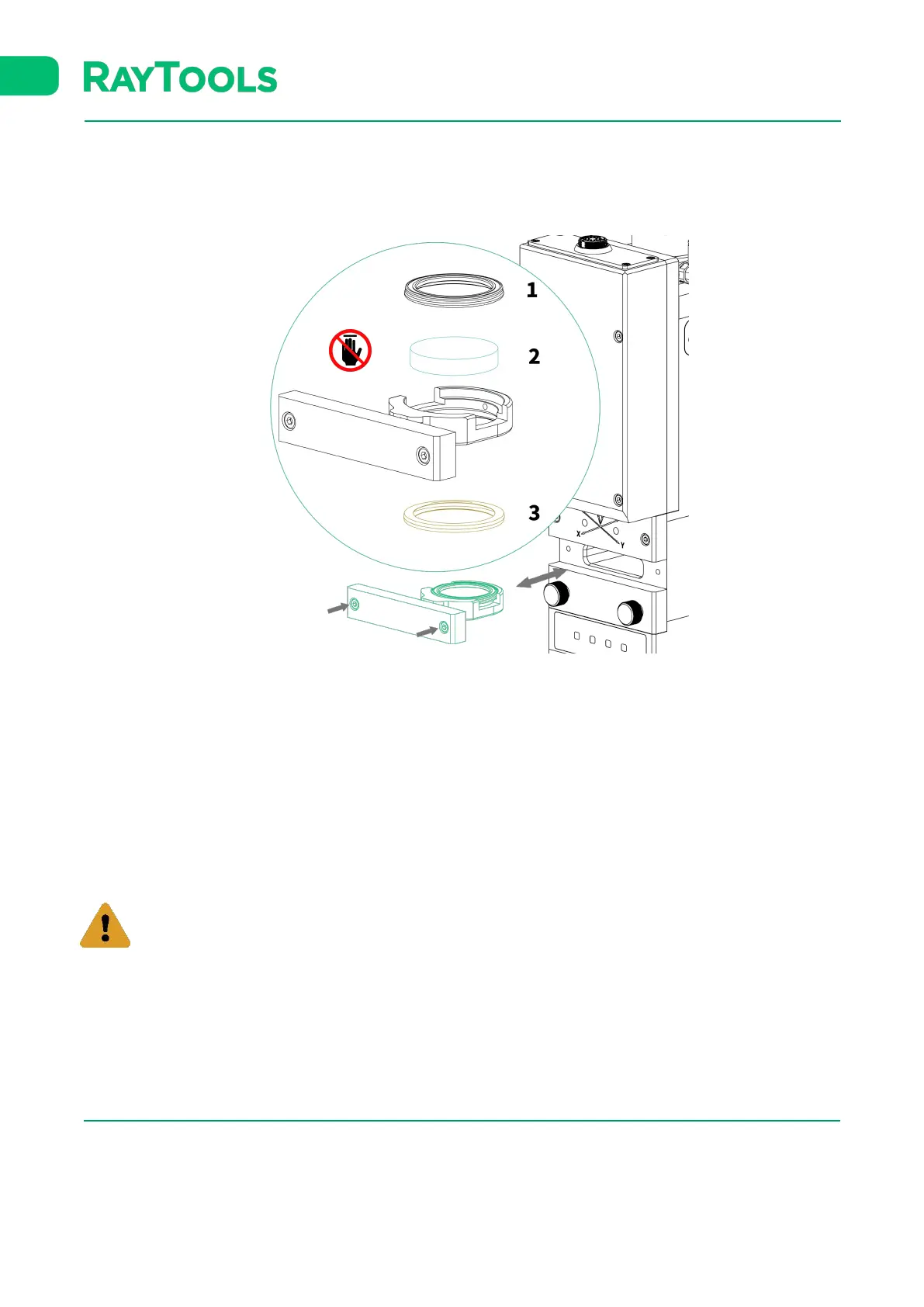
5.2.2 Removal and Installation of Middle Cover Glass/Protection Glass
The cover glass is wearing part which needs to be replaced once it is damaged.
▪ As shown above, loose the 2 bolts to pull out cover glass holder by pinching 2 edges of drawer type holder.
▪ Seal the mounting openings by textured tape immediately.
▪ Remove the pressing ring (1) and cover glass (2) after wearing fingertips
▪ Clean the cover glass holder and seal ring (3). The elastic seal ring (3) should be replaced if it is damaged.
▪ Install the cleaned or new cover glass (regardless of the front or back surface) into the holder of cover glass.
▪ Install the pressing ring.
▪ Insert the cover glass holder back to the laser head and tighten the bolts.
It is not allowed to pull out the edge of seal ring directly as it is very easy to damage the seal ring.





 To Next Page