V1.0 Raytools AG © Copyright 7 |24
www.raytools.ch
BS06K SERIES 6kW All-In-One Smart Laser Cutting Head-User Manual
2 Mechanical Installation
2.1 Fiber Insertion
WARNING: The optical components must be dust free and all dusts must be cleaned before use. The fiber
shall be horizontally inserted into fiber interface to prevent dust from entering the interface and falling on
the lens. Clean the upside of the fiber before inserting into the laser head.
2.1.1 QBH Fiber Insertion
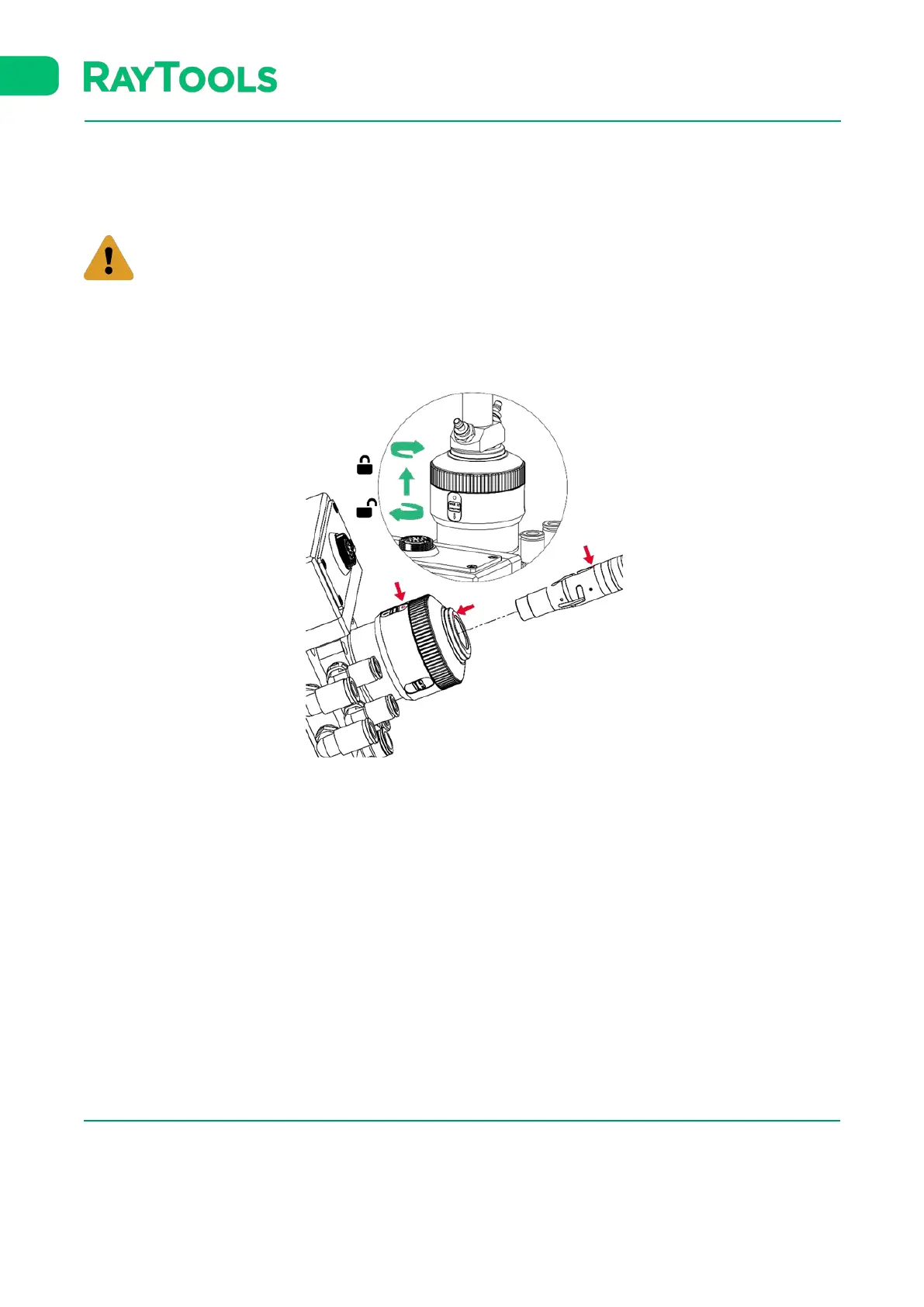
▪ Align the red point at the end of the QBH interface to the red point of the handwheel.
▪ Remove QBH dustproof cover.
▪ Align the red mark of fiber end to red mark on QBH of cutting head. Then insert the fiber straightly to the bottom
of the QBH interface.
▪ Turn the QBH handwheel clockwise. It is in place when you hear the "Da" voice, then pull the handwheel up and
turn clockwise to end.



 To Next Page