DIGITAL INCUBATOR
4. Function Settings
19
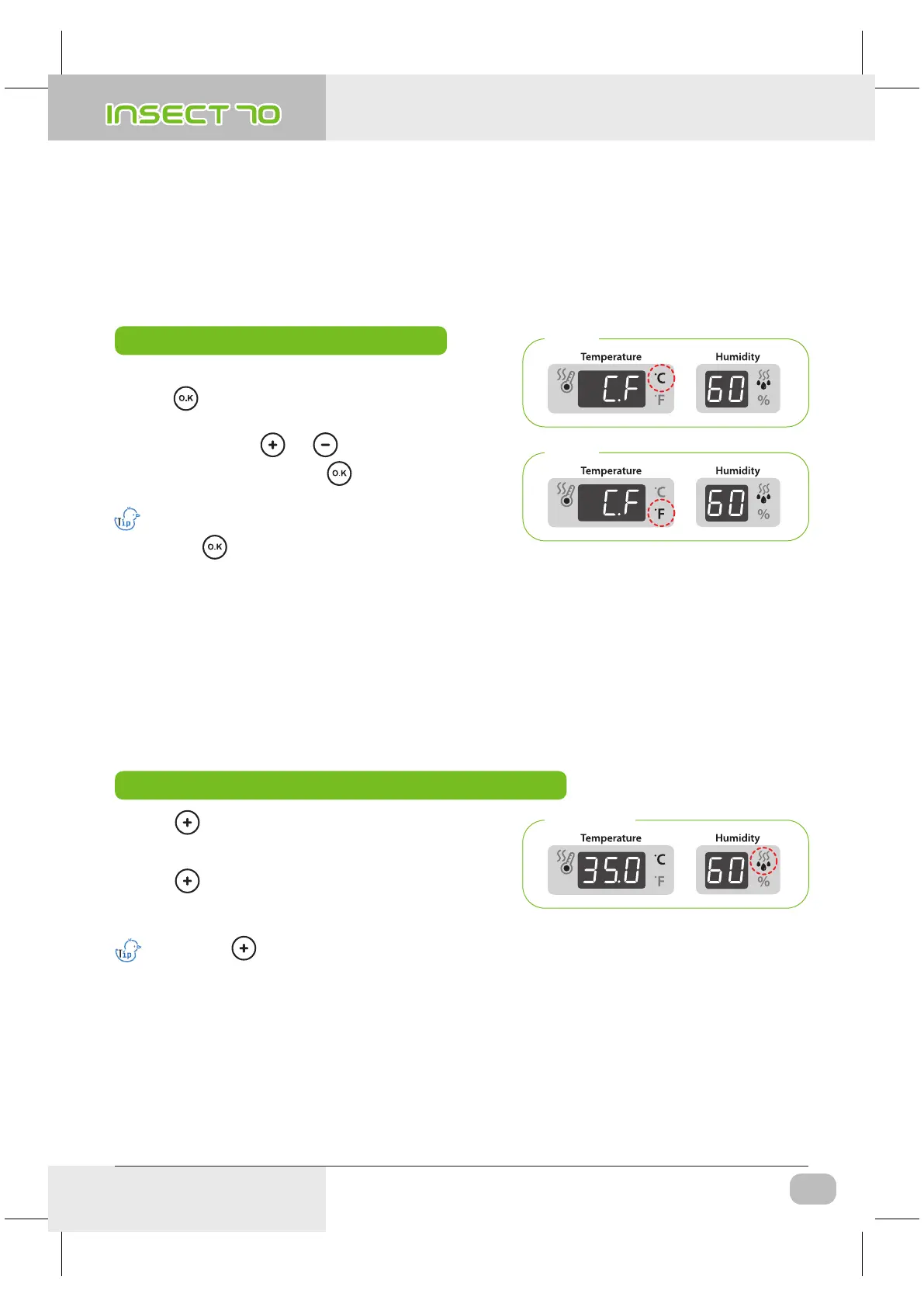
(3) How to change Centigrade & Fahrenheit /
Work Automatic Pumping System by Force
▶ From the abnormal LOw temperature alarm setting,
press button once and “C.F” (Celsius/Fahrenheit)
will be displayed for 0.5 second and LED for “C” will blink.
▶ After selecting °C or °F , press button to save.
[Default setting :
℃]
How to change Centigrade & Fahrenheit
▶ Select °C or °F with or button.
℃ = 5/9 (℉ - 32)
Step 11
Step 12
※ Just press button if you do not need to change setting.
How to Work Automatic Pumping System(APS) by Force
APS by Force
If you press button for about 10sec. pump will operate for about 2min.
Press any key to remove.
▶ Press button for about 10sec. then pump motor
works for 2min. by force. It still works for 2min. even if
you remove your finger from the button.
▶ Press button for about 5sec. during incubation
process. Then, PUMP will operate by force with LED
light on.
USA & Canada Official Sales & Service https://www.R-Com-Hatcher.com
Insect Incubator Rcom Max 70 User Manual



 To Next Page