조작부의 명칭과 기능
1. Introduction
DIGITAL INCUBATOR
① ④
⑤
⑥
⑦ ⑧
② ③
Setting Mode: Press two buttons at the same time to go to Setting Mode.
Select Menu / Quick Movement / Cancellation / Setting value check during incubation
Value + / APS is forced to operate if press 5sec. / APS is forced to operate for 2min. if press 10sec.
Value - / Factory Initialization
● Function Key
Function
Dispaly
Default Setting
Temp.
35.0℃
tEP
Humidity
60%
rH HI
2℃
Abnormal high
temp. alarm
LO
-3℃
Abnormal low
temp. alarm
℃
℃ / ℉
Centigrade / Fahrenheit
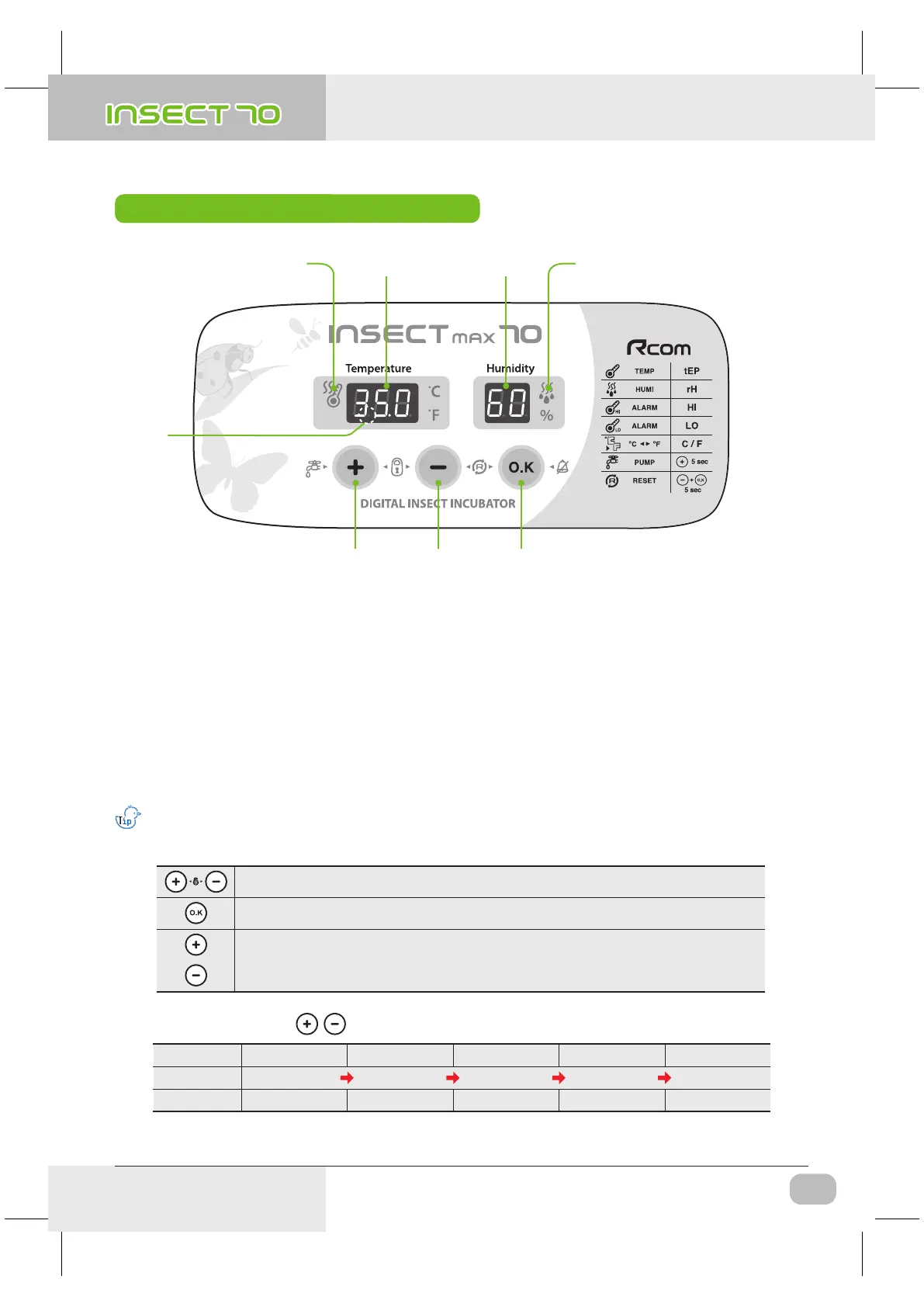
Name & Function of Operation Parts
(4) Name & Function of
Operation Parts
Heater Operation Lamp
: Light on when working
①
Temp. Display
: Current Temperature Display
②
Humidity Display
: Current Humidity Display
③
Pumping System Operation Lamp
: Light on when working
④
Power Failure Alarm Function (FND light)
: Light on when power failure (Cancel Button : OK)
⑤
Up Button
: Setting Temp. & Humidity UP
⑥
Down Button
: Setting Temp. & Humidity DOWN
⑦
Menu Selecting Button
: Setting Value check
⑧
● Names and components of each part
Insect MAX 70 is available to automatic humidity raise only, if you want to control low humidity level,
please adjust "Air Controlling Lever" by manual [refer to page 13]
Press buttons at the same time to go to setting mode.
7
USA & Canada Official Sales & Service https://www.R-Com-Hatcher.com
Insect Incubator Rcom Max 70 User Manual



 To Next Page