EC9000i / 9100i / 9600i Series Scanner User Guide Models and features
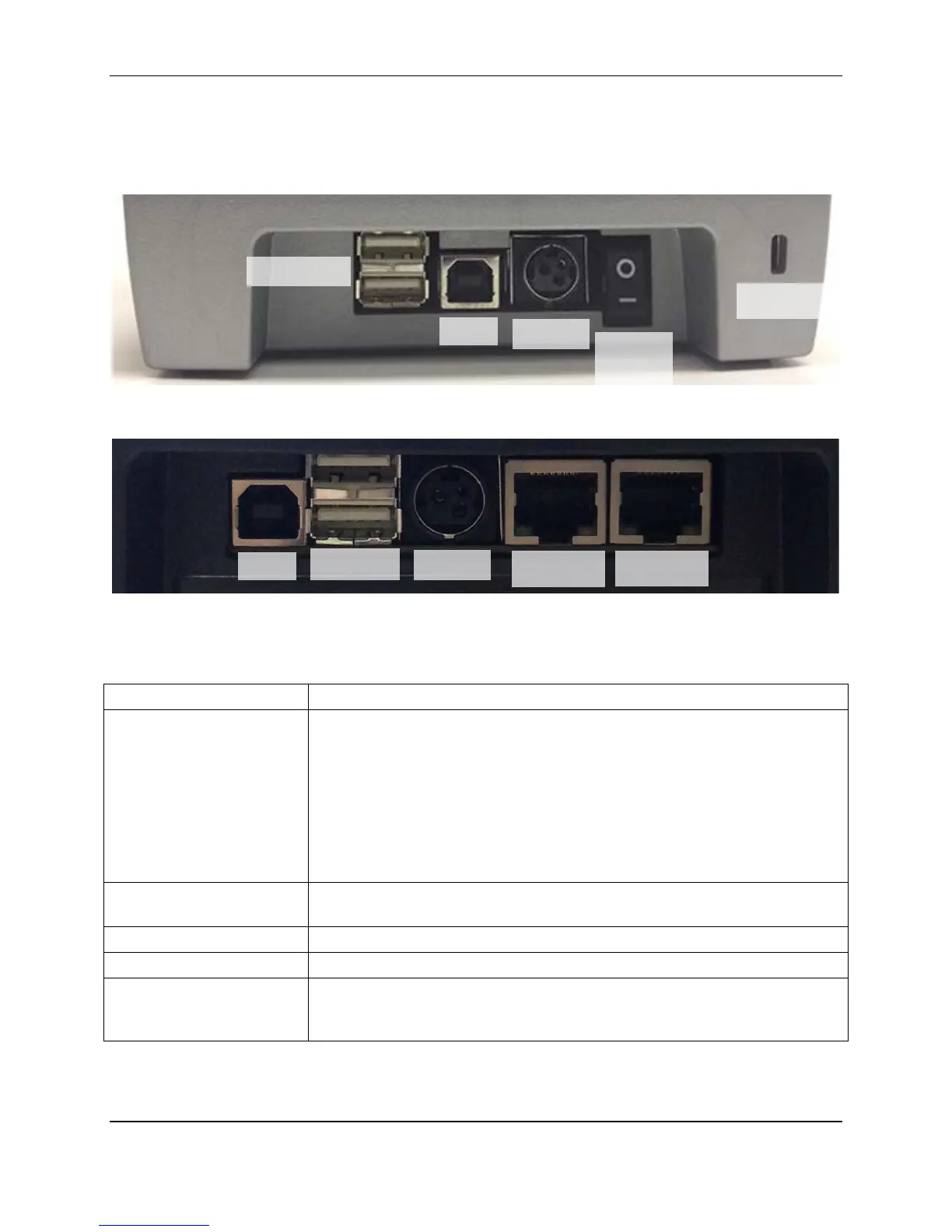
Connection ports
EC9000i and EC9100i
EC9600i
Note: Not all scanner models include every item shown in the diagrams.
USB hub With EC9000i / 9100i series scanners, you can use these ports to:
• Connect peripheral devices (such as a PIN entry device).
• Connect USB devices to your computer (such as a printer or an
external hard drive).
• Recharge a mobile device (such as a phone).
With the EC9600i series scanner, you can use these ports to recharge a
mobile device (such as a phone).
You cannot connect the scanner to your computer with these ports.
USB High-speed 2.0 (480 Mb/s). Use this port to connect to a computer. You
must use the RDM A to B, USB cable.
Power Connect the power adaptor to this port.
On/Off Switch Powers the scanner on or off independent of the computer. (EC9000i only).
K-Slot The K-Slot or Kensington® Security Lock lets you secure the unit with a
cable (not provided) that locks into the slot. Cables can be purchased from
your local computer supply store.
switch
©2015 RDM Corporation Page 15



 To Next Page