EC9000i / 9100i / 9600i Series Scanner User Guide Models and features
Your scanner
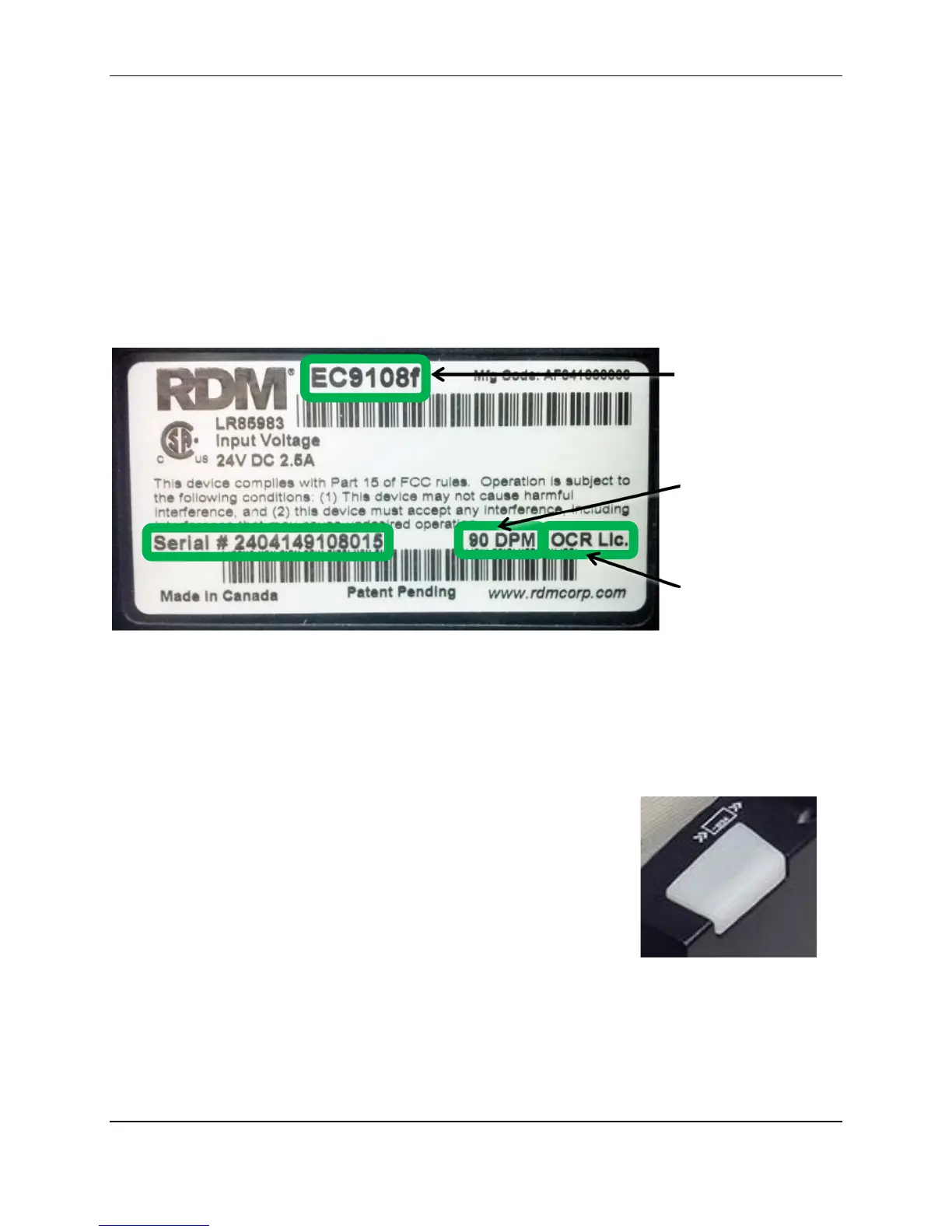
There is a label on your scanner that includes the following details about your scanner:
• The scanner’s model number (EC9108f in the example below).
• The scanner’s serial number.
• The speed of your scanner (90 documents per minute in the example below).
• Whether the scanner is licensed for OCR (The example below is licensed for OCR scanning).
You can locate your scanner’s label on the bottom or back of your scanner.
Programmable application button
This button is located on the front right of the scanner. The light indicates the status of the scanner. For
more information, see Light signals and beeps on page 24.
Third-party applications can configure the application button to perform a
variety of functions. These functions might include opening a document,
launching a website, or starting an application. Not all applications use the
application button.
Developers can find information about programming the application button
in the help file that is included with RDM’s application development kit
(ADK). Developers can obtain the ADK by contacting RDM.
Note: The programmable application button is not supported on some scanner models. The LED is
supported on all models.
©2015 RDM Corporation Page 9



 To Next Page