EC9000i / 9100i / 9600i Series Scanner User Guide Setting up your scanner
To hook up:
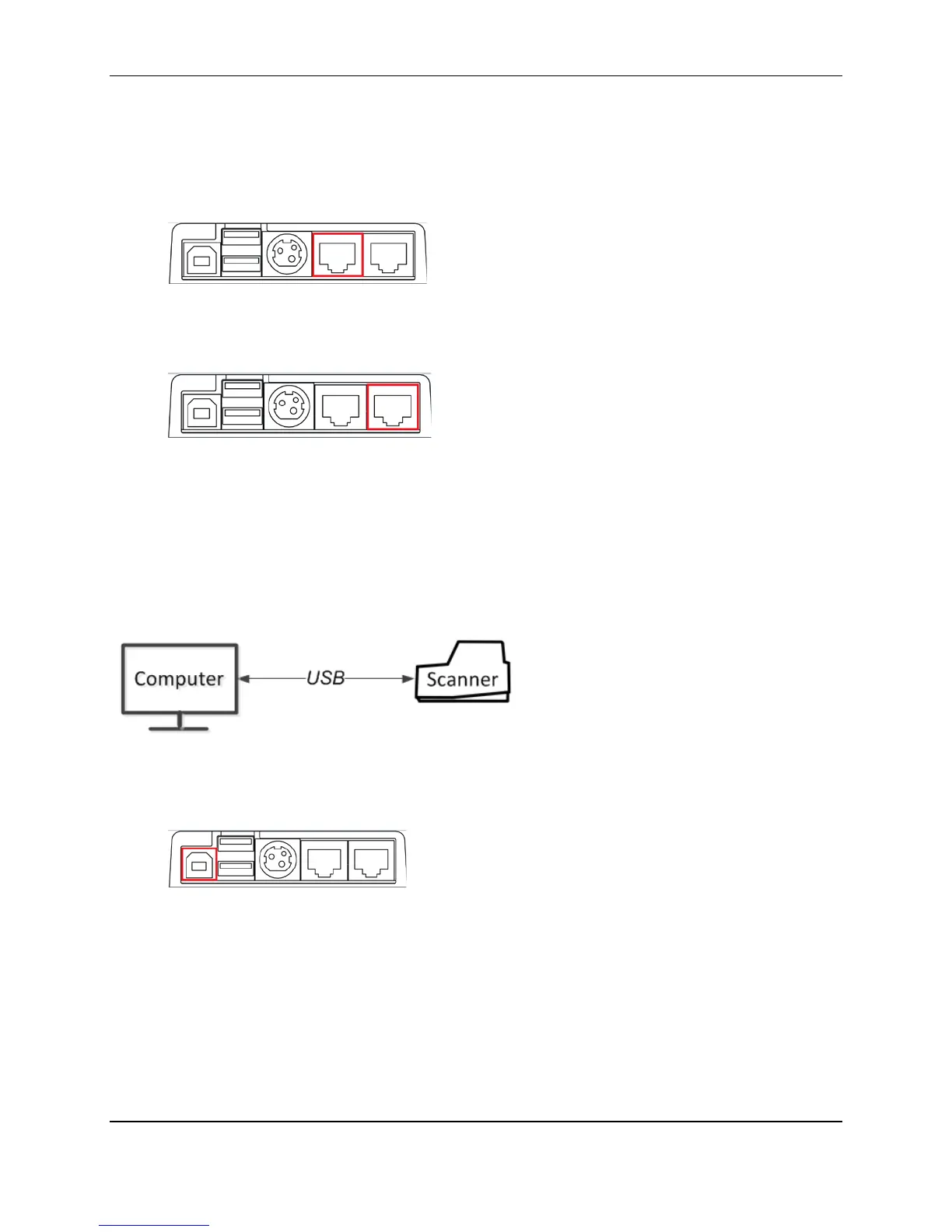
1. Disconnect the Ethernet cable that is plugged into your computer and connect it to the scanner in
one of the two Ethernet ports (marked in red below).
2. Using the Ethernet patch cable that is included in your scanner box, connect one end to the
Ethernet port on the back of your scanner (marked in red below) and the other end into your
computer.
Like option 1, this setup allows multiple computers to use the scanner, but it requires only one Ethernet
jack for both the scanner and your computer.
Note: The computer that is connected to the network through the scanner is limited to a 100MB/s
connection.
Option 3: Scanner is connected to the computer using USB
To hook up:
1. Plug the USB cable (included) into the square USB port on the back of the scanner (marked in
red below).
2. Plug the other end into a USB port on your computer.
When you connect via USB, you can use the scanner only with the computer it is connected to.
©2015 RDM Corporation Page 20



 To Next Page