2 -
LM800/ 8000
COMMON CALIBRATION
7
2.2 Auto Cal
After "Sensor Setup", do an "Auto Cal".
The instrument will automatically advance from Auto Cal step 1 (Diff.
Setup) to step 5 (Cal Weight). You can however, still select from the
Auto Cal menu in any order.
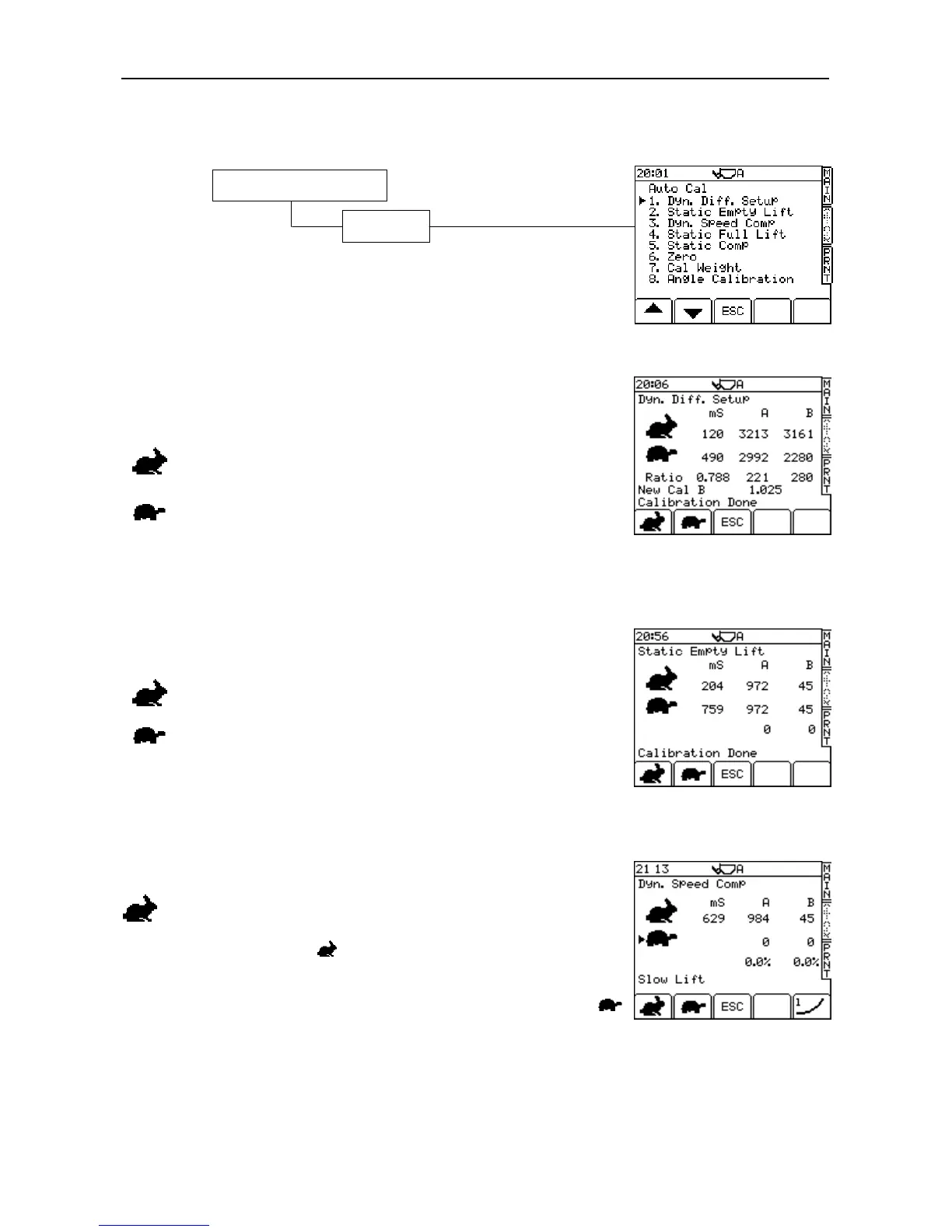
2.2.1 Dyn. Diff. Setup
This function is active only when the "Dual Sensor" setting on the "Sensor
Setup"
page is set to "Diff". Diff. Setup compensates for oil temperature
(LM 9000 only) and backpressure fluctuation in the hydraulics.
Follow the screen prompts.
Lift an EMPTY bucket at fast speed and press ENTER.
Lift an EMPTY bucket at slow speed and press ENTER.
The instrument then displays the message "Calibration Done". Press the
'ESC' key to continue the Auto Cal. (‘Static Empty Lift’).
2.2.2 Static Speed Compensation (‘Static Empty Lift’)
NOTE: This function is enabled only when the "Static Speed" setting on the
"Sensor Setup"
page is set to "On", otherwise this screen will not appear.
Follow the screen prompts.
Lift an EMPTY bucket at fast speed to the static weigh point (kickout),
allow the system to weigh and then press ENTER.
Lift an EMPTY bucket at slow speed to the static weigh point (kickout),
allow the system to weigh and then press ENTER. The instrument then
displays the message "Calibration Done".
2.2.3 Dynamic Speed Compensation (‘Dyn. Speed Comp’)
By default, dynamic speed compensation is switched off until the Auto
Cal routine is performed.
Fast Speed calibration (Use Loaded Bucket)
Fill the bucket (you don't need to zero beforehand). With the menu
pointer opposite the symbol, lift the bucket at full speed. The
instrument will bleep once then display the frequency output of each
pressure sensor, and the lift speed in milliseconds.
Press ENTER to confirm. The menu pointer will then move opposite the
icon and display the prompt "Slow Lift" (fig. 6).
1. Calibration (Enter PIN*)
1. Auto Cal



 To Next Page