2 -
LM800/ 8000
COMMON CALIBRATION
8
Slow Speed calibration
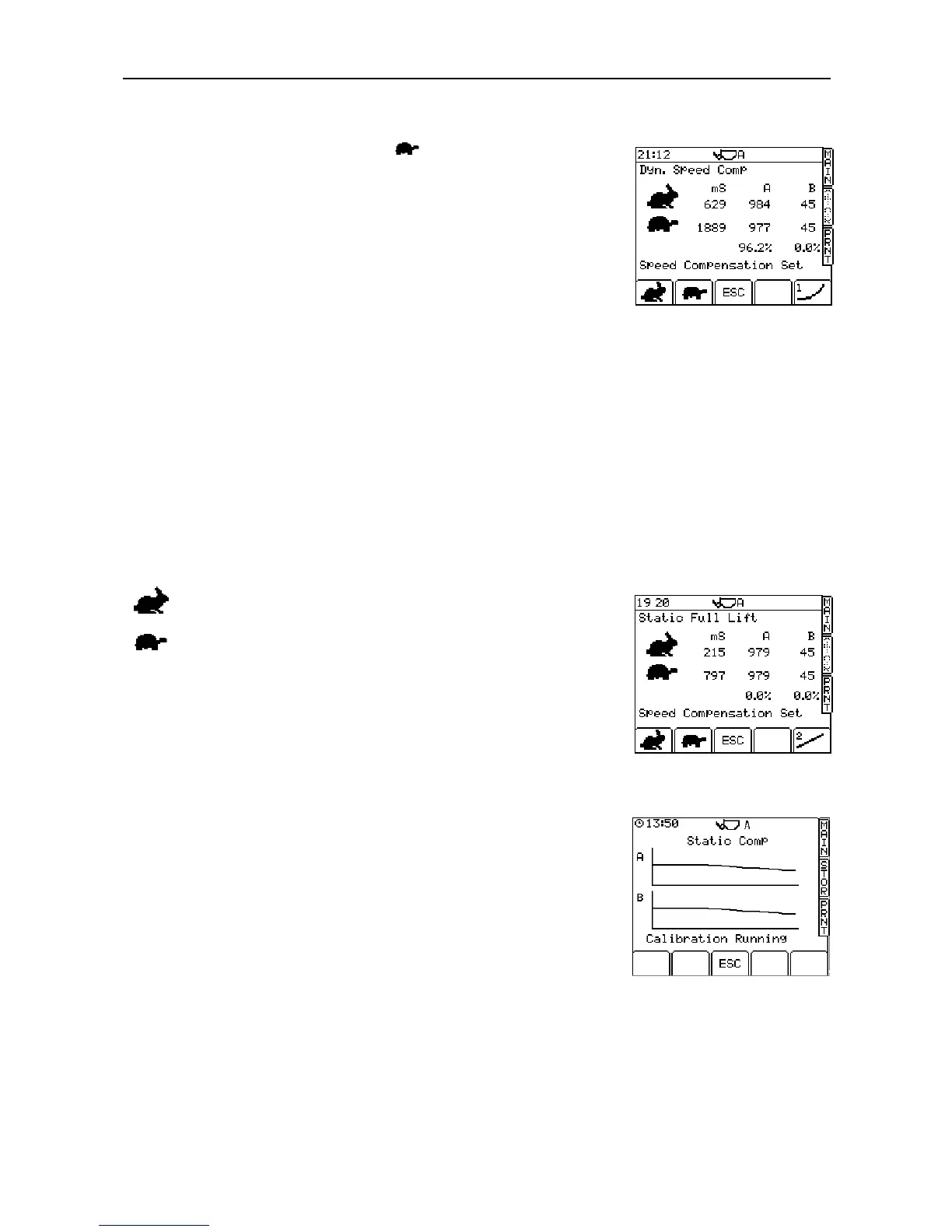
1. With the menu pointer opposite the symbol, lower the bucket then
slowly lift through the weighing position again. If you lift too quickly, the
display will flash 'Error'. If so, lower the bucket and try again. The
instrument will bleep once, then display the frequency output of each
pressure sensor, and the sample time in milliseconds (fig. 7).
2. Press ENTER to confirm.
3. The instrument then displays the message "Speed Compensation Set".
4. Press the 'ESC' key to continue AUTOCAL (Static Full Lift).
NOTE: The percent figures relate to the 'Proportional Scaling' function. This
function predicts the difference in Speed Compensation required for light
and heavy loads in the bucket. This compensates for hydraulic
inefficiencies and the frictional behaviour of the lift system.
2.2.4 Static Speed Compensation (‘Static Full Lift’)
On machines where a substantial difference in displayed weight is experienced with changes in engine speed /
speed of lift (for example G series Caterpillar loaders) this option can be turned to ON. Doing so will enable
the Static Speed Compensation items within the Autocal menu and will turn on the Speed Compensated Static
weighing function. This will allow the Loadmaster to apply a compensation value to the displayed weight
based on the speed of lift, and should result in far more stable displayed weights where changes in speed of
lift are experienced.
NOTE: This function is enabled only when the "Static Speed" setting on the "Sensor Setup"
page is set to "On",
otherwise this screen will not appear.
Follow the screen prompts.
Lift a FULL bucket at fast speed to the static weigh point (kickout), allow
the system to weigh and then press ENTER.
Lift a FULL bucket at slow speed to the static weigh point (kickout), allow
the system to weigh and then press ENTER. The instrument then
displays the message "Speed Compensation Set".
2.2.5 Static Compensation (‘Static Comp’)
By default, Static Compensation is switched off until the Auto Cal routine
is performed.
Static compensation takes effect when the bucket is stationary at the
weighing position. It enables the live static reading to become more
stable over the sampling period and improves the accuracy of the weight
reading.
Calibration is fully automatic. At the screen prompt, lift a FULL bucket
SLOWLY to the weighing position. The screen then plots two graphs
each with 30 samples for load sensors A and B (something similar to fig.
8). The calibration routine runs for 45 seconds and then displays the
message 'Calibration Done'.
Press the 'ESC' key to continue AUTOCAL (Zero).



 To Next Page