2 -
LM800/ 8000
COMMON CALIBRATION
9
2.2.6 Zero
1. Lift the empty bucket at maximum speed. The instrument will bleep once when the weight is taken. ENTERING
to set "Dynamic Zero" is automatic.
2. Lift the bucket to the weighing position. The instrument will bleep twice. ENTERING to set "Static Zero" is
automatic.
3. Press the "ESC" key to continue AUTOCAL (Cal Weight).
NOTE: Sticky material, bucket wear, or faulty electronics can cause variation from zero.
Zero the system for each each different attachment used. Zero measurements are viewed on the “Dynamic
Factors” and “Static Factors” screens.
2.2.7 Cal Weight (Weight Calibration)
If both dynamic and static weighing (Dyn/Stat) mode is enabled, then
both a dynamic calibration routine and static, weight calibration routine
are performed. If either dynamic weighing only ("Dyn"), or static weighing
only ("Stat") mode is set, then the appropriate calibration routine will
apply.
1. Zero the empty bucket.
2. Load the bucket (preferably to its full capacity) with a known weight of
material.
NOTE: If you don't know the exact weight, you can make an estimate and then
use the "NUDGE" facility afterwards to correct the calibration factors.
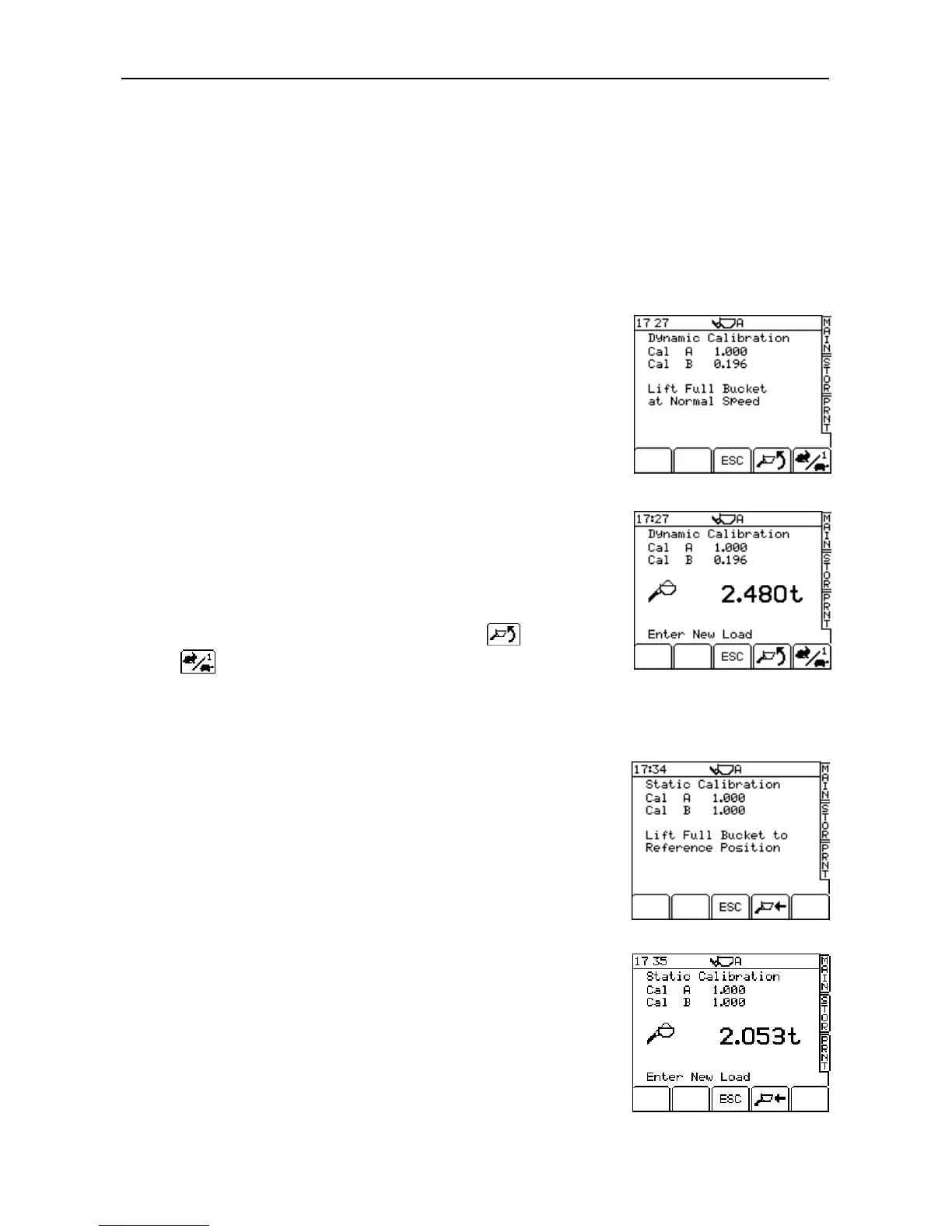
3. Select the "Cal Weight" screen (fig. 9).
Dynamic Calibration Routine
NOTE: If you want to do the static calibration first, press the key.
indicates that speed compensation is enabled.
4. Lift the bucket at maximum speed through the weighing position. The
screen will display a weight reading and the message 'Enter New Load'
(fig. 10).
5. Key-in the known weight (or the estimated weight) and press ENTER.
The instrument now calculates the Dynamic Cal. factor based on the
weight entered. The screen will display the message "Confirmed".
Static Calibration Routine
Normally, the "Static Calibration" routine follows automatically after the
Dynamic calibration routine (see note above). The message "Lift Full
Bucket To Reference Position" is displayed (fig. 11).
6. Lift the full bucket to the weighing position. The display will give a weight
reading and the message "Enter New Load" (fig. 12).
7. Key-in the known weight (or the estimated weight) and press ENTER.
The instrument now calculates the Static Cal. factor based on the weight,
then displays the message "Calibration Done".
8. Press the 'ESC' key to continue AUTOCAL (Angle Calibration).
NOTE: The Angle Calibration routine and Temperature Calibration routine are
disabled. Pressing the "ESC" key returns you to the AUTOCAL menu.
Alternatively, exit calibration mode by selecting the MAIN screen.



 To Next Page