Installing ECUs Recon Blockage Plus™ Installation Manual
600840-000069, rev 1.0 Page 11 of 35
1. Determine the number of ECUs (153510-000182) you need per manifold. The number of
ECUs you use depends on the number of runs per manifold.
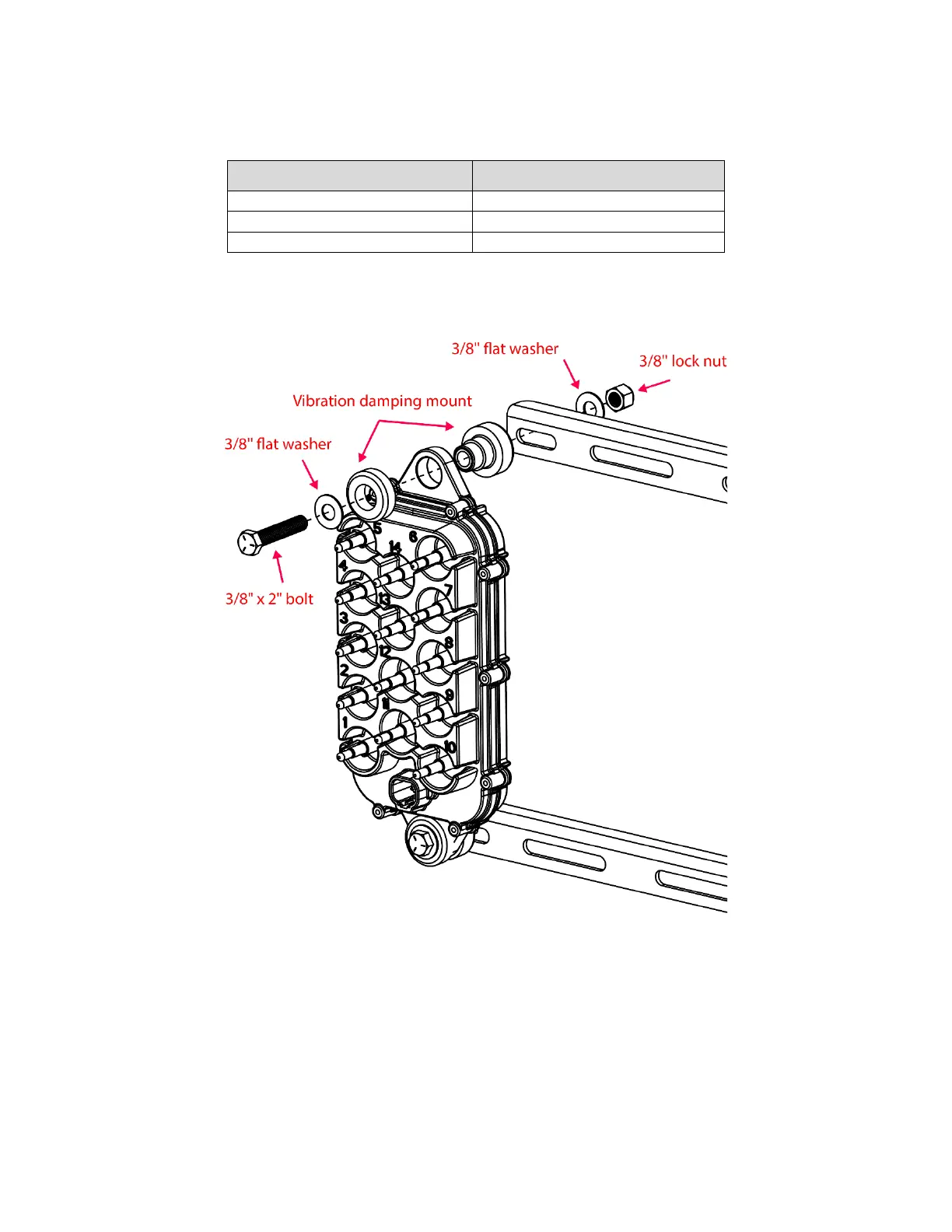
2. Secure the top and bottom of the ECU to a bracket using a 3/8" x 2" bolt (356060-
000371), washers (352012-000031), vibration damping mount (353070-000239), and
lock nut (352011-000045) as shown in Figure 9. Hand tighten.
Figure 9: Securing ECU to brackets
3. If you’re using 2 ECUs per manifold, install another ECU onto the other end of the
brackets.
4. Orient the ECU so that the LED faces the tractor (recommended). Use u-bolts (352013-
000007 or 356060-000108) to secure the center of the brackets to the manifold post,
right below the manifold. Hand tighten.
5. Adjust the assembly as needed and fully tighten the hardware.



 To Next Page