Installing the Work Switch Recon Blockage Plus™ Installation Manual
600840-000069, rev 1.0 Page 18 of 35
Installing the Work Switch
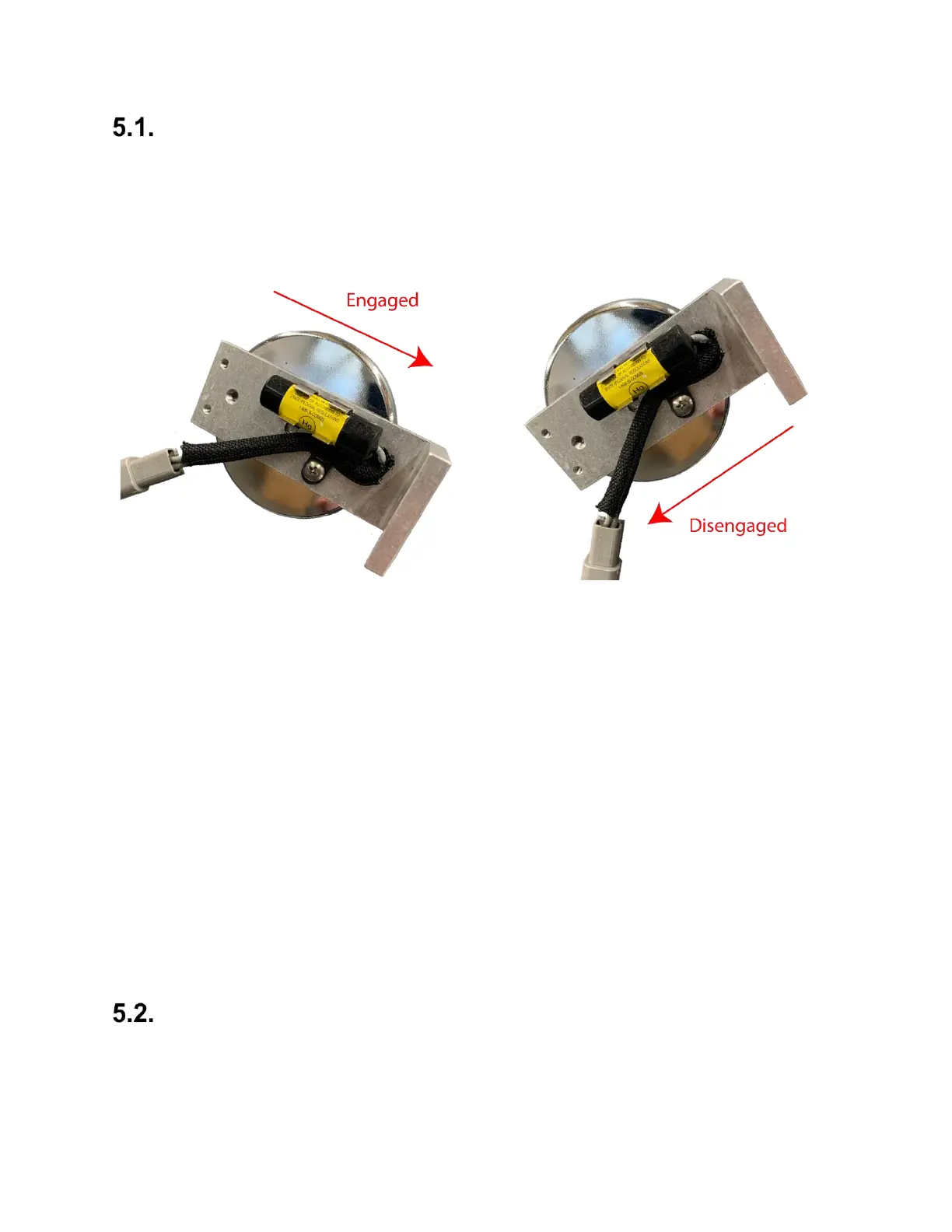
The work switch is a mercury switch, meaning the switch is engaged when the mercury inside is
tilted toward the wires and it contacts the electrical leads.
Mount the work switch (353070-000534) in a location where the work switch tilts from one end
to the other when the toolbar is changing from raised to lowered positions.
Figure 17: Work switch functionality
Determining Work Switch Method
The work switch uses one of two methods to determine when the implement is in the ground:
• Default method
o The work switch is tilted toward the wires when the implement is in the ground.
o The work switch is tilted away from the wires when the implement is out of the
ground.
• Inverted method
o The work switch is tilted away from the wires when the implement is in the
ground.
o The work switch is tilted toward the wires when the implement is out of the
ground.
Take note of your work switch method. It will be configured during system configuration in the
app. See the Recon Blockage Plus™ Operator’s Guide (Intelligent Ag document number
600890-000075) for instructions.
Verifying Work Switch Installation
Refer to Section 2.3 of the Operator’s Guide for instructions to verify that the work switch was
correctly installed and configured.


 To Next Page