EasyManua.ls Logo

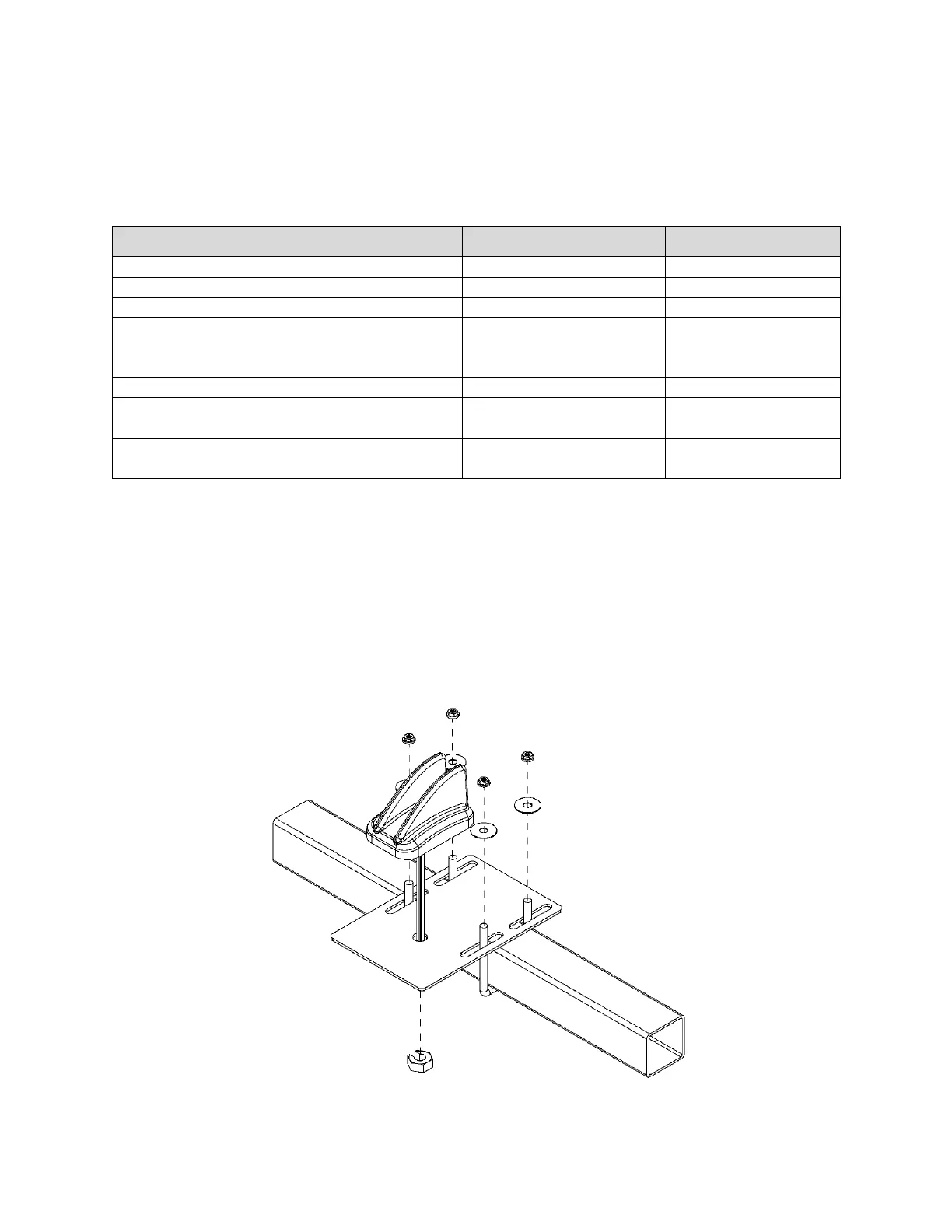
Recon BLOCKAGE+ - Installing the Wi-Fi Antenna; Figure 20: Mounting the Wi-Fi Antenna

Recon BLOCKAGE+
35 pages
Print Icon
To Next Page IconTo Next Page
To Previous Page IconTo Previous Page
Loading...
Installing the Wi-Fi Antenna Recon Blockage Plus Installation Manual
600840-000069, rev 1.0 Page 21 of 35
7. Installing the Wi-Fi Antenna
The Wi-Fi antenna sends information from the Recon Blockage Plus system to the iPad.
Provided Parts
Part Name
Part Number
Quantity Needed
SMA cap
251015-000139
2
SMA terminator jack
251015-000272
1
Wi-Fi antenna
252005-000010
1
U-bolt
352013-000007
or
356060-000152
2
Antenna bracket
353070-000083
1
3/8" locknut
(for square u-bolts)
356060-000094
4
3/8" washer
(for square u-bolts)
356060-000239
4
Tools Needed
Standard wrench set
Installation Location
Mounted on the rear of the tractor or on top of the air cart. Refer to the steps below for specific
mounting locations for your air cart configuration.
Installing the Wi-Fi Antenna
Figure 20: Mounting the Wi-Fi antenna

Table of Contents