9
Owner’s Manual:1400 & 1410
1787021 REV D
ECO 16-0082
May 2017
Air & Explosion
www.radiaproducts.com (PHONE) 800-221-1083 | (INTL) +1-763-533-2969 | (FAX) 763-533-0015
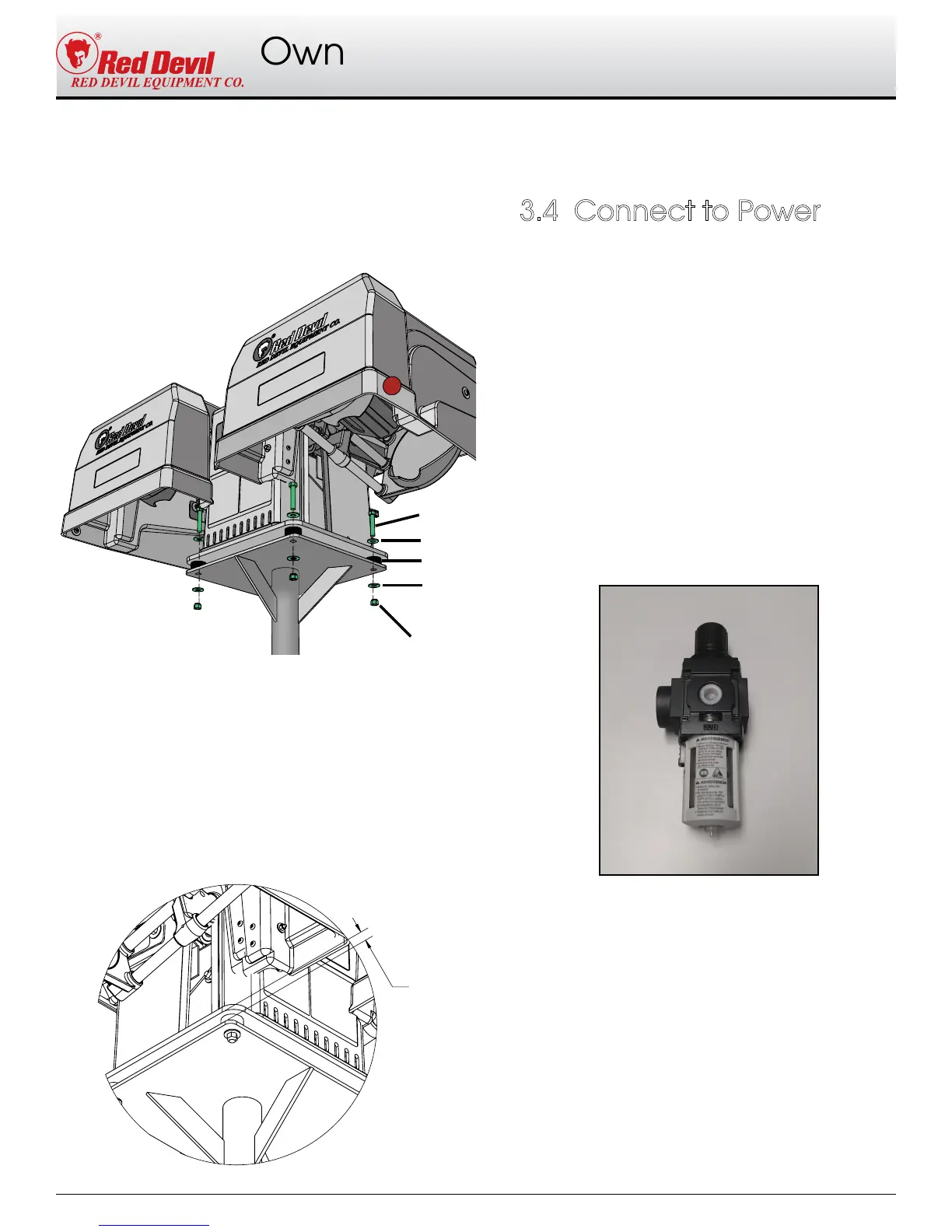
5. Set the mixer on the upper plate of the
base, on top of the rubber bumpers (F).
6. Secure the mixer to the base using the four
rubber bumpers, bolts (G) , washers (H), and
nuts (I) provided.
7. Adjust the fasteners.
a. Tighten all four bolts to just snug
b. turn all four bolt 1 1/2 more turns.
c. Adjust the bolts as required to ensure
the gap between the mounting base
and the unit is 1/2" at all four bolts. This
compresses the isolators equally.
(I)
(G)
(H)
(H)
(F)
1/2"
1. X1 machines
Follow the electrical instructions described in
sections 1.2 & 2.2
2. A1 machines
Connect a 10 CFM air supply to the inlet side
of the filter regulator. The air supply must
be at least 80 PSI to reliably operate the
machine, and MUST NOT EXCEED 150 PSI.
The Lubicator requires air tool oil. It is
shipped without oil to prevent leaking during
shipment. See Section 5.4.
Assembly and Test, Continued..
3.4 Connect to Power
Lubicator


 To Next Page