50
b) Programming additional functions
By default, the speed controller is preprogrammed with the optimal settings.
WhenusingaLiPovehiclebattery,checkthespeedcontrollersettingstoconrmthatundervoltagepro-
tection is enabled (normally 3.0 V/cell). If undervoltage detection is switched off, the LiPo battery may be
permanently damaged due to overdischarge.
WhenusingaNiMHbattery,disableundervoltagedetectionorcongurealowervoltagesetting.
Thesetupbuttoncanbeusedtoprogramthesettings.
Proceed as follows:
• Switch on the remote control and leave the throttle/brake lever in the
neutral position.
• Switchoffthespeedcontroller(movetheswitchtothe"OFF"position).
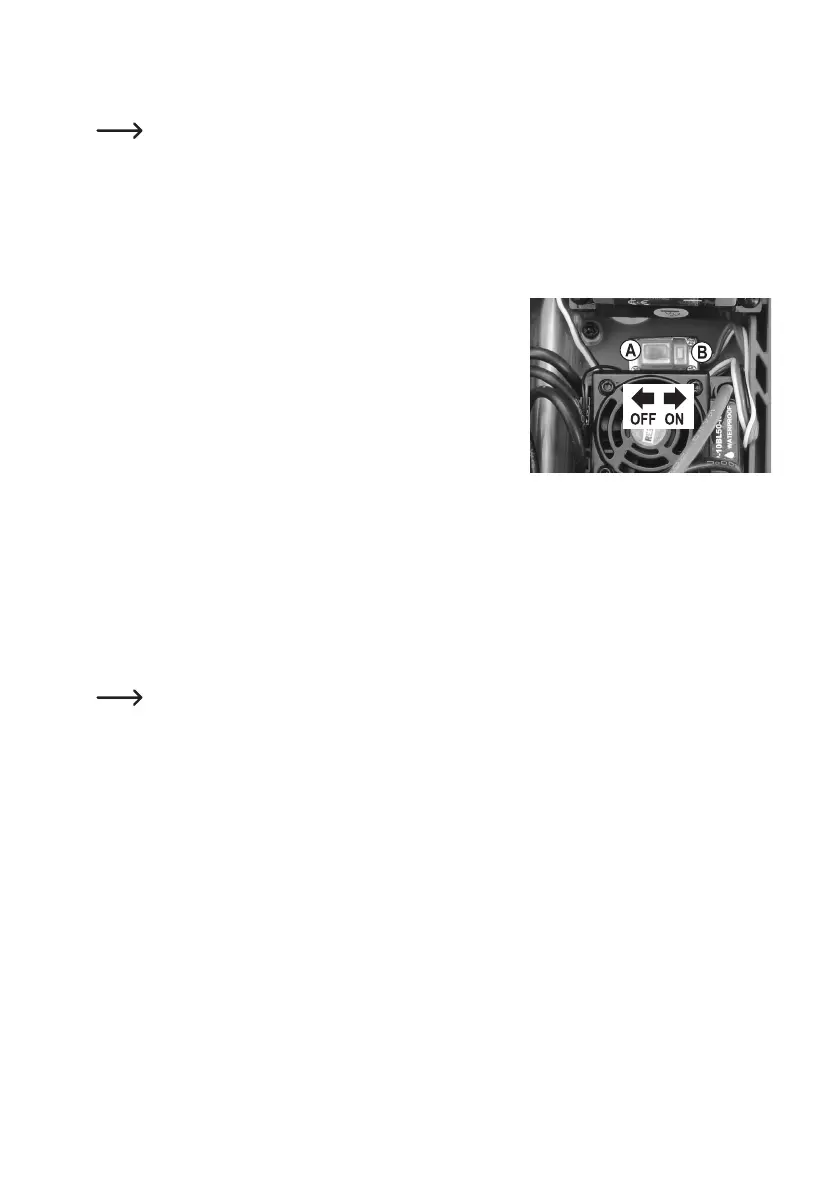
• Hold down the setup button (B) next to the on/off switch (A) and turn
onthespeedcontroller(movetheswitchtothe"ON"position).
Keep holding down the setup button (B).
• TheLEDonthespeedcontrollerwillashredandtheenginewillbeep
(keep holding down the setup button).
• TheLEDwillstarttoashgreenafterafewseconds(keepholdingdownthesetupbutton).
Thenumberofgreenashes(1x...5x)indicatestheselectedsetting.
1xashand1xbeep: Forward/reversethrottleorforwardthrottleonly
2xashesand2xbeeps: Brake
3xashesand3xbeeps: LowvoltagedetectionfortheLiPobattery
4xashesand4xbeeps: Startupmode
5xashesand5xbeeps: Brakingpower
Beepsaregeneratedbyabriefactivationofthebrushlessmotor.Thisbeepcanbeveryquietdepending
on the engine. If this is the case, note the LED indication on the speed controller.
• Waituntilthedesiredsettingisindicated(e.g.undervoltageprotection=threetimesgreenLEDashesandthree
times engine beeps), and then release the setup button (refer to the next page for a table with the various setting
options).
• NowtheLEDashesredagain.Thenumberofredashingsignalsindicateswhichsettingvalueisactive(for
example,forundervoltageprotection3.0Vpercell,theLEDashesredfourtimesbrieyandtheengineemits
four short beeps).
• Pressthesetupbuttontochangethesetting.ThenumberofredLEDashes(andenginebeeps)willchangeac-
cordingly.
• Turnoffthespeedcontrollertoexitsettingsmodeandsavetheprogramming.Ifyouthenturnonthespeedcontrol-
ler, it will be ready for operation with the new settings.
• Follow the above steps to change the other settings.











 To Next Page