ASSEMBLY, INSTALLATION AND OPERATION
8
5. Place a handful of media on top of the piece already placed, and then press the
Feed button to start feeding. Once the tabber is feeding satisfactory, go to the
next step.
NOTE: When placing material on the Media Support ensure that it is shingled.
6. With media loaded on the Media Supports, press the TAB button followed by the
FEED button.
7. Run two pieces and then check the position of the tab side to side.
8. Adjust if necessary by moving the Side Guides to the left or to the right.
9. Once feeding and side-to-side tab position is satisfactory, perform the Tab
Positioning Adjustment.
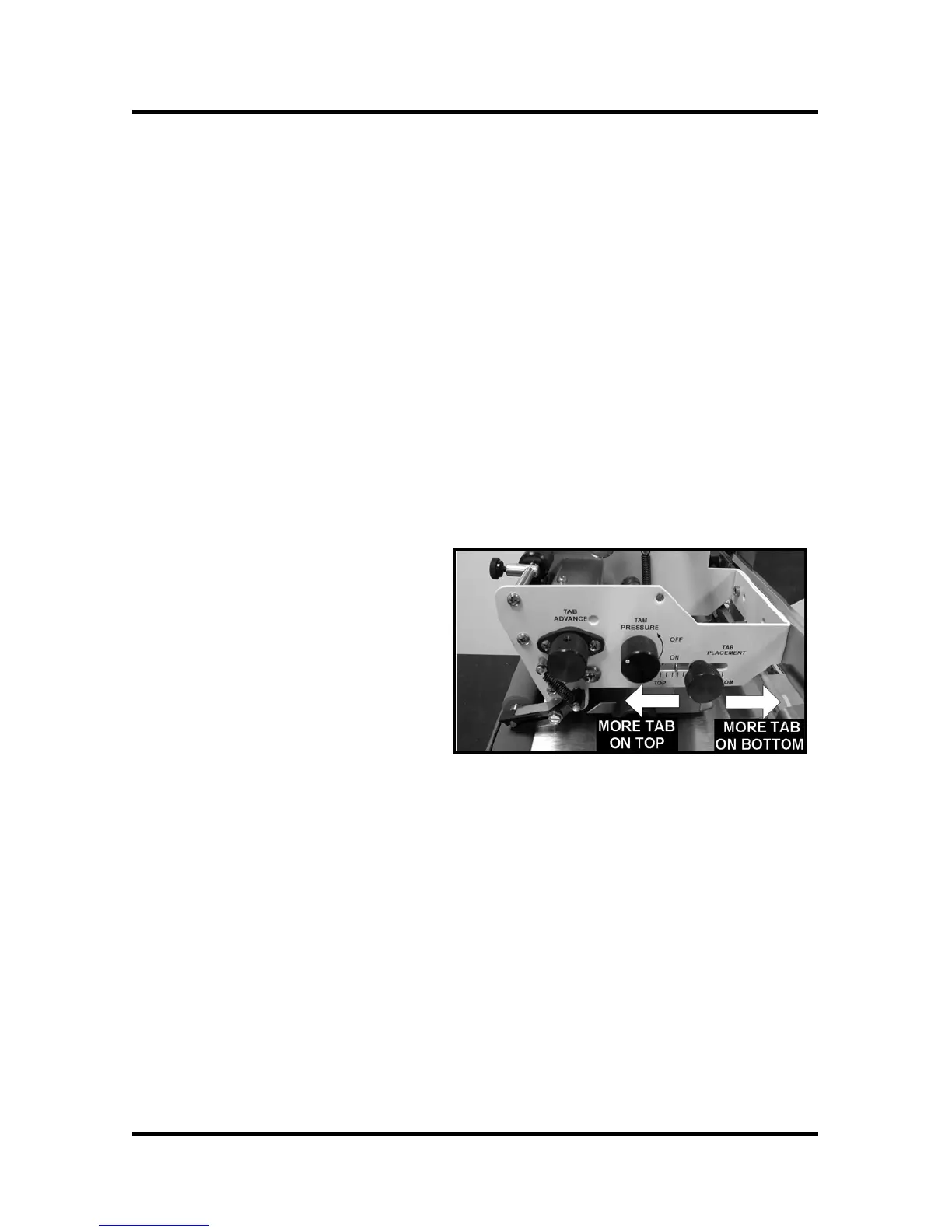
Tab Positioning Adjustment
The tab should be positioned so that approximately half of the tab goes on the top of the
media and half on the bottom.
1. Check the position of the tab on
the media if incorrect, loosen
the Tab Positioning Adjustment
Knob.
2. Move the knob forward to allow
more tab on the top of the media
or back to allow more of the tab
on the bottom of the media.
Tighten the knob.
3. Run two pieces through the machine and then check the tab position top-to-
bottom on the second piece.
4. Repeat steps 1-3 until you are satisfied with the positioning of the tab.



 To Next Page