ADJUSTMENTS
12
Tab Sensor Adjustment
Requirement:
Adjust the Tab Sensor to detect the presence of tabs in the machine.
Adjustment:
1. Unplug the T-250.
2. Remove the left and right side covers.
Caution: When removing the right side cover; be careful not to damage the
connections to the Tab Sensitivity Adjustment knob/switch. The connection to this
switch should be temporarily disconnected, to avoid damage.
Note: The Tab Sensitivity Adjustment knob (switch) will be reconnected in one of the
next steps.
3. Remove the entrance cover (stainless steel cover that media support guides attach to),
by removing the two Philips head screws, located at the left and right side of tabber.
4. Reconnect the Tab Sensitivity Adjustment knob/switch and temporarily mount the
right side cover using one or two screws on top.
5. Remove plastic splash guard, which is located over PC Board.
6. Install/thread tabs as described in this manual.
Note: Factory adjustments are done using a roll of white
paper tabs (white tab on white backing). If you are
experiencing problems with a certain tab type, install/thread
the “problem tabs” into the T-250 for this adjustment.
7. Plug the T-250 into the power receptacle and turn it on.
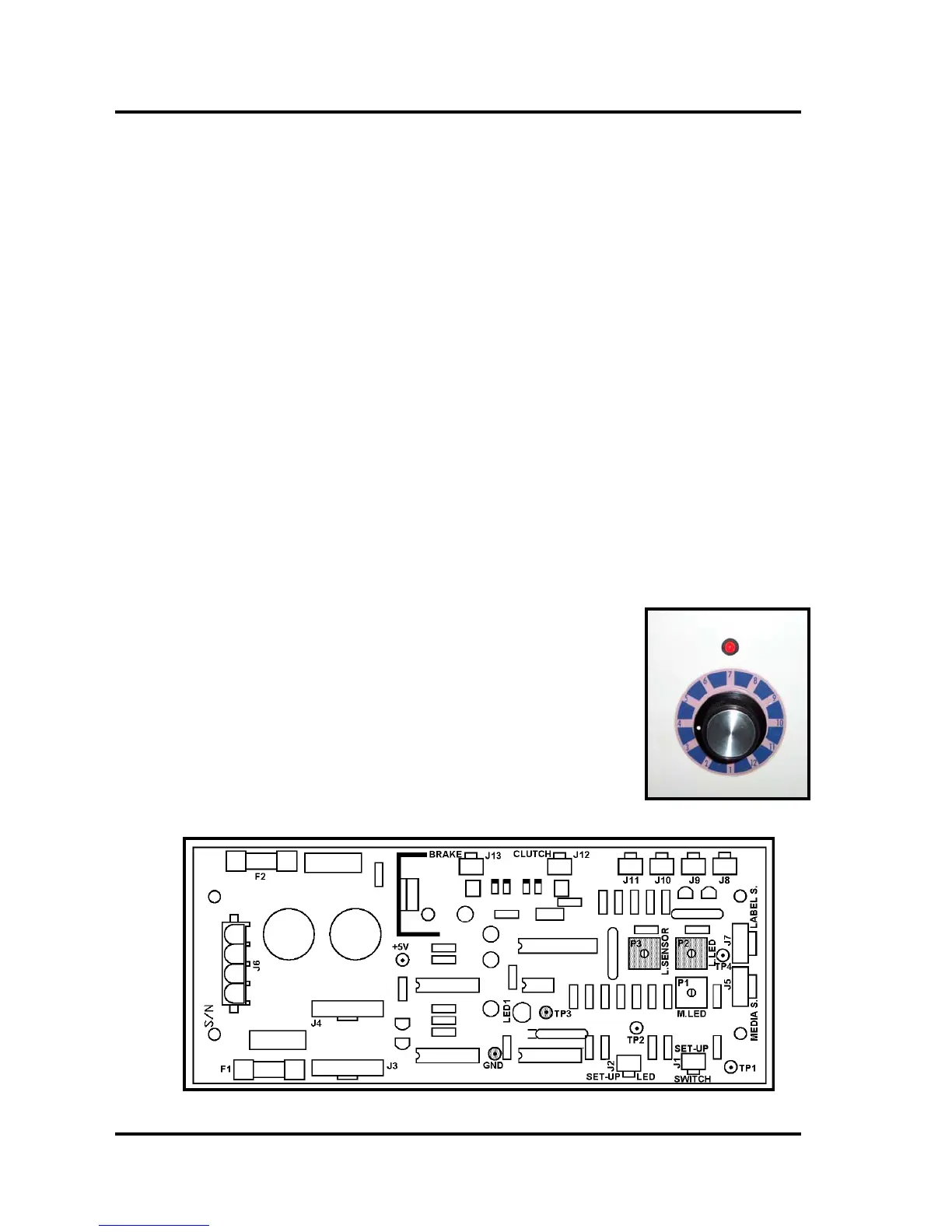
8. Set the Tab Sensitivity Adjustment knob to #3.
9. Connect your DC voltmeter probes to GND and TP3 on the
PC Board.



 To Next Page