GETTING ACQUAINTED
2
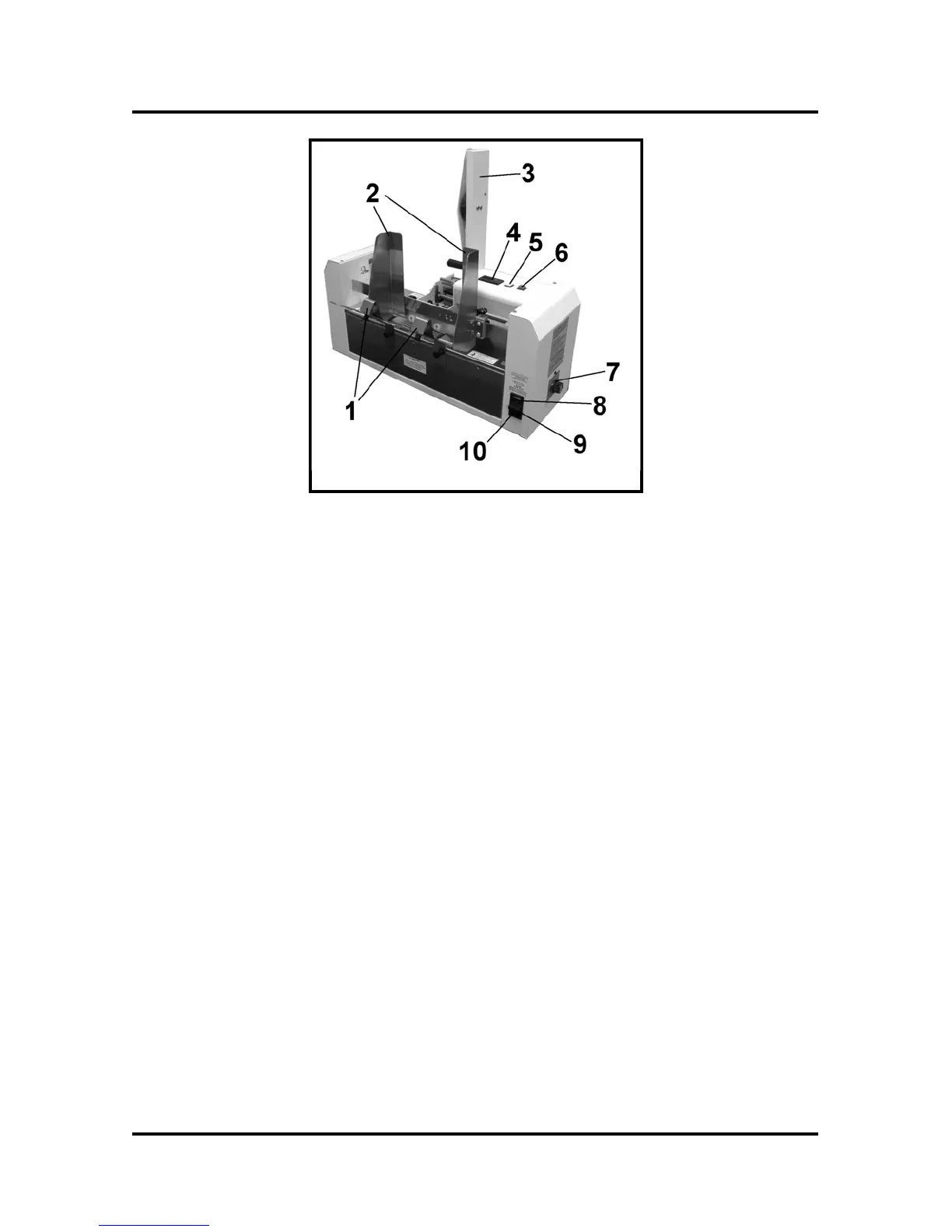
Rear View
1.
Media Support – Supports media during feeding.
2.
Media Side Guides – Help maintain position of media in relationship to tabs.
3.
Tab Roll Support – The tab roll is mounted here.
4.
Media Counter – Resettable counter to track number of pieces fed.
5.
Tab Feed Switch – When this switch is depressed the tabs will feed when the
media switch is also depressed.
6.
Media Feed Switch – This switch when depressed will cause the media to feed.
7.
Tab Sensitivity Adjustment – Different tabs have different densities. This
adjustment compensates for the different types of tabs.
8.
Fuse – The main power fuse is located here.
9.
Power Inlet – The power cord is plugged in here.
10.
Main Power Switch – Controls the power to the tabber.
Functional Operation
The T-250 is a stand-alone machine that can process media into a stacker or tray. The T-
250 will process various sizes of media and place a single “tab” on the lead edge of the
media. The media can vary in length from 3.6” to 11” and vary in thickness from a C-
folded sheet of 20# bond paper to a booklet of 5/32” thick.
The T-250 will process media at a speed up to 12,000 pieces per hour depending on the
skill of the operator, the length (depth) of the media and the type of material.
When the media is fed, a media sensor detects the lead edge of the media and starts a tab
feeding into position. The media contacts the tab and the exit roller presses the tab to the
media and carries the media out of the tabber. At the same time, the tab feed stops until
another piece of media is seen by the media sensor. The sensitivity of the tab sensor is
adjusted by the tab sensor adjustment on the rear of the tabber for different types of tabs.



 To Next Page