DISASSEMBLY AND ASSEMBLY
21
Replacing Clutch and Brake
1. Unplug the machine, then remove the tabs and Tab Roll Holder from the machine.
2. Remove the rear cover.
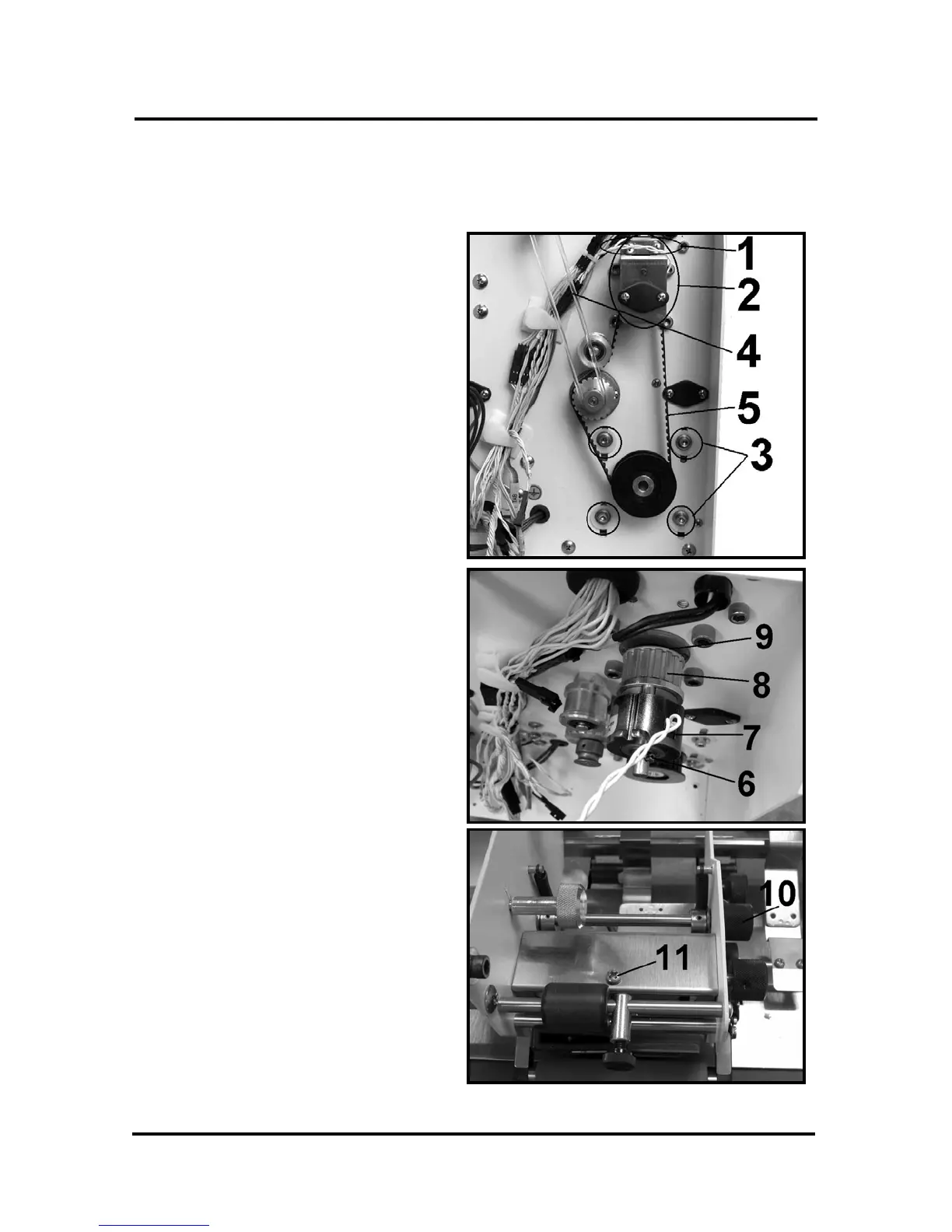
3. Remove the two screws [1]
securing the clutch bearing
housing to the machine.
4. Remove the bearing housing
assembly [2].
5. Loosen the four screws [3]
securing the motor to the frame.
6. Remove the take-up roll drive belt
[4].
7. Lift the motor and remove the
motor drive belt [5].
8. Support the clutch and carefully
drive the pin [6] out of the shaft.
9. Unplug and remove the clutch [7],
clutch pulley [8] and e-ring [9] on
the shaft behind the clutch pulley.
10. Remove the tab advance knob
[10] and set aside.
11. Remove the screw [11] and the
small cover over the tab pull roller
assembly.


 To Next Page